

If you travel or run a small office, a compact printer can change how you work on the road. You’ll get sharp, reliable prints without hauling a full setup, and many models print inkless or connect wirelessly. I’ll walk you through top picks-each with its strengths-so you can pick the right balance of size, speed, and features for your needs.
| Bluetooth Thermal Printer for Travel |

| Travel-Ready | Portability: Lightweight (690 g / 1.5 lb) travel design | Connectivity: Bluetooth wireless | Printing Technology: Inkless thermal printing | VIEW LATEST PRICE | Read Our Analysis |
| iDPRT MT610 Pro Portable Bluetooth Thermal Printer |

| Mobile Powerhouse | Portability: Very lightweight (498 g / 1.1 lb), book-sized | Connectivity: Bluetooth + USB-C | Printing Technology: Inkless thermal printing (300 DPI) | VIEW LATEST PRICE | Read Our Analysis |
| HP OfficeJet 200 Wireless Mobile Printer – Black Battery Included (CZ993A) |

| Professional Portable | Portability: Portable (4.85 lb), fits car/backpack/briefcase | Connectivity: Wi‑Fi (802.11bgn), Bluetooth, USB | Printing Technology: Inkjet (uses HP ink cartridges) | VIEW LATEST PRICE | Read Our Analysis |
| N80 Portable Wireless Thermal Printer – Bluetooth Inkless |
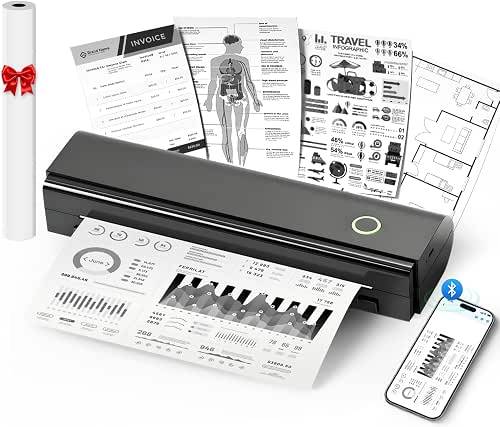
| High-Capacity Traveler | Portability: Portable (1.5 lb), compact for backpacks/briefcases | Connectivity: Bluetooth (mobile) + USB‑C (computer) | Printing Technology: Inkless direct thermal printing (203 DPI) | VIEW LATEST PRICE | Read Our Analysis |
| Inkless Portable Wireless Thermal Printer with Carry Case |

| All-In-One Kit | Portability: Compact/light (1.75 lb), slim 1.7″ thickness | Connectivity: Bluetooth (mobile) + driver for laptop/PC | Printing Technology: Inkless thermal printing | VIEW LATEST PRICE | Read Our Analysis |
More Details on Our Top Picks
Bluetooth Thermal Printer for Travel
Who’s this for? You’re often on the move and need reliable, lightweight printing-this Bluetooth thermal printer fits. Weighing just 690g (1.5 lb), it slips into a bag without weighing you down. You’ll pair it instantly via Bluetooth for fast, wireless printing wherever you work. Its inkless thermal technology means no cartridges to replace, keeping printing clean and simple. It accepts various thermal paper sizes, including 8.5 x 11, though remember it only works with thermal paper. And if you hit a snag, you can get specialized phone or email support to keep you printing smoothly.
- Portability:Lightweight (690 g / 1.5 lb) travel design
- Connectivity:Bluetooth wireless
- Printing Technology:Inkless thermal printing
- Mobile App / Software Support:Technical support for setup (phone/email) – Bluetooth pairing implied
- Power / Battery:Built for mobile use (battery implied; lightweight travel)
- Paper Compatibility:Thermal paper only (includes 8.5 x 11 support)
- Additional Feature:Ultra-lightweight 690g
- Additional Feature:Phone/email tech support
- Additional Feature:Supports 8.5 x 11
iDPRT MT610 Pro Portable Bluetooth Thermal Printer
If you need a truly portable, no-fuss printer for contracts, receipts, or on-the-spot documents, the iDPRT MT610 Pro delivers fast, inkless A4 thermal printing at 300 DPI in a device you can carry like a notebook. You’ll get sharp pages in 4–6 seconds without messy cartridges, though avoid fully black images to keep quality high. At 1.1 lb and 10.2 inches long, it slips beside your laptop, with a textured grip and matte finish. The 2000mAh battery prints about 360 pages per charge (roughly four hours). Pair via Bluetooth in ~90 seconds, use USB-C for computers, and print through the HerePrint app.
- Portability:Very lightweight (498 g / 1.1 lb), book-sized
- Connectivity:Bluetooth + USB-C
- Printing Technology:Inkless thermal printing (300 DPI)
- Mobile App / Software Support:HerePrint app for photos/notes + drivers for PC
- Power / Battery:2000 mAh battery – ~4 hours / up to 360 pages
- Paper Compatibility:Thermal paper only (≈3.1″ width / A4 via thermal)
- Additional Feature:300 DPI sharp printing
- Additional Feature:2000mAh = 360 pages
- Additional Feature:HerePrint app + USB-C
HP OfficeJet 200 Wireless Mobile Printer – Black Battery Included (CZ993A)
The HP OfficeJet 200 is ideal for travelers and field workers who need true portability without sacrificing print quality-its rechargeable lithium‑ion battery and compact 4.85‑pound body let you print up to legal size from a car, backpack, or briefcase. You’ll appreciate HP Fast Charge (90% in 90 minutes), AC or car charging, and a 50-sheet tray. Print wirelessly via Wi‑Fi Direct, Bluetooth, or USB from laptops, phones, and tablets; HP Auto Wireless Connect simplifies setup. It prints up to 20 ppm at 600 x 600 dpi, accepts various media to 8.5 x 14 inches, and uses HP 62 cartridges.
- Portability:Portable (4.85 lb), fits car/backpack/briefcase
- Connectivity:Wi‑Fi (802.11bgn), Bluetooth, USB
- Printing Technology:Inkjet (uses HP ink cartridges)
- Mobile App / Software Support:HP Smart app (printing/scanning/cloud services)
- Power / Battery:Rechargeable lithium-ion battery included, Fast Charge support
- Paper Compatibility:Supports plain, glossy, photo, envelopes (not thermal-only)
- Additional Feature:Full-color inkjet prints
- Additional Feature:HP Fast Charge (90%)
- Additional Feature:50-sheet paper tray
N80 Portable Wireless Thermal Printer – Bluetooth Inkless
For anyone needing true on-the-go printing without ink hassles, the N80 Portable Wireless Thermal Printer is ideal because it uses inkless direct thermal technology and runs up to 160 US Letter/A4 pages on a single charge. You’ll appreciate its 1.5-pound portability, compact size, and 2600mAh battery for travel, cars, small offices, construction sites, schools, and outdoor use. Connect via Bluetooth to iPhone, Android, iPad, and tablets using Nada Print, or use USB-C with a driver for laptops. It prints PDF, Word, images, and web pages at 203 DPI on US Letter/A4 thermal paper; ordinary paper won’t work.
- Portability:Portable (1.5 lb), compact for backpacks/briefcases
- Connectivity:Bluetooth (mobile) + USB‑C (computer)
- Printing Technology:Inkless direct thermal printing (203 DPI)
- Mobile App / Software Support:Nada Print app for iOS/Android
- Power / Battery:2600 mAh battery – up to ~160 US Letter sheets
- Paper Compatibility:US Letter and A4 thermal paper only (roll included)
- Additional Feature:2600mAh = 160 pages
- Additional Feature:Includes 7m thermal roll
- Additional Feature:Supports tattoo transfer printing
Inkless Portable Wireless Thermal Printer with Carry Case
You’ll appreciate the inkless Gloryang thermal printer if you need truly portable, fuss-free printing on the go, since it uses thermal technology (no ink, toner, or ribbons) and fits easily into a backpack or briefcase with its slim 1.7-inch profile and included carrying case. You’ll connect via Bluetooth to iOS or Android using the “Jadens Printer” app, or install the driver for laptop use. It prints 2–8.5-inch documents on Gloryang thermal paper only. At 1.75 lb it’s compact, with a built-in paper bin, two loading methods, three rolls included, charging cable, and clear photo and text quality.
- Portability:Compact/light (1.75 lb), slim 1.7″ thickness
- Connectivity:Bluetooth (mobile) + driver for laptop/PC
- Printing Technology:Inkless thermal printing
- Mobile App / Software Support:“Jadens Printer” app for iOS/Android + drivers for PC
- Power / Battery:Built-in rechargeable battery (portable use implied)
- Paper Compatibility:Gloryang thermal paper only (2″–8.5″ widths)
- Additional Feature:Includes three paper rolls
- Additional Feature:Built-in paper bin
- Additional Feature:Comes with carrying case
Factors to Consider When Choosing Mobile Printers
When choosing a mobile printer, you’ll want to weigh portability and weight so it’s easy to carry where you need it. Check the printing technology, battery life, connectivity options, and print speed to make sure it fits your workflow. Balancing those factors helps you pick a reliable, efficient model for on-the-go use.
Portability And Weight
Because you’ll be carrying your printer often, weight and size should drive your choice: models range from under 0.5 lb to about 4.85 lbs, and lighter, compact units slip into backpacks or briefcases and cut travel fatigue. You’ll want a balance: very light printers are easy to carry but often have smaller batteries and less paper capacity, while heavier units may handle longer runs. Look for slim profiles, textured grips, and secure latches so the device won’t slip or open in transit. Check how the printer pairs with carrying cases or built-in paper storage to streamline transport. Finally, match battery capacity to your typical workload so you’re not weighed down by chargers or frequent recharges.
Printing Technology Type
Although thermal printing dominates the mobile market for its inkless convenience, you should weigh trade-offs like media compatibility and image needs when choosing technology. Thermal units use heat-sensitive paper, no ink or ribbons, and cut down on maintenance and mess-ideal for receipts, labels, and crisp text at 203–300 DPI. But thermal limits you to compatible media and typically monochrome output. If you need color, regular paper, or higher-resolution photos, consider compact inkjet or small laser models; they handle standard paper and color but add bulk and require ink or toner management. Balance desired media types, print speed, upkeep, and whether color or fine-detail images matter most to pick the right mobile printer technology.
Battery Life Expectations
If you rely on a mobile printer for long shifts or travel, battery life becomes a primary deciding factor-manufacturers usually rate it by pages per charge or hours of continuous printing, so compare those specs to your typical workload. You’ll want a higher mAh rating if you need extended use between charges, since it generally means longer runtime. Also check for fast-charging support so brief stops get you back to work quickly. Consider how printing speed and frequency affect real-world battery drain; a fast printer might use more power per page. Prioritize models whose battery efficiency matches your environment-fieldwork, travel, or occasional office use-to avoid carrying chargers or backups unnecessarily.
Connectivity Options Available
Wondering how you’ll connect your mobile printer to devices on the go? You’ll usually see Bluetooth for wireless printing from smartphones and tablets; pairing can be quick-some devices connect in as little as 90 seconds-so you can print without cables. Many models also include USB or USB-C ports for direct wired connections to laptops or desktops, handy when Bluetooth isn’t supported or you need a stable link. Keep in mind that compatibility often depends on dedicated apps or drivers you’ll need to download for different operating systems. Finally, note that while Bluetooth covers mobile-device printing, some printers still require a USB connection for computer printing, so verify each model’s specific capabilities before you buy.
Print Speed Performance
Print speed matters more than you might think when choosing a mobile printer: faster models can churn out full A4 pages in as little as 4–6 seconds, which keeps you productive if you’re printing multiple documents on the go. You’ll want to compare pages-per-minute or seconds-per-page figures, since speeds vary widely across models. Thermal printers often lead in speed because they don’t use ink, but they need compatible paper. Remember that resolution settings affect throughput – higher dpi slows printing – and battery capacity or power management can reduce sustained speed during long sessions. Match speed to your workflow: choose faster tech if you regularly print many pages, or accept slower, higher-quality output if clarity matters more than raw throughput.
Paper Size Compatibility
Speed is important, but you also need to make sure the printer handles the paper sizes you actually use. Mobile printers vary from tiny 3.1-inch widths to full US Letter/A4 8.5 x 11-inch formats, so check specs closely. If you rely on receipts or tickets, a thermal-only unit that supports specific sizes might work, but it won’t handle regular or inkjet paper for contracts or photos. Compatibility dictates what you can print-receipts, labels, photos, or full-page documents-so confirm supported widths and types before buying. Look for models with adjustable settings or app-based switches to calibrate alignment and clarity for different paper dimensions. Prioritize the sizes you’ll need most to avoid compromises.
Durability And Build
While you’re choosing a mobile printer, prioritize a build that balances lightweight portability with rugged materials and thoughtful design features like textured grips and matte finishes that resist scuffs and slipping. You’ll want sturdy construction that survives travel and frequent handling without feeling bulky. Check battery design and longevity so the unit stays functional during long days without constant recharging. Look for resistance to impacts, dust, and moisture if you’ll use the printer outdoors or in transit. Compact form factors should pair with secure paper-loading mechanisms to prevent jams and mechanical damage. By weighing materials, battery reliability, environmental protection, and secure media handling, you’ll pick a durable mobile printer that performs consistently on the go.
App And Driver Support
Apps and drivers determine how easily you’ll use a mobile printer across devices and tasks, so pick models with well-designed mobile apps and official drivers for Windows, macOS, and Linux. You’ll want robust app support for seamless wireless printing from smartphones and tablets, including dedicated tools for photo printing, document conversion, and basic editing. Efficient interfaces add scanning, cloud integration, and print-queue management, so you can control jobs on the go. Confirm drivers are downloadable from official sources to guarantee OS compatibility and security. Check that apps and drivers handle common formats-PDF, Word, Excel, images-so you don’t waste time converting files. Finally, prioritize brands that push regular app and driver updates to maintain functionality as systems evolve.




