

You’ll notice how a well-chosen monitor stand can instantly reduce neck strain and declutter your desk. You’ll want options that balance sturdiness, adjustability, and smart storage without taking up much space. I’ll compare top picks like the TAVR and BONTEC, plus budget-friendly and dual-pack choices, so you can find the best fit for your setup and workflow-keep going to see which features matter most.
| TAVR Dual Monitor Adjustable Desktop Stand Riser |
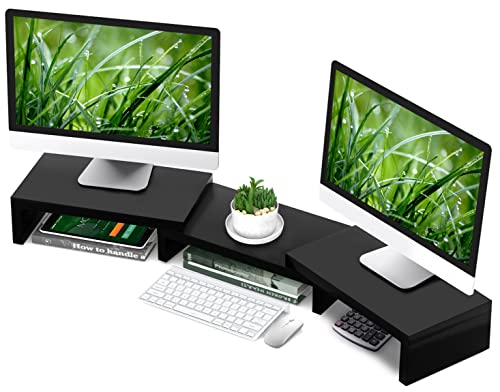
| Best for Multi-Monitor Setups | Adjustability: Length 30.7–43.3″ + adjustable angle/end pieces | Ergonomic benefit: Raises monitors to eye level to reduce neck/back/waist strain | Storage/Organizer: Three storage shelves underneath for various devices/accessories | VIEW LATEST PRICE | Read Our Analysis |
| BONTEC Dual Monitor Stand Riser with Smartphone Holder |

| Best for Organized Workspaces | Adjustability: Length 31.5–42.5″ + swivel angle adjustment | Ergonomic benefit: Raises monitors to eye level to reduce neck/back/shoulder strain | Storage/Organizer: Three compartments underneath for keyboard, files, devices | VIEW LATEST PRICE | Read Our Analysis |
| Zimilar Adjustable Metal Monitor Stands (2-Pack) |

| Best for Durability & Cooling | Adjustability: Three height settings (4.13″, 4.92″, 5.71″) | Ergonomic benefit: Raises screens to eye level to improve posture and reduce strain | Storage/Organizer: Uses space under stand for office supplies (2-pack) | VIEW LATEST PRICE | Read Our Analysis |
| WALI Adjustable Monitor and Laptop Riser with Storage |

| Best Sleek & Minimalist Option | Adjustability: Three height settings (3.9″, 4.7″, 5.5″) | Ergonomic benefit: Raises devices to comfortable viewing height to reduce neck/back strain | Storage/Organizer: Storage space beneath platform for office/school supplies | VIEW LATEST PRICE | Read Our Analysis |
| Amazon Basics Adjustable Monitor Stand Riser with Organizer |

| Best Budget Ergonomic Pick | Adjustability: Three height settings (2.87″, 4.25″, 4.9″) | Ergonomic benefit: Raises monitors to reduce neck and eye strain | Storage/Organizer: Storage space below (11.6 x 11 x 4″) for office supplies | VIEW LATEST PRICE | Read Our Analysis |
More Details on Our Top Picks
TAVR Dual Monitor Adjustable Desktop Stand Riser
If you need a space-saving, customizable stand that supports multiple screens, the TAVR Dual Monitor Adjustable Desktop Stand Riser is a strong pick – it extends from 30.7 to 43.3 inches and holds up to three monitors (44 lbs total), so you can arrange dual or triple setups while keeping peripherals and consoles neatly stored on its three under-shelves. You’ll raise screens to eye level to reduce neck, back, and waist strain and encourage better posture. The angle-adjustable end pieces fit curved displays, and the sturdy, well-made frame keeps things stable. Assembly takes about two minutes with numbered parts.
- Adjustability:Length 30.7–43.3″ + adjustable angle/end pieces
- Ergonomic benefit:Raises monitors to eye level to reduce neck/back/waist strain
- Storage/Organizer:Three storage shelves underneath for various devices/accessories
- Weight capacity / support:Supports up to 44 lbs
- Non-slip / stability:Stable structure; well-made materials (non-slip implied)
- Assembly / setup:Easy installation ~2 minutes; numbered components and manual
- Additional Feature:Adjustable length range
- Additional Feature:Angle-customizable end pieces
- Additional Feature:Three-tier storage shelves
BONTEC Dual Monitor Stand Riser with Smartphone Holder
Looking for a compact way to lift two monitors and clear desk clutter? The BONTEC Dual Monitor Stand Riser raises two screens to eye level, reducing neck and shoulder strain while improving workflow. It adjusts from 31.5 to 42.5 inches and offers swivel-angle flexibility to fit different desk layouts. Three roomy compartments underneath store your keyboard, mouse, files, or gaming gear, and a smartphone slot plus a cable-management opening keep essentials accessible and tidy. Assembly takes about three minutes with included screws, and a non-slip base guarantees stable, desk-safe placement for durable, organized workspace enhancement.
- Adjustability:Length 31.5–42.5″ + swivel angle adjustment
- Ergonomic benefit:Raises monitors to eye level to reduce neck/back/shoulder strain
- Storage/Organizer:Three compartments underneath for keyboard, files, devices
- Weight capacity / support:(Implied heavy-duty; stable construction) supports dual monitors – length-adjustable but capacity not numerically stated (stable long-term use)
- Non-slip / stability:Non-slip base to ensure stability and protect desk
- Assembly / setup:About 3 minutes to assemble using included screws
- Additional Feature:Built-in smartphone slot
- Additional Feature:Cable management opening
- Additional Feature:Swivel angle adjustment
Zimilar Adjustable Metal Monitor Stands (2-Pack)
For anyone juggling multiple devices or tight desk space, the Zimilar Adjustable Metal Monitor Stands (2-Pack) are ideal because their three quick-click height settings (4.13”, 4.92”, 5.71”) lift screens to eye level while freeing up under-stand storage for books, pens, and accessories. You’ll improve posture and reduce eye, neck, and back strain by raising monitors to a comfortable height. Built from durable steel with adjustable, anti-skid feet and rubber desk pads, each stand supports up to 44 lbs. The star mesh platform promotes airflow to prevent overheating. Tool-free assembly and button-operated retractable legs make adjustments fast and straightforward.
- Adjustability:Three height settings (4.13″, 4.92″, 5.71″)
- Ergonomic benefit:Raises screens to eye level to improve posture and reduce strain
- Storage/Organizer:Uses space under stand for office supplies (2-pack)
- Weight capacity / support:Supports up to 44 lbs
- Non-slip / stability:Adjustable feet with anti-skid rubber padding; rubber pads protect desk
- Assembly / setup:Tool-free assembly; button-operated retractable legs
- Additional Feature:Star mesh platform
- Additional Feature:Tool-free assembly
- Additional Feature:Retractable button legs
WALI Adjustable Monitor and Laptop Riser with Storage
You’ll appreciate the WALI Adjustable Monitor and Laptop Riser with Storage if you need a sturdy, budget-friendly stand that raises your screen to three comfortable heights while freeing up desk space beneath. Its 14.6 x 9.3-inch metal shelf fits most flat-screen displays, laptops, and even small printers, supporting up to 44 lbs with rubber pads to prevent slipping and protect surfaces. Choose 3.9, 4.7, or 5.5-inch heights to improve posture and reduce neck strain. Vented holes promote airflow to avoid overheating, and the sleek black finish hides supplies stored under the platform. US customer support is available daily.
- Adjustability:Three height settings (3.9″, 4.7″, 5.5″)
- Ergonomic benefit:Raises devices to comfortable viewing height to reduce neck/back strain
- Storage/Organizer:Storage space beneath platform for office/school supplies
- Weight capacity / support:Supports up to 44 lbs (20 kg)
- Non-slip / stability:Rubber pads provide slip resistance and protect surface
- Assembly / setup:Included product with straightforward setup; US customer support available
- Additional Feature:Large metal shelf
- Additional Feature:Vented platform holes
- Additional Feature:US-based customer support
Amazon Basics Adjustable Monitor Stand Riser with Organizer
If neck fatigue slows your workflow, this Amazon Basics adjustable riser is a smart pick for anyone who spends long hours at a desk. You get three height settings-2.87″, 4.25″, and 4.9″-so you can position your monitor to reduce neck and eye strain. It supports up to 22 lb (10 kg) and fits monitors, laptops, flat screens, and even printers. Built from durable ABS plastic with non‑skid feet, it keeps equipment stable. An 11.6 x 11 x 4-inch storage space under the stand helps you stash office supplies and keep your workspace clutter-free. Suitable for home, office, or school.
- Adjustability:Three height settings (2.87″, 4.25″, 4.9″)
- Ergonomic benefit:Raises monitors to reduce neck and eye strain
- Storage/Organizer:Storage space below (11.6 x 11 x 4″) for office supplies
- Weight capacity / support:Supports up to 22 lbs (10 kg)
- Non-slip / stability:Non-skid feet to prevent wobbling or slipping
- Assembly / setup:Adjustable, simple to set up (three height settings) – no special tools required
- Additional Feature:ABS plastic construction
- Additional Feature:Compact under-stand bin
- Additional Feature:Three distinct height settings
Factors to Consider When Choosing Monitor Stands
When choosing a monitor stand, you’ll want to prioritize ergonomic benefits and proper height adjustability to reduce neck and eye strain. Check the weight capacity and desk footprint so your setup stays stable without crowding your workspace. Also consider built-in storage options for a cleaner, more organized desk.
Ergonomic Benefits
Although many factors go into choosing a monitor stand, its ergonomic impact should drive your decision: raising the screen to eye level and offering adjustable height keeps your neck, shoulders, and back in a neutral position, reduces eye strain by aligning the display with your natural line of sight, and lets you customize posture to prevent long-term musculoskeletal issues. You’ll feel less fatigue during long work or gaming sessions when your monitor encourages a neutral sitting posture, which also boosts focus and productivity. Proper height and alignment minimize repetitive head and eye movements, cutting strain. Choose a riser that vents if your setup runs hot; it preserves component life while keeping the ergonomic benefits intact.
Height Adjustability
Because your monitor height directly affects posture and comfort, pick a stand that gives you enough range to place the screen at eye level-most stands offer roughly 2.87 to over 5.7 inches of lift. You’ll want multiple height settings so you can fine-tune alignment and cut neck, back, and eye strain during long work or gaming sessions. Look for button-operated or mechanical adjustments that let you change elevation quickly and without tools. Choose a stand that matches your desk setup and monitor size so it can reach the position that promotes a natural sitting posture. Proper height adjustment boosts comfort and productivity by reducing musculoskeletal discomfort, letting you focus longer and work more efficiently.
Weight Capacity
Height and stability go hand in hand, so after setting the correct eye-level you should check how much weight the stand can safely bear. You’ll want a capacity that exceeds the combined weight of your monitor(s), accessories, and peripherals so you get extra stability and longer-lasting hardware. Typical ranges span roughly 20 lbs (9 kg) to 44 lbs (20 kg) or more per stand, but always verify the manufacturer’s spec for multi-monitor arms or stacked setups. Overloading a riser risks structural failure, wobble, and damage to screens. If you plan to upgrade to heavier panels or add a webcam, docking station, or speakers, factor those into the total load and pick a stand with a comfortable safety margin.
Desk Footprint
When you pick a monitor stand, consider how much desk surface it will eat up so you don’t block workspace you actually need; compact designs and adjustable-width or -length options let you fit the stand to your desk while preserving room for keyboards, notebooks, and other gear. Think with respect to footprint area: a smaller base frees space for daily tasks. Choose compact footprint models that elevate your monitor without sprawling across the surface. Adjustable stands adapt to different desk depths, letting you slide them closer to the wall or toward the edge as needed. Look for non-slip bases and protective pads so the stand stays secure and won’t mar the desktop. Avoid oversized stands if you need clear, usable workspace.
Storage Options
Think about storage as part of the stand itself-picking one with built-in compartments, shelves, or phone and cable slots keeps essentials like keyboards, mice, and chargers within reach while freeing desktop space. Choose stands with multiple shelves or dedicated compartments so you can assign spots for a keyboard, stationery, or a compact printer; that maximizes space efficiency and prevents piles from forming. Look for integrated phone holders and cable-management openings to keep devices accessible and cords tidy. Match the storage capacity to your actual needs-too little and clutter returns, too much and you waste space. Properly selected storage not only keeps your desk cleaner but speeds up workflow by keeping frequently used items exactly where you expect them.
Build Materials
Good storage won’t help much if the stand itself can’t hold your monitor securely, so you’ll also want to take into account what the stand’s made of. Metal stands-usually steel or aluminum-offer superior strength and stability, often supporting up to 44 lbs, so they’re best for heavier monitors or dual setups. Plastic stands, commonly ABS, are lightweight and corrosion-resistant, but their load limits typically sit around 10 kg (22 lbs), so check your monitor’s weight before buying. Look for non-skid rubber feet to protect your desk and prevent slipping during adjustments. If heat is a concern, metal mesh platforms improve ventilation and help dissipate warmth from laptops or monitors with active electronics. Match materials to weight, durability, and cooling needs.
Frequently Asked Questions
Will These Stands Improve My Posture Long-Term?
Yes – they’ll help, ironically since you probably blamed bad posture on gravity, not setup. You’ll sit straighter, reduce neck strain, and build healthier habits, but you’ll need consistent use, ergonomic adjustments, and occasional movement to maintain long-term benefits.
Are Any Stands Compatible With Ultrawide Monitors?
Yes – many stands support ultrawide monitors, but you’ll need to check weight, VESA pattern, and width capacity. Pick a heavy-duty, wide-base or dual-arm stand, and you’ll get stable, adjustable ultrawide support.
Do Monitor Stands Affect Cable Warranty or Insurance?
Yes – using a stand can affect warranties or insurance if it causes damage or voids terms, so you should check manufacturer and insurer policies, keep receipts, and use recommended mounts to avoid disputes and denied claims.
Can I Use These Stands With Vesa-Mounted Arms?
A stitch in time saves nine: yes, you can use these stands with VESA-mounted arms if the mounting plate matches VESA hole patterns and weight limits, and you’ll secure them properly to avoid wobble or damage.
Are Any Stands Eco-Friendly or Made From Recycled Materials?
Yes – some stands use recycled aluminum, reclaimed wood, or BPA-free recycled plastics, and manufacturers label them as eco-friendly or certified. You can check product specs and certifications to confirm sustainable materials and recycled content before buying.




