

If you want a laptop that actually handles modern games without breaking the bank, these five RTX-equipped options are worth your time. They balance performance, cooling, and display quality for smooth 1080p or light 1440p play, and they offer upgrade paths that matter down the line. Pick the one that fits your budget and priorities, and you’ll see why RTX still leads – but there’s one surprising choice that might change your mind.
| Acer Nitro V 15.6″ Gaming Laptop (Ryzen 5 RTX 4050) |

| Best Performance Balance | GPU: NVIDIA GeForce RTX 4050 (6 GB) | Screen Size: 15.6-inch | Refresh Rate: 144 Hz | CHECK LATEST PRICE | Read Our Analysis |
| Lenovo LOQ Essential Gaming Laptop – Core i5 RTX 4050 |
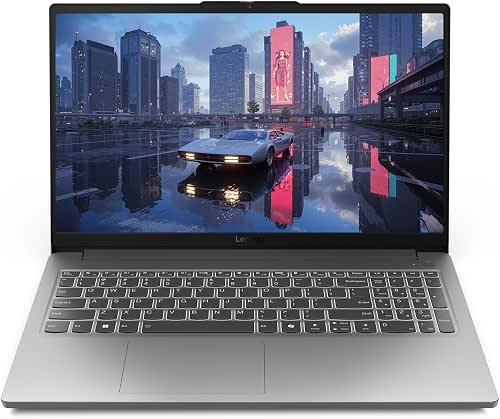
| Value Contender | GPU: NVIDIA GeForce RTX 4050 | Screen Size: 15.6-inch | Refresh Rate: 144 Hz | CHECK LATEST PRICE | Read Our Analysis |
| HP Victus 15.6″ Gaming Laptop – Ryzen 5 RTX 2050 |

| Entry-Level Gamer | GPU: NVIDIA GeForce RTX 2050 (4 GB) | Screen Size: 15.6-inch | Refresh Rate: 144 Hz | CHECK LATEST PRICE | Read Our Analysis |
| HP Victus 15.6″ Gaming Laptop i5-13420H RTX4050 |
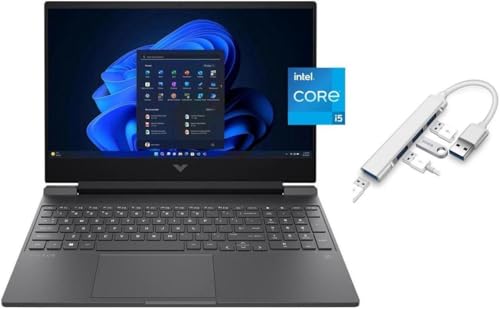
| Power Midrange Pick | GPU: NVIDIA GeForce RTX 4050 (6 GB) | Screen Size: 15.6-inch | Refresh Rate: 144 Hz | CHECK LATEST PRICE | Read Our Analysis |
| HP Victus 15.6″ FHD 144Hz Gaming Laptop (i5 RTX 3050) |

| Affordable Performer | GPU: NVIDIA GeForce RTX 3050 (6 GB) | Screen Size: 15.6-inch | Refresh Rate: 144 Hz | CHECK LATEST PRICE | Read Our Analysis |
More Details on Our Top Picks
Acer Nitro V 15.6″ Gaming Laptop (Ryzen 5 RTX 4050)
If you want a budget-friendly 15.6″ gaming laptop that balances solid frame rates with modern AI features, the Acer Nitro V with a Ryzen 5 7535HS and RTX 4050 is a smart pick – it pairs a 144 Hz Full HD IPS panel and DLSS 3 support with Copilot integration for on-the-fly AI assistance, so you can game, stream, and multitask without breaking the bank. You get a hexa-core Ryzen 5, RTX 4050 with 6 GB VRAM and 194 AI TOPS, 8 GB DDR5, 512 GB PCIe x8 SSD, Wi‑Fi 6, dual fans, NitroSense tuning, and Windows 11 Home.
- GPU:NVIDIA GeForce RTX 4050 (6 GB)
- Screen Size:15.6-inch
- Refresh Rate:144 Hz
- Storage Capacity:512 GB PCIe NVMe SSD
- RAM (base configuration):8 GB DDR5
- Operating System:Windows 11 Home
- Additional Feature:Copilot generative AI
- Additional Feature:Dual-fan NitroSense cooling
- Additional Feature:4 USB 3.0 ports
Lenovo LOQ Essential Gaming Laptop – Core i5 RTX 4050
Casual and budget-conscious gamers who want solid 1080p performance will appreciate the Lenovo LOQ Essential with its Core i5-12450HX and GeForce RTX 4050 – a combo that balances multi-threaded CPU power and Ada Lovelace GPU features like DLSS3 to keep games smooth on a 15.6″ 144Hz panel. You get responsive play from the 144Hz FHD IPS screen with 100% sRGB and 300 nits, plus an RTX 4050 that ups framerates and image quality. The 8GB RAM and 512GB SSD are basic but serviceable, while the 100mm fan, lightweight Luna Grey chassis, tactile keyboard, rapid-charge battery, and 3-month Game Pass add real-world value.
- GPU:NVIDIA GeForce RTX 4050
- Screen Size:15.6-inch
- Refresh Rate:144 Hz
- Storage Capacity:512 GB SSD
- RAM (base configuration):8 GB
- Operating System:(not explicitly stated) – includes Windows (typical Lenovo LOQ shipping config)
- Additional Feature:100% sRGB coverage
- Additional Feature:100mm high-flow fan
- Additional Feature:3 months Game Pass
HP Victus 15.6″ Gaming Laptop – Ryzen 5 RTX 2050
The HP Victus 15.6″ is a solid pick for gamers who want a balanced, affordable machine that still handles modern titles-its RTX 2050 GPU with 4 GB VRAM and a 144Hz FHD display deliver smoother frame rates than integrated graphics, while the Ryzen 5 7535HS and 8 GB DDR5 keep multitasking responsive. You’ll get a 512 GB NVMe SSD, Wi‑Fi 6, Bluetooth 5.3, and three USB 3.0 ports in a 15-inch, anti-glare IPS chassis with a backlit keyboard and enlarged touchpad. Battery life runs about six hours, and HP Fast Charge helps you top up quickly.
- GPU:NVIDIA GeForce RTX 2050 (4 GB)
- Screen Size:15.6-inch
- Refresh Rate:144 Hz
- Storage Capacity:512 GB PCIe NVMe SSD
- RAM (base configuration):8 GB DDR5
- Operating System:Windows 11 Home
- Additional Feature:HP Wide Vision webcam
- Additional Feature:~6 hours battery life
- Additional Feature:Sustainable materials design
HP Victus 15.6″ Gaming Laptop i5-13420H RTX4050
Packed with an RTX 4050 and a 144Hz FHD display, the HP Victus 15.6″ is ideal for gamers who want smooth 60–144+ FPS gameplay on medium-to-high settings without breaking the bank. You get a 13th-gen i5-13420H with 4 performance and 4 efficient cores, boosting to 4.6 GHz single-core for responsive play and multitasking. The RTX 4050 with 6GB GDDR6 handles modern titles and ray-tracing-lite. 16GB RAM and a 512GB SSD keep load times short. Extras include a backlit keyboard, Wide Vision HD camera, Windows 11, mica silver finish, and a USB 3.0 hub.
- GPU:NVIDIA GeForce RTX 4050 (6 GB)
- Screen Size:15.6-inch
- Refresh Rate:144 Hz
- Storage Capacity:512 GB SSD
- RAM (base configuration):16 GB
- Operating System:Windows 11 Home
- Additional Feature:16GB base RAM
- Additional Feature:USB 3.0 multi-port hub
- Additional Feature:Temporal noise-reduction camera
HP Victus 15.6″ FHD 144Hz Gaming Laptop (i5 RTX 3050)
If you want a budget-friendly gaming rig that still handles modern titles at respectable settings, the HP Victus 15.6″ pairs a 13th Gen Intel Core i5-13420H with an NVIDIA GeForce RTX 3050 to deliver smooth 1080p gameplay on its 144 Hz panel. You’ll get 6 GB GDDR6 graphics, 8 GB DDR4-3200 RAM, and a 512 GB SSD for quick load times and decent multitasking. The 15.6″ FHD IPS micro-edge, anti-glare display keeps action crisp, while the Performance Blue chassis looks sharp. It’s a solid entry-level choice if you want affordable performance without unnecessary extras.
- GPU:NVIDIA GeForce RTX 3050 (6 GB)
- Screen Size:15.6-inch
- Refresh Rate:144 Hz
- Storage Capacity:512 GB SSD
- RAM (base configuration):8 GB DDR4-3200
- Operating System:(not explicitly stated) – typical HP Victus ships with Windows (model line uses Windows 11 Home)
- Additional Feature:6GB GDDR6 VRAM
- Additional Feature:DDR4-3200 memory
- Additional Feature:Performance Blue finish
Factors to Consider When Choosing NVIDIA GeForce RTX Laptops
When picking an RTX laptop, you’ll want to prioritize raw GPU performance metrics and how the CPU cores balance with the graphics to avoid bottlenecks. Check display specs like resolution, refresh rate, and color accuracy, plus memory and storage capacity and speed to match your workflow. Don’t overlook cooling and thermals, since sustained performance hinges on efficient heat management.
GPU Performance Metrics
Because GPU performance hinges on more than just model name, you should weigh several specific metrics-VRAM capacity, core counts and clocks, memory bandwidth, architecture features, and TGP/thermal behavior-to predict how an RTX laptop will actually run games at your target settings. VRAM matters for texture detail and resolution headroom; 6 GB+ is safer for high-res or heavy texture packs. Check shader/Tensor/RT core counts and boost clocks, but interpret them alongside sustained clocks under the laptop’s TGP and cooling. Memory bandwidth (bus width × memory clock) and die size determine throughput for complex scenes. Review synthetic benchmarks and real-game fps at your intended resolution (1080p/1440p) to gauge practical performance and headroom. Finally, prefer newer architectures for better efficiency and AI/ray-tracing support.
CPU And Core Balance
Match your CPU to the RTX GPU so the processor can actually feed frames instead of holding them back: aim for a modern 6‑core (or equivalent SMT) CPU for midrange mobile RTX chips and 8+ effective cores for higher‑end ones, prioritize high single‑core boost clocks for CPU‑bound games, and favor newer microarchitectures with strong IPC and sustained all‑core frequencies for prolonged gaming and content work. You should weigh single‑thread boost for responsiveness and frame delivery versus multicore throughput for streaming or rendering. Check sustained TDP and cooling-low sustained CPU power throttles performance and starves the GPU over long sessions. Also match fast RAM (DDR5 4800–5600+) and 16 GB+ capacity to avoid memory bottlenecks that undermine CPU-to-GPU feeding.
Display Quality Specs
Looking for a panel that actually shows off your RTX GPU? You should pick at least 1080p on 15–17″ laptops to keep UI sharp without killing battery or performance. Favor high refresh rates – 120–144 Hz or higher – for noticeably smoother motion versus 60 Hz. Choose IPS or equivalent for wide viewing angles and target ~300 nits peak brightness so colors stay accurate and the screen remains usable in bright rooms. Check color coverage specs (≥100% sRGB or higher DCI‑P3) and Delta‑E or colorimeter results when you need faithful color for creative work. Finally, prioritize adaptive sync (G‑SYNC/FreeSync) and low response times (≤5 ms G‑to‑G) to cut tearing and ghosting during gameplay.
Memory And Storage
A great display only helps if the system behind it keeps up, so you’ll want to pair that panel with memory and storage that won’t bottleneck your RTX GPU. Aim for at least 16 GB of DDR5 (4800–5600 MHz+); dual-channel configurations deliver noticeably better CPU/GPU bandwidth than single-channel, improving frame rates and render times. Prioritize a PCIe NVMe SSD (Gen3 x4 or Gen4 x4) with 512 GB minimum for OS and key games, 1 TB+ if you store many large installs or media projects. Check for user-accessible upgrades: extra SO-DIMM slots and an M.2 PCIe bay let you expand RAM and add drives later. If you do heavy content creation or swap usage, pick SSDs with strong sustained write performance and DRAM cache to avoid long slowdowns.
Cooling And Thermals
Often you’ll find that cooling makes the difference between a laptop that sustains high RTX clocks and one that throttles after a few intense minutes; prioritize multi-heatpipe layouts with dual (or more) fans, generous ventilation, and features like vapor chambers or dedicated GPU vents that keep junction temps and clock speeds stable during long sessions. You should check fan design-thin blades and large diameters improve airflow-and look for high airflow metrics from manufacturers or reviewers. Prefer chassis materials and grill sizes that aid dissipation; cramped, poorly ventilated shells force higher internal temps. Use models with user-accessible utilities to raise fan curves or set power limits when needed. Finally, evaluate real-world sustained-power tests: junction temperatures and clock stability under extended loads reveal whether cooling actually preserves RTX performance.
Battery Life Expectations
Good cooling helps your RTX GPU keep clocks high, but battery behavior is the other side of the trade-off: expect runtimes from roughly 2–8 hours depending on what you do, with gaming or heavy RTX work often nearer 1–3 hours and light productivity or video playback reaching 4–8+ hours. You’ll see huge swings based on enabled GPU features-ray tracing, DLSS frame generation, and high-performance modes can roughly halve runtime. Screen choices matter: 120–240 Hz panels and high brightness can cut endurance 20–50% versus a 60 Hz, dimmer setting. Use power profiles and hybrid GPU switching to push battery life up; leaving integrated graphics active for browsing can add several hours. Finally, check battery Wh, sustained CPU/GPU TDP, and cooling efficiency for realistic expectations.
Build Quality Materials
Sturdiness matters when you’re buying an RTX laptop: choose chassis materials like anodized aluminum or magnesium alloy over plastic to reduce flex, improve heat dissipation, and keep high-performance components running cooler. Check for reinforced hinge designs and internal metal frames or cross-braces to withstand repeated opening and prevent warping under weight and heat. Inspect surface finishes and build tolerances-tight seams, uniform gaps, and matte or textured coatings resist scratches, fingerprints, and wear that expose weak points. Consider metal exhausts and thoughtfully placed vents so fan mounts and ventilation areas don’t deform with prolonged GPU/CPU heat. Finally, verify port mounting and palm-rest support: metal-reinforced I/O plates and solid palm-rest backing cut stress on connectors and lower cracking or loosening risks.
Connectivity And Ports
While solid build materials and reinforced hinges keep an RTX laptop reliable under load, the ports you get determine how well it fits into your setup. You’ll want at least one high-bandwidth USB-C with DisplayPort Alt Mode and USB 3.2 Gen 2 or Thunderbolt 4 to drive monitors and fast peripherals. Prefer a dedicated HDMI 2.1 or DisplayPort (via USB-C) for high-refresh 120–240 Hz panels and 4K60+ output. Check for Gigabit Ethernet or an included USB‑C/USB‑A adapter for low-latency wired play and stable large transfers. Confirm multiple USB‑A ports plus an SD or microSD reader for peripherals and media. Finally, verify audio and power: a 3.5 mm combo jack and either a dedicated power port or USB‑C PD meeting the laptop’s charging wattage.




