

If you need a portable workstation that handles CAD, simulation, and content work without breaking a sweat, these five Quadro T2000 laptops are the sensible options to ponder. You’ll find compact Precision models, full‑power 15.6″ workstations, and ZBook Studio rigs with 6–8 core CPUs, 4 GB Quadro T2000 GPUs, NVMe storage, and 16–32 GB RAM-each built for sustained loads and serviceability-so keep going to see which fits your workflow.
| Dell Precision 5550 15.6″ i9 16GB 512GB (Renewed) |

| Versatile Power | GPU: NVIDIA Quadro T2000, 4 GB | Display Size: 15.6″ UHD (touch) | CPU Family / Model Series: Intel Core i9-10885H | VIEW LATEST PRICE | Read Our Analysis |
| Dell Precision 7550 15.6″ i7-10850H Laptop (Renewed) |
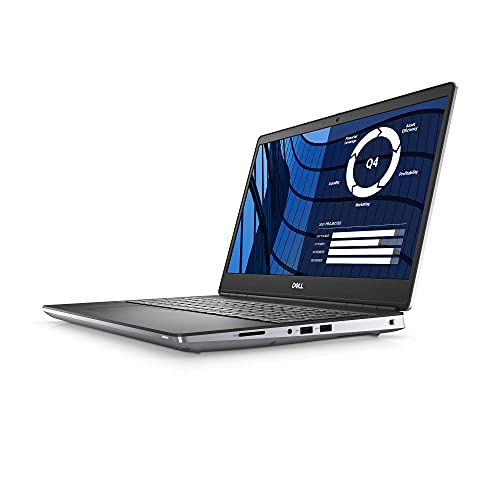
| Performance Workhorse | GPU: NVIDIA Quadro T2000, 4 GB GDDR6 | Display Size: 15.6″ FHD (1920×1080), 60Hz, non-touch | CPU Family / Model Series: Intel Core i7-10850H | VIEW LATEST PRICE | Read Our Analysis |
| HP ZBook Studio G7 15.6″ i9 Quadro T2000 (Renewed) |

| Compact Studio | GPU: NVIDIA Quadro T2000, 4 GB | Display Size: 15.6″ FHD | CPU Family / Model Series: Intel Core i9-10885H | VIEW LATEST PRICE | Read Our Analysis |
| Dell Precision 5550 15.6″ UHD i9 Workstation (Renewed) |
| Visual Creator | GPU: NVIDIA Quadro T2000, 4 GB | Display Size: 15.6″ UHD (touch) | CPU Family / Model Series: Intel Core i9-10885H | VIEW LATEST PRICE | Read Our Analysis |
| HP ZBook Studio G7 15.6″ Core i9 32GB 2TB |

| Ultimate Mobile Studio | GPU: NVIDIA Quadro T2000, 4 GB | Display Size: 15.6″ FHD | CPU Family / Model Series: Intel Core i9-10885H | VIEW LATEST PRICE | Read Our Analysis |
More Details on Our Top Picks
Dell Precision 5550 15.6″ i9 16GB 512GB (Renewed)
If you need a compact mobile workstation for demanding CAD, 3D modeling, or pro‑graphics work on the go, the renewed Dell Precision 5550 with an Intel Core i9 and NVIDIA Quadro T2000 is a great fit – it pairs workstation‑class GPU performance and a 15.6″ UHD touchscreen with a slim chassis, so you can run heavy professional apps without lugging a bulky desktop replacement. You get an i9‑10885H, 16GB RAM, 512GB NVMe SSD, and Windows 11 Pro; the Quadro T2000 (4GB) handles complex scenes. Certified refurbished units include AC adapter, minimum 90‑day warranty, generic packaging, and basic inspection.
- GPU:NVIDIA Quadro T2000, 4 GB
- Display Size:15.6″ UHD (touch)
- CPU Family / Model Series:Intel Core i9-10885H
- Condition / Resale State:Renewed / Certified Refurbished
- Operating System:Windows 11 Pro 64-bit
- Warranty Minimum:Minimum 90-day warranty
- Additional Feature:Touchscreen UHD display
- Additional Feature:16 GB RAM
- Additional Feature:512 GB NVMe SSD
Dell Precision 7550 15.6″ i7-10850H Laptop (Renewed)
Choose the Dell Precision 7550 if you need a mobile workstation that balances high CPU performance with professional GPU reliability-its six-core i7-10850H and NVIDIA Quadro T2000 (4 GB GDDR6) make it ideal for CAD, 3D modeling, and engineering workflows on the go. You’ll get a 15.6″ FHD anti-glare display with 100% DCI-P3 and 500 nits, 32 GB DDR4 RAM, and a 512 GB SSD for responsive multitasking and large file handling. Renewed condition means it’s inspected and eligible for Amazon Renewed Guarantee. Windows 10 Pro, vPro CPU features, and full-featured ports complete the package.
- GPU:NVIDIA Quadro T2000, 4 GB GDDR6
- Display Size:15.6″ FHD (1920×1080), 60Hz, non-touch
- CPU Family / Model Series:Intel Core i7-10850H
- Condition / Resale State:Renewed / Pre-owned (Amazon Renewed)
- Operating System:Windows 10 Pro
- Warranty Minimum:Eligible for Amazon Renewed Guarantee (replacement/refund) (renewed warranty support)
- Additional Feature:32 GB DDR4 RAM
- Additional Feature:500 nits brightness
- Additional Feature:vPro capable CPU
HP ZBook Studio G7 15.6″ i9 Quadro T2000 (Renewed)
For professionals who need powerful mobile rendering and simulation on a budget, the HP ZBook Studio G7 (Renewed) pairs an Intel Core i9 with the NVIDIA Quadro T2000 so you can tackle CAD, 3D modeling, and heavy visualization tasks on the go. You get a 15.6″ FHD display, Windows 11 Pro, and an i9-10885H driving the T2000’s 4 GB of professional graphics memory. It ships certified refurbished with 8 GB RAM and a 256 GB NVMe drive, basic accessories, and a minimum 90-day warranty. Ports include USB-C, USB 3.1 (charging), Mini DisplayPort 1.4, and headset jack.
- GPU:NVIDIA Quadro T2000, 4 GB
- Display Size:15.6″ FHD
- CPU Family / Model Series:Intel Core i9-10885H
- Condition / Resale State:Certified Refurbished (Renewed)
- Operating System:Windows 11 Pro 64-bit
- Warranty Minimum:Minimum 90-day warranty
- Additional Feature:256 GB NVMe SSD
- Additional Feature:USB 3.1 charging port
- Additional Feature:Mini DisplayPort 1.4
Dell Precision 5550 15.6″ UHD i9 Workstation (Renewed)
Professionals who need workstation-class graphics in a portable package will appreciate the Dell Precision 5550 with its NVIDIA Quadro T2000-it’s built to accelerate CAD, 3D modeling, and other GPU‑intensive tasks while staying thin and travel-ready. You’ll get an Intel Core i9-10885H, 8 GB RAM, and a 256 GB NVMe SSD inside a 15.6″ UHD touchscreen chassis running Windows 11 Pro. Certified Refurbished units are tested, cleaned, and backed by a minimum 90-day warranty, though they may ship in generic packaging. Ports include two Thunderbolt 3 USB-C and one USB-C with DisplayPort for flexible connectivity.
- GPU:NVIDIA Quadro T2000, 4 GB
- Display Size:15.6″ UHD (touch)
- CPU Family / Model Series:Intel Core i9-10885H
- Condition / Resale State:Renewed / Certified Refurbished
- Operating System:Windows 11 Pro 64-bit
- Warranty Minimum:Minimum 90-day warranty
- Additional Feature:256 GB NVMe SSD
- Additional Feature:Touchscreen UHD display
- Additional Feature:8 GB RAM
HP ZBook Studio G7 15.6″ Core i9 32GB 2TB
If you need a powerful mobile workstation for demanding CAD, 3D rendering, or video work, the HP ZBook Studio G7 with an Intel Core i9 and NVIDIA Quadro T2000 delivers pro-grade performance in a slim 15.6″ chassis-its 32 GB RAM and 2 TB SSD keep large projects responsive while Thunderbolt 3 ports let you expand storage or connect high-speed peripherals. You’ll get an octa-core i9-10885H and Quadro T2000 with 4 GB VRAM for stable viewport and render performance, plus Windows 11 Pro, Wi‑Fi, Bluetooth, and a built-in camera. Certified refurbished units include accessories and a minimum 90-day warranty.
- GPU:NVIDIA Quadro T2000, 4 GB
- Display Size:15.6″ FHD
- CPU Family / Model Series:Intel Core i9-10885H
- Condition / Resale State:Certified Refurbished (Renewed)
- Operating System:Windows 11 Pro 64-bit
- Warranty Minimum:Minimum 90-day warranty
- Additional Feature:2 TB SSD
- Additional Feature:32 GB RAM
- Additional Feature:Thunderbolt 3 ports
Factors to Consider When Choosing NVIDIA Quadro T2000 Laptops
When choosing a Quadro T2000 laptop, you’ll want to weigh CPU performance against the GPU and its graphics memory to guarantee smooth rendering and compute tasks. Check display quality and resolution for accurate color and detail, then confirm RAM capacity and upgrade options so you can handle larger projects. Finally, prioritize fast storage type and speed to reduce load times and improve overall responsiveness.
Performance And CPU
Because the Quadro T2000 is built for sustained, GPU‑accelerated professional work, you should pair it with a high‑performance mobile CPU (ideally 6–8 cores in the 45W class) to avoid CPU bottlenecks in tasks like simulation, rendering, and complex CAD prep. For multi‑threaded workloads prioritize 6–8 cores and larger caches to keep the GPU fed and boost throughput. For viewport responsiveness and interactive modeling balance core count with per‑core frequency-look for >2.5 GHz base and >4.0 GHz boost where single‑thread speed matters. Make sure the CPU/platform offers modern features (PCIe 3.0/4.0, high memory speeds, vPro if needed) to maximize bandwidth and manageability. Finally, pick systems with robust cooling and true 45W-class designs to prevent throttling under sustained loads.
GPU And Graphics Memory
Consider how much graphics memory and bandwidth your workflows actually need: the Quadro T2000 usually ships with 4 GB of GDDR5/GDDR6 VRAM, which handles 2D CAD, moderate 3D modeling, and typical viewport work comfortably but can hit limits with large assemblies, UHD textures, or GPU‑heavy simulations. You should check dataset and texture sizes against that 4 GB ceiling; exceeding it forces swapping to system storage and causes big slowdowns. Also factor memory bandwidth and type-GDDR6 and higher bandwidth improve throughput for memory‑bound tasks and real‑time visualization. For GPU‑accelerated rendering or VR, balance CUDA/OpenCL core counts with available VRAM. If your projects routinely use big models or high‑res assets, prioritize a configuration with more VRAM or consider an alternative GPU.
Display Quality And Resolution
Display quality and resolution directly affect how clearly you see models, textures, and UI elements, so choose a panel that matches your workflow needs. For professional CAD and 3D visualization, pick at least a 15.6″ FHD (1920×1080) panel; upgrade to UHD (3840×2160) when you need extra screen real estate and finer texture detail. Prioritize high brightness (400–500 nits) and wide color gamut – aim for near 100% DCI‑P3 – to keep shading and color grading accurate and visible in bright environments. Choose IPS or comparable wide‑angle panels for consistent color and contrast during collaboration or multi‑monitor setups. If you use touch or pen input, confirm precise stylus support without added glare. Make certain proper OS scaling and GPU output so UI elements stay sharp at UHD; 60 Hz is typically sufficient.
Memory Capacity And Upgrades
When you’re configuring a Quadro T2000 laptop, plan memory around your typical projects: 16 GB is the practical baseline for medium CAD and 3D work, while 32 GB or more keeps large scenes, simulations, and heavy multitasking from stalling. Check whether the system supports dual-channel memory and populate matching SODIMMs (2×8 GB rather than 1×16 GB) to maximize bandwidth for GPU-driven tasks. Verify the maximum supported RAM and number of slots so you can upgrade-some models solder memory and limit expansion. If you handle huge datasets or rely on GPU memory paging, prioritize higher DDR4/LPDDR4x speeds (e.g., 2933 MHz+) as the platform allows. Plan capacity and upgrade paths up front to avoid bottlenecks.
Storage Type And Speed
After sizing your RAM for large models and multitasking, don’t overlook storage speed and type-they directly affect how fast projects load, how quickly caches fill, and whether the GPU waits on data. Choose NVMe PCIe SSDs for noticeably faster sequential reads/writes (often 1,500–3,500+ MB/s) versus SATA SSDs (~500–600 MB/s) to cut load and transfer times in GPU-accelerated workflows. Prefer PCIe Gen4 when the platform supports it-Gen4 can roughly double Gen3 bandwidth for scratch and cache throughput. Pick higher-capacity (1–2 TB) drives to keep large datasets local and reduce swaps to slower storage. Check endurance/TBW ratings for sustained writes common in editing and simulations. For redundancy or huge capacity, add a secondary NVMe/SATA in RAID or use a Thunderbolt NVMe enclosure.
Port Selection And Connectivity
Don’t skimp on ports and connectivity – they determine how smoothly you’ll hook up monitors, storage, networks, and audio for pro workloads. Make certain the laptop includes at least one Thunderbolt 3/USB‑C port with Power Delivery and DisplayPort so you can use eGPU docks, fast charging, and multiple high‑res monitors. Balance USB-A (USB 3.2 Gen1/2) and USB‑C to avoid constant adapter juggling and to support high‑speed NVMe enclosures. Prefer a dedicated full‑size HDMI or DisplayPort (or miniDP) to drive external displays at native refresh rates and accurate color pipelines. Confirm an integrated universal audio jack and, if you record, a separate mic input or combo that preserves quality. Finally, make certain a wired Ethernet port or reliable adapter option and Wi‑Fi 6 for stable, low‑latency transfers.
Build Quality And Thermals
Because the T2000 runs sustained GPU workloads, you’ll want a laptop with a rigid chassis and a thermally sound design so performance isn’t throttled under load. Look for aluminum or magnesium-alloy construction and a reinforced hinge to minimize flex and protect internals during heavy use. Prefer designs with dual heat pipes, a vapor chamber or multiple heatsinks, and high-quality thermal paste to move heat away from the GPU.
Ensure ample intake and exhaust paths, multiple fan zones, higher fan RPM headroom, and large exhaust vents to reduce thermal throttling during rendering or simulation. Verify the internal layout gives unobstructed airflow to the GPU and allows easy cleaning or replacing thermal pads. Check firmware/BIOS fan curves, performance/quiet modes, and GPU power limits so you can prioritize sustained performance or lower noise.
Battery Life And Portability
Frequently, battery life and portability are the trade-offs you’ll weigh most heavily with a Quadro T2000 laptop: thinner, lighter designs make travel easier but usually mean smaller batteries and less thermal headroom, which shortens runtime and can force the GPU to throttle under sustained workloads. You should expect much shorter unplugged times during GPU-accelerated tasks like rendering or CAD than during light office work. Check battery capacity (Wh): 70–90 Wh units will outlast 40–50 Wh models when driving a discrete Quadro. Use power- and thermally-aware settings-limit GPU power, enable hybrid graphics, lower brightness-to extend runtime by 20–50% depending on workload. If you need frequent mobile GPU work, prioritize larger batteries and efficient cooling or plan on AC access or an external battery pack for consistent performance.




