

If you’re outfitting a small office, home lab, or security setup, PoE switches make cabling simpler and deployments cleaner. You’ll want to balance port count, per‑port wattage and overall PoE budget, plus management features like VLANs and per‑port power control. I’ve rounded up five solid options that span compact fanless models to managed gigabit units with surge protection – and one of them might be the exact fit you didn’t know you needed.
| TP-Link 9-Port 10/100Mbps PoE Switch (TL-SF1009P) |

| Best for Small Offices | PoE standard: IEEE 802.3at/af (PoE+) | PoE ports (count of PoE-capable ports): 8 PoE ports | Uplink ports present: 1 non‑PoE uplink port | CHECK LATEST PRICE | Read Our Analysis |
| BV-Tech 6-Port PoE+ Switch (60W Fanless) |
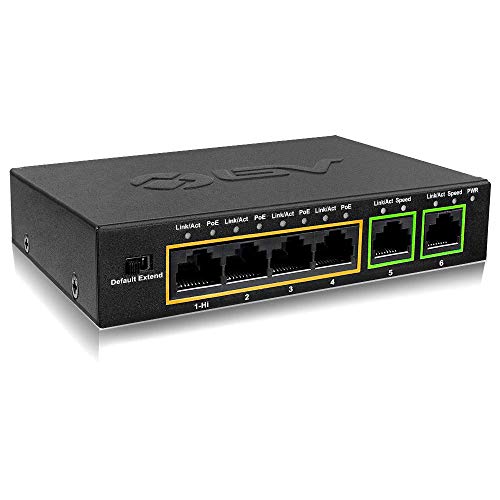
| High-Power Single-Port | PoE standard: PoE+ (supports 802.3at; Hi‑PoE on port 1) | PoE ports (count of PoE-capable ports): 4 PoE ports (ports 1–4) | Uplink ports present: 2 Ethernet uplink ports | CHECK LATEST PRICE | Read Our Analysis |
| TP-Link TL-SF1005P 5-Port Fast Ethernet PoE Switch |

| Quiet Home/Small Office | PoE standard: IEEE 802.3at/af (PoE+) | PoE ports (count of PoE-capable ports): 4 PoE ports | Uplink ports present: 1 non‑PoE uplink port | CHECK LATEST PRICE | Read Our Analysis |
| 8-Port Gigabit PoE+ Switch with 2 Uplinks |

| Best for Managed Networks | PoE standard: IEEE 802.3af/at (PoE/PoE+) | PoE ports (count of PoE-capable ports): 8 PoE ports | Uplink ports present: 2 gigabit uplink ports | CHECK LATEST PRICE | Read Our Analysis |
| 5-Port PoE Ethernet Switch (4 PoE + Uplink) |

| Remote-Managed Compact | PoE standard: IEEE 802.3af/at (PoE/PoE+) | PoE ports (count of PoE-capable ports): 4 PoE ports | Uplink ports present: 1 × 1000 Mbps uplink port | CHECK LATEST PRICE | Read Our Analysis |
More Details on Our Top Picks
TP-Link 9-Port 10/100Mbps PoE Switch (TL-SF1009P)
If you need a compact, budget-friendly PoE solution for small offices or home networks, the TP‑Link TL‑SF1009P delivers: eight 802.3at/af PoE+ ports supplying up to 30 W per port (65 W total), an extra uplink port for your router, and simple plug‑and-play operation-with useful extras like Extend Mode for long runs and port isolation to keep traffic secure. You’ll get 10/100 Mbps switching, 8 Gbps capacity, and 48 V DC PoE. Metal casing and shielded ports boost durability. Priority Mode favors ports 1–2 for voice/video. It’s backed by a three‑year warranty and weekday technical support.
- PoE standard:IEEE 802.3at/af (PoE+)
- PoE ports (count of PoE-capable ports):8 PoE ports
- Uplink ports present:1 non‑PoE uplink port
- Total PoE power budget:65 W total
- Physical build (metal housing / fanless):Metal case (shielded ports)
- Extend/long-distance PoE mode:Extend mode to 250 m (at 10 Mbps)
- Additional Feature:Priority Mode ports 1–2
- Additional Feature:Port Isolation feature
- Additional Feature:8 Gbps switching capacity
BV-Tech 6-Port PoE+ Switch (60W Fanless)
Designed for small offices and installers who need reliable, compact PoE power, the BV-Tech 6-Port PoE+ Switch delivers flexible high-power options with a fanless metal body that sits quietly on a desk or in a cabinet. You get four PoE+ ports (ports 1–4) at 10/100 Mbps and two 10/100 uplinks. Port 1 supports Hi-PoE up to 60 W, while ports 2–4 supply up to 30 W each within a 60 W total budget (60 W DC adapter). It auto-detects PDs, lacks passive PoE support, reaches 100 m (250 m in Extend), and includes a 30-day return, one-year warranty, and lifetime tech support.
- PoE standard:PoE+ (supports 802.3at; Hi‑PoE on port 1)
- PoE ports (count of PoE-capable ports):4 PoE ports (ports 1–4)
- Uplink ports present:2 Ethernet uplink ports
- Total PoE power budget:60 W total
- Physical build (metal housing / fanless):Metal housing, fanless desktop
- Extend/long-distance PoE mode:Extend mode to 250 m (max)
- Additional Feature:Hi‑PoE single-port 60W
- Additional Feature:Includes 60W DC adapter
- Additional Feature:30-day money-back guarantee
TP-Link TL-SF1005P 5-Port Fast Ethernet PoE Switch
Choose the TL-SF1005P when you need a compact, budget-friendly PoE switch that powers up to four cameras or access points while keeping setup simple-its 67 W budget and 30 W per port support 802.3at/af devices without extra configuration. You’ll get four PoE+ 10/100 ports plus one non‑PoE uplink, plug-and-play operation, and PoE Auto Recovery to reboot hung devices with a button. Use Extend Mode for runs up to 250 m (at 10 Mbps) and Priority Mode to favor ports 1–2 for video. The fanless metal design is quiet and durable, with wall-mounting, shielded ports, a 3-year warranty, and weekday support.
- PoE standard:IEEE 802.3at/af (PoE+)
- PoE ports (count of PoE-capable ports):4 PoE ports
- Uplink ports present:1 non‑PoE uplink port
- Total PoE power budget:67 W total
- Physical build (metal housing / fanless):Sturdy metal casing, fanless
- Extend/long-distance PoE mode:Extend mode to 250 m (at 10 Mbps)
- Additional Feature:PoE Auto Recovery button
- Additional Feature:IEEE 802.3X flow control
- Additional Feature:Desktop or wall-mountable
8-Port Gigabit PoE+ Switch with 2 Uplinks
Get reliable PoE power and gigabit uplinks for small offices or remote sites that need to run multiple access points or IP cameras without extra power outlets. You’ll get eight gigabit PoE+ ports delivering up to 30W per port from a 120W budget and two dedicated gigabit uplinks for backbone links. Manage it via web, desktop, or mobile app, or switch to unmanaged mode for plug-and-play. VLAN, QoS, DHCP snooping, port mirroring, and static MAC control keep traffic orderly. Fanless metal design, wall- or desktop-mountable, with overload, short-circuit, lightning protection, and a one-year replacement warranty.
- PoE standard:IEEE 802.3af/at (PoE/PoE+)
- PoE ports (count of PoE-capable ports):8 PoE ports
- Uplink ports present:2 gigabit uplink ports
- Total PoE power budget:120 W total
- Physical build (metal housing / fanless):Rugged metal casing, fanless
- Extend/long-distance PoE mode:(Supports PoE delivery – long-distance mode not specified)
- Additional Feature:Managed or unmanaged mode
- Additional Feature:4 kV lightning protection
- Additional Feature:VLAN and QoS support
5-Port PoE Ethernet Switch (4 PoE + Uplink)
If you need reliable PoE power for a small surveillance or Wi‑Fi deployment, this 5‑port PoE+ switch gives you four powered ports plus a gigabit uplink so you can plug cameras or access points in and manage them remotely. You get 4 PoE ports (2×1 G, 2×100 Mbps) plus a 1 G uplink, IEEE 802.3af/at compliance, and up to 30 W per port with a 52 W budget. Easy Smart management (app, web, cloud), VLAN, QoS, port mirroring, and flow control let you optimize traffic. Fanless metal housing, wall/desktop mount, 4 kV lightning protection, and one-year support complete the package.
- PoE standard:IEEE 802.3af/at (PoE/PoE+)
- PoE ports (count of PoE-capable ports):4 PoE ports
- Uplink ports present:1 × 1000 Mbps uplink port
- Total PoE power budget:52 W total
- Physical build (metal housing / fanless):Fanless metal housing
- Extend/long-distance PoE mode:PoE delivery up to 250 m supported
- Additional Feature:Cloud management interface
- Additional Feature:Mixed gigabit/100 Mbps PoE ports
- Additional Feature:Two-level 4 kV lightning protection
Factors to Consider When Choosing Power Over Ethernet Switches
When you’re picking a PoE switch, you’ll want to check the total PoE power budget so every device gets enough wattage. Figure out how many ports you need, the required data speeds, and whether cabling distance or reach will affect performance. Also decide if you need managed features for VLANs, QoS, or remote monitoring.
PoE Power Budget
In planning your PoE deployment, calculate the switch’s total PoE power budget and compare it to the sum of the maximum power needs of all connected PDs (for example, multiple 30 W cameras), remembering per-port limits (15.4 W for 802.3af, up to 30 W for 802.3at/PoE+), the switch’s supply rating and voltage (typically 48 V DC), and leave 20–30% headroom for reboots, spikes, and future growth. Check the switch’s aggregate wattage rating and make certain it can sustain continuous loads; power supply limits, not just per-port specs, define what you can actually deliver. Consider Hi-PoE or high-wattage single-port options if you need concentrated power, but verify remaining ports retain sufficient capacity for other devices.
Port Count Needs
Port count drives your PoE switch choice, so tally every powered device you have now and expect to add, then add about 20–30% spare ports for growth and redundancy. Count IP cameras, phones, APs and sensors, plus projected expansion, to pick a switch with enough PoE ports so you won’t scramble later. Reserve ports for mission‑critical gear-VoIP phones and surveillance-so they get predictable power and priority. Include dedicated uplink ports (non‑PoE or higher‑speed) when you’ll aggregate to a core switch to avoid wasting PoE ports on backbone traffic. For remote sites or long runs, choose switches with extra ports to reduce field visits and support added devices without re‑cabling. Match port types to device needs when planning inventory.
Data Speed Requirements
After you’ve counted devices and left spare ports for growth, think about how fast those ports need to be. Match port speeds to your highest‑bandwidth devices: IP cameras, NVRs, and Wi‑Fi APs with multi‑gig clients usually need gigabit to avoid bottlenecks. Don’t ignore aggregated throughput-pick a switch whose switching capacity and backplane exceed the sum of simultaneous traffic so peak usage won’t cause congestion. For multiple high‑bandwidth PoE devices, verify total upstream uplink capacity (speed and number of uplinks) can carry traffic to the core without saturating. Remember protocol overhead and future growth; choose headroom by preferring gigabit ports and higher switching capacity. If you use distance‑extending modes that reduce link speed, confirm devices still operate acceptably at the lower rate.
Distance And Reach
When you plan cable runs, remember PoE’s practical limits: standard 802.3af/at reliably carries data and power up to about 100 meters on good Cat5e/Cat6, but beyond that you’ll face voltage drop, reduced available power at the device, and potential link degradation. For distances past 100 m, factor in cable resistance and voltage drop so devices still get required wattage – leave headroom above the PD’s needs. Some switches offer an “extend” mode to push data and power to roughly 250 m, but expect speeds to fall (often to 10 Mbps). For true gigabit and full PoE over long runs use active solutions: PoE extenders, midspans, or fiber with local injectors. Finally, use high-quality, properly terminated cabling and test end-to-end performance.
Management Options
Because management determines how much control and visibility you’ll have over both data and power, choose your PoE switch type based on the features you actually need: unmanaged for simple plug-and-play setups, smart/easy‑managed for basic VLANs, QoS and remote monitoring, and fully managed for granular VLANs (802.1Q), QoS, security policies, and scripting. You’ll want managed options if you need VLAN segmentation, port mirroring, DHCP snooping, or CLI/web/app access. Smart switches give simplified VLAN, QoS, and remote monitoring without full CLI complexity. Decide between cloud/remote management for centralized monitoring and updates versus local-only control to limit exposure. For PoE specifically, verify per-port power scheduling, priority-based allocation, total PoE budget monitoring, and auto-recovery to maintain reliable power and handle faults.
Physical Durability
Management features only matter if the switch survives the environment you install it in, so you should also evaluate physical durability. Choose metal housings and shielded ports to withstand impacts, electromagnetic interference, and wear from repeated cable insertion. Prefer fanless designs or ruggedized cooling to cut moving parts that fail in dusty or vibration-prone locations. Verify wall- or rack-mount options and compact form factors so installation space prevents strain, bending, or accidental cable dislodging. Look for IP or ingress protection ratings, surge/lightning protection, and industrial-grade power input specs if the unit faces moisture, dust, or electrical transients. Finally, check manufacturer-stated operating temperature ranges and vibration/shock tolerances to match your site’s conditions.
Safety And Protections
If you’re installing PoE switches in mission-critical or public spaces, prioritize safety and protective features that stop faults before they cause damage. Make sure the switch offers overcurrent and short-circuit protection so a misbehaving powered device can’t cause fire or hardware failure. Prefer PoE implementations with per-port power monitoring and auto shutoff to detect faults and isolate affected ports quickly. Verify built-in surge and lightning protection with specified kV ratings on both data and power lines to guard against transients. Choose models with thermal protection, good heat dissipation, and controlled fans to prevent overheating and trigger safe shutdowns under sustained load. Finally, confirm IEEE 802.3af/at/at+ support and safety certifications like UL and CE for interoperable, certified electrical safety.
Warranty And Support
When you’re comparing PoE switches, don’t overlook warranty and support because they’re what keep your deployment running after the sale; check warranty length and coverage details (hardware and PoE power delivery), whether replacements or advance RMAs are provided, and what technical support options and hours are available so you can minimize downtime and avoid unexpected costs. You should verify warranty length (1 vs. 3 years) and confirm it covers both hardware defects and PoE failures. Check whether replacement or repair services, turnaround times, and advance RMA options are specified. Confirm phone, email, and chat support, plus scope: configuration, troubleshooting, firmware updates. Look for extended or lifetime support policies and clear documentation, and note exclusions and requirements like registration, proof of purchase, or authorized‑installer maintenance.




