

If you rely on laser prints that stay sharp and consistent, you’ll want drum kits that balance high page yields with dependable compatibility. You’ll learn which models-from E‑Z Ink and Brother to Canon and third‑party bundles-cut costs per page without sacrificing tone or longevity, plus what reset steps and warranties to expect, so you can pick the right kit for your setup and budget…
| E-Z Ink Replacement Drum Unit for Brother Printers (2-Pack) |

| Best Value | Product Type: Compatible replacement drum unit (DR730) – 2-pack | Toner Included?: No (toner TN760 not included) | Page Yield (drum): ~12,000 pages per drum unit | VIEW LATEST PRICE | Read Our Analysis |
| Greencycle Replacement Drum Cartridge for Canon 051 |
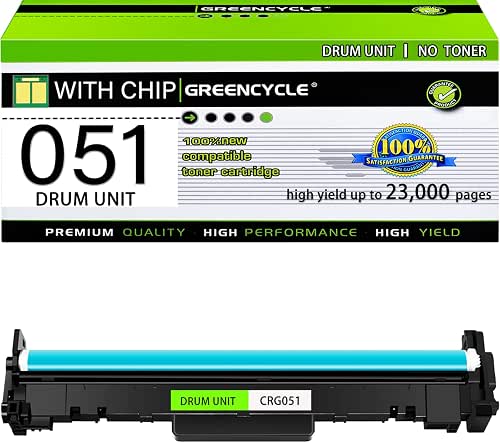
| High-Yield Performer | Product Type: Compatible replacement imaging drum cartridge (CRG051) – 1 pack | Toner Included?: No (toner sold separately) | Page Yield (drum): Up to 23,000 pages per drum unit (5% coverage) | VIEW LATEST PRICE | Read Our Analysis |
| Ankink DR630 Compatible Drum Unit Replacement (2-Pack) |

| Budget-Friendly Pick | Product Type: Compatible replacement drum unit (DR630/DR660) – 2-pack | Toner Included?: No (toner not included) | Page Yield (drum): ~12,000 pages per drum unit | VIEW LATEST PRICE | Read Our Analysis |
| InkNI Compatible DR630/TN660 Toner Cartridge 3-Pack |

| All-in-One Kit | Product Type: Compatible drum unit (DR630) included in drum+toner kit – 1 drum in kit | Toner Included?: Partially – kit includes 2× TN660 toner cartridges plus 1 drum | Page Yield (drum): DR630 drum supports up to ~12,000 pages | VIEW LATEST PRICE | Read Our Analysis |
| DR620 Replacement Drum Unit for Brother Printers |

| Long-Life Reliability | Product Type: Replacement imaging drum unit (DR620) – 1 pack | Toner Included?: No (toner cartridge not included) | Page Yield (drum): ~25,000 pages per drum unit (5% coverage) | VIEW LATEST PRICE | Read Our Analysis |
More Details on Our Top Picks
E-Z Ink Replacement Drum Unit for Brother Printers (2-Pack)
If you need a budget-friendly, high-yield drum for everyday black‑and‑white printing, the E‑Z Ink 2‑pack (DR730) is a smart choice – each unit yields about 12,000 pages, so you won’t swap drums often in home offices or small workgroups. You get two DR730 drum units and a user guide; toner (TN760) isn’t included. Each compatible drum supports standard sheet sizes and fits many Brother HL, MFC, and DCP models (listed). The units weigh about 2.44 pounds total and measure 7.8 x 13.1 x 8.4 inches. Enjoy a low-cost replacement with Amazon’s usual 30-day return coverage.
- Product Type:Compatible replacement drum unit (DR730) – 2-pack
- Toner Included?:No (toner TN760 not included)
- Page Yield (drum):~12,000 pages per drum unit
- Printer Compatibility (brand):Brother printers and MFC series
- Package Quantity:2 drum units in package (+ user guide)
- Compatibility Type (OEM vs Compatible):Compatible / third-party (E‑Z Ink for Brother line)
- Additional Feature:Amazon 30-day returns
- Additional Feature:Dual drum pack
- Additional Feature:DR730 model number
Greencycle Replacement Drum Cartridge for Canon 051
Choose the Greencycle Replacement Drum Cartridge for Canon 051 when you need a high-yield, budget-friendly drum that’s built for frequent office use and fits a wide range of ImageCLASS and LBP models. You get one black CRG051 imaging drum (2170C001) compatible with MF269dw, MF267dw, MF266dn, MF264dw, MF263dn, MF260 series and LBP162dw/161dn. Expect up to 23,000 pages at 5% coverage; Greencycle tests for reliable compatibility and clear printouts. Note the box may show a toner image but contains only the drum; toner ships separately (CRG051 or CRG051H). Support is available for setup and troubleshooting.
- Product Type:Compatible replacement imaging drum cartridge (CRG051) – 1 pack
- Toner Included?:No (toner sold separately)
- Page Yield (drum):Up to 23,000 pages per drum unit (5% coverage)
- Printer Compatibility (brand):Canon ImageCLASS / LBP series
- Package Quantity:1 drum unit in package
- Compatibility Type (OEM vs Compatible):Compatible / third-party (greencycle)
- Additional Feature:23,000-page yield
- Additional Feature:Includes one drum
- Additional Feature:Box may show toner
Ankink DR630 Compatible Drum Unit Replacement (2-Pack)
For small offices or home users who need long-lasting, budget-friendly replacements, the Ankink DR630 2-pack shines with a high-yield drum rated for about 12,000 pages per unit. You’ll get two compatible drum units for Brother DR-630/DR660 models; toner cartridges aren’t included and this isn’t an OEM product. It supports many Brother HL, DCP, and MFC models-confirm compatibility before ordering. Use Ankink TN660 or TN630 toners for best results. After installation you must reset the drum when the printer shows “Drum Ends Soon,” “Replace Drum,” or “Drum Ended.” Follow instructions to guarantee proper functionality and crisp prints.
- Product Type:Compatible replacement drum unit (DR630/DR660) – 2-pack
- Toner Included?:No (toner not included)
- Page Yield (drum):~12,000 pages per drum unit
- Printer Compatibility (brand):Brother printers and MFC/DCP series
- Package Quantity:2 drum units in package
- Compatibility Type (OEM vs Compatible):Compatible / third-party (Ankink)
- Additional Feature:Requires drum reset
- Additional Feature:Works with TN660 toners
- Additional Feature:High-yield ~12,000
InkNI Compatible DR630/TN660 Toner Cartridge 3-Pack
The InkNI Compatible DR630/TN660 3-pack is ideal for small offices or home users who need high yield and reliable print quality without the OEM price tag. You get one DR630 drum unit plus two TN660 toner cartridges, compatible with many Brother models (HL, DCP, MFC series). Each TN660 yields up to 2,600 pages (5,200 total); the drum supports up to 12,000 pages. Manufactured to ISO 9001, ISO 14001, and STMC standards, these parts match Brother quality while adding about 1,400 pages over TN630 compatibles. InkNI backs them with a two-year warranty and 24/7 Amazon support.
- Product Type:Compatible drum unit (DR630) included in drum+toner kit – 1 drum in kit
- Toner Included?:Partially – kit includes 2× TN660 toner cartridges plus 1 drum
- Page Yield (drum):DR630 drum supports up to ~12,000 pages
- Printer Compatibility (brand):Brother printers and MFC/DCP series
- Package Quantity:1 drum + 2 toner cartridges (3 items total)
- Compatibility Type (OEM vs Compatible):Compatible / third-party (InkNI)
- Additional Feature:Includes drum + 2 toners
- Additional Feature:ISO & STMC certified
- Additional Feature:2-year warranty
DR620 Replacement Drum Unit for Brother Printers
If you print high volumes and want a straightforward, low-maintenance replacement, the DR620 drum unit is a smart fit because it delivers about 25,000 pages at 5% coverage and installs in roughly five minutes. You’ll swap the imaging drum directly-no toner included-so you should have fresh toner ready. It’s designed as part of Brother’s complete printing system to keep text and graphics sharp across DCP, HL, and MFC series models listed. Installation saves time versus changing multiple parts, and predictable yield helps plan supplies. Choose the DR620 when you want reliable, low-effort drum replacement for consistent print quality.
- Product Type:Replacement imaging drum unit (DR620) – 1 pack
- Toner Included?:No (toner cartridge not included)
- Page Yield (drum):~25,000 pages per drum unit (5% coverage)
- Printer Compatibility (brand):Brother printers (multiple HL, DCP, MFC series)
- Package Quantity:1 drum unit in package
- Compatibility Type (OEM vs Compatible):Compatible / replacement (non‑OEM)
- Additional Feature:25,000-page yield
- Additional Feature:Quick 5-minute install
- Additional Feature:Single drum pack
Factors to Consider When Choosing Printer Drum Kits
When choosing a printer drum kit, you’ll want to check drum unit compatibility with your model and compare page yield estimates so you know how long it’ll last. Make sure the toner and drum are matched for best print quality and fewer defects. Also consider how easy the kit is to install and whether the printer requires a drum reset.
Drum Unit Compatibility
Although it’s tempting to grab any drum labeled for your brand, you’ll want to confirm exact model and series compatibility to avoid installation problems and protect print quality. You should check the specific printer model and series because drums can differ within a brand; matching those identifiers prevents fit and function issues. Verify the drum is designed for your printer type-laser vs. other technologies-since wrong types can fail or damage hardware. Also confirm compatibility with the toner cartridges you use: some drums require specific toner models to deliver best results. Look for manufacturer compatibility lists or retailer specifications that state supported printers and related consumables, so you buy a drum that installs cleanly and maintains crisp output.
Page Yield Estimates
Because drum units are rated by page yield, you should use those estimates to match a kit to your print volume and budget. Page yield estimates represent the average number of pages a drum prints before replacement, typically calculated at 5% coverage on letter or A4 paper. Yields vary widely-from roughly 12,000 to over 25,000 pages-so compare models against your monthly output. Higher-yield drums cut per-page cost and lower replacement frequency, which benefits high-volume settings. Remember estimates assume standard conditions and may differ from your real-world use if you print heavier graphics or larger coverage. Use published yields to plan maintenance intervals and budget for consumables, and choose a yield level that aligns with your expected workload to avoid unexpected downtime.
Toner And Drum Matching
After you’ve matched drum yields to your print volume, the next step is pairing the drum unit with the correct toner so both components work together. You’ll check compatibility because toner cartridges and drum units are separate parts that must match for proper function. Use the drum designed for a specific toner model-like pairing TN660 with DR630-to optimize yield and avoid issues. Don’t mix incompatible models; doing so can trigger print defects or error messages such as “Replace Drum” or “Drum Ends Soon.” Match page yields for both parts so one doesn’t need premature replacement, which wastes consumables. Follow manufacturer instructions for installation and resetting to maintain performance and make sure the printer recognizes the paired drum and toner.
Print Quality Expectations
When you’re evaluating drum kits, focus on how precisely the drum’s imaging surface transfers toner and how consistently it performs over its rated yield, since both determine sharpness, evenness of coverage, and resistance to streaks or fading. You’ll want drums produced under strict quality control or with certifications because they deliver more consistent, sharper output. Check rated yield against your expected volume: wear on the drum can reduce resolution and introduce faded areas as pages accumulate. Verify compatibility with your printer model and toner type to avoid color shifts or loss of detail. Prioritize well-made or OEM options for critical documents, and inspect reviews or test pages to confirm minimal smudging, streaking, and uniform density throughout the cartridge’s life.
Installation And Resetting
If you’re swapping a drum kit, follow the manufacturer’s steps to remove the old unit and seat the new one securely-most installs take about five minutes but may require a manual reset to clear “Drum Ends Soon” or “Replace Drum” alerts. You’ll want to reset the drum counter when prompted so the printer recognizes the new unit and doesn’t show premature warnings. Consult the manual for the model-specific maintenance-reset procedure; skipping this can cause persistent error messages or prevent printing. Proper installation and resetting also guarantee accurate page-yield tracking and reduce diagnostic confusion. If instructions aren’t clear, check the manufacturer’s support site for step-by-step guides or videos before assuming the drum is defective.
Warranty And Support
Proper installation and a successful reset don’t end your responsibilities-you’ll also want solid warranty and support coverage in case the drum fails or causes errors later on. Check warranty length-many run from several months up to two years-and confirm what defects or malfunctions are covered. Look for clear replacement or refund options if a unit fails prematurely or proves incompatible with your printer. Verify how the warranty interacts with seller return guarantees or legal withdrawal rights so you don’t lose protections. Prioritize vendors offering responsive support-professional help desks or 24/7 messaging-to troubleshoot installation, reset, and performance issues. Good support should include step‑by‑step installation guidance, reset instructions, and maintenance tips that help extend the drum’s lifespan and keep prints crisp.
Cost Per Page
Because the drum kit determines how many pages you actually get, you should always calculate cost per page by dividing the kit’s price by its rated page yield-this gives a quick, comparable measure of printing efficiency and helps you spot when a higher-yield unit will save you money over time. You’ll also check that page yield is based on standard coverage (usually 5%) so comparisons are apples-to-apples. Choosing a high-yield drum typically lowers cost per page, since the fixed cost spreads over more sheets. If your model lets you replace only the drum rather than drum-plus-toner, you’ll often cut ongoing costs further. Finally, factor drum quality and reliability: frequent maintenance or poor consistency raises real cost per page even if the sticker price looks low.
Frequently Asked Questions
Are Drum Kits Compatible With Photo Printers and Inkjets?
Yes – drum kits usually work only with laser and LED printers, not inkjets or most dedicated photo printers, so you’ll need to check your model; if you’ve got a laser photo printer, compatibility can vary.
How Do Drum Kits Affect Color Accuracy in Color Lasers?
Think of a palette’s true hues guiding your work: drum kits directly influence color accuracy by controlling toner placement, density, and registration. If you use worn or misaligned drums, colors shift, fade, or display banding.
Can Drum Kits Be Recycled at Local E-Waste Facilities?
Yes, you can often recycle drum kits at local e-waste facilities; they’ll accept used imaging drums or guide you to manufacturer take-back programs, so contact your facility first to confirm accepted items and any preparation steps.
Do Drum Kits Have Warranties Covering Print Defects?
Yes – they often do. Think of a drum kit as a hired craftsman: if prints falter, the warranty steps in to fix or replace it. Check terms for defect coverage, duration, and required proof of issue.
Are There Counterfeit Drum Kits to Watch Out For?
Yes – you’ll find counterfeit drum kits; they mimic branding, use cheap materials, and cause defects. Check serial numbers, buy from authorized dealers, compare packaging, test performance, and insist on warranties to avoid fakes.




