

If your HL-L2350DW just ran out mid-job, you’ll want a reliable replacement that won’t slow you down. You’ll find options for everyday printing, heavy workloads, and full-color needs that balance yield and cost. I’ll outline five top choices and what makes each one fit different users – so you can pick the right fit for your Brother printer.
| Brother TN630 Genuine Black Toner Cartridge Standard Yield |
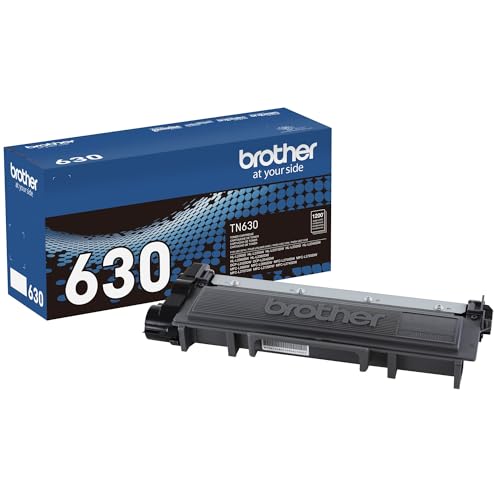
| Reliable Everyday | Compatibility (printer models): List of Brother monochrome models (DCP-L2520DW, DCP-L2540DW, HL-L2300D, HL-L2305W, HL-L2315DW, HL-L2320D, HL-L2340DW, HL-L2360DW, HL-L2380DW, MFC-L2680W, MFC-L2685DW, MFC-L2700DW, MFC-L2705DW, MFC-L2707DW, MFC-L2720DW, MFC-L2740DW) | Yield (pages): Up to 1,200 pages (standard yield) | Cartridge Type / Color: Black toner cartridge (TN630, standard) | VIEW LATEST PRICE | Read Our Analysis |
| Brother TN223 Standard-Yield 4-Pack Toner (CMYK) |

| Best for Color | Compatibility (printer models): List of Brother color models (HL-L3210CW, HL-L3230CDW, HL-L3270CDW, HL-L3290CDW, MFC-L3710CW, MFC-L3750CDW, MFC-L3770CDW) | Yield (pages): Black up to 1,400 pages; each color up to 1,300 pages | Cartridge Type / Color: 4-pack (Black, Cyan, Magenta, Yellow) toner cartridges (TN223) | VIEW LATEST PRICE | Read Our Analysis |
| Replacement Brother TN660 TN630 Black Toner Cartridge (2) |

| High-Yield Value | Compatibility (printer models): List of Brother monochrome models (HL-L2300D, HL-L2305W, HL-L2315DW, HL-L2320D, HL-L2340DW, HL-L2360DW, HL-L2380DW, MFC-L2680W, MFC-L2700DW, MFC-L2705DW, MFC-L2707DW, MFC-L2720DW, MFC-L2740DW, MFC-L2685DW, DCP-L2520DW, DCP-L2540DW) | Yield (pages): Up to 2,600 pages per cartridge (high-yield) | Cartridge Type / Color: Black toner cartridges (TN660/TN-660 high-yield) – pack of 2 | VIEW LATEST PRICE | Read Our Analysis |
| Brother TN830XL High-Yield Black Toner Cartridge |
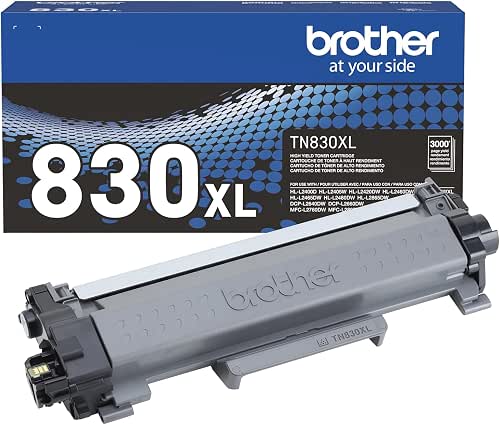
| Professional Grade | Compatibility (printer models): List of Brother monochrome models (HL-L2400D, HL-L2405W, HL-L2420DW, HL-L2460DW, HL-L2460DW XL, HL-L2465DW, HL-L2467DW, HL-L2480DW, HL-L2865DW, DCP-L2640DW, DCP-L2647DW, MFC-L2760DW, MFC-L2807DW, MFC-L2820DW, MFC-L2820DWXL, MFC-L2900DW, MFC-L2900DW XL, MFC-L2980DW) | Yield (pages): Up to 3,000 pages (high-yield TN830XL) | Cartridge Type / Color: Black toner cartridge (TN830XL high-yield) | VIEW LATEST PRICE | Read Our Analysis |
| Compatible Black Toner Cartridges for Brother TN760 (4-Pack) |

| Bulk Budget Pack | Compatibility (printer models): List of Brother monochrome models (DCP-L2550DW, HL-L2350DW, HL-L2370DW, HL-L2370DWXL, HL-L2390DW, HL-L2395DW, MFC-L2710DW, MFC-L2730DW, MFC-L2750DW, MFC-L2750DWXL) | Yield (pages): Approximately 3,000 pages per cartridge (high-yield) | Cartridge Type / Color: Black toner cartridges (TN760 compatible, 4-pack) | VIEW LATEST PRICE | Read Our Analysis |
More Details on Our Top Picks
Brother TN630 Genuine Black Toner Cartridge Standard Yield
If you print mainly black-and-white documents and want reliable, professional results without frequent swaps, the Brother TN630 is a smart choice – you’ll get crisp, sharp monochrome prints with a standard yield of up to 1,200 pages. It’s a genuine Brother cartridge engineered to integrate smoothly with compatible laser printers and all-in-ones, delivering consistent, rich blacks for business documents. It fits many models like the DCP-L2520DW, HL-L2360DW, and MFC-L2740DW. You can also enable Amazon Dash Replenishment on Dash-eligible printers for automatic reorders, so you won’t run out unexpectedly.
- Compatibility (printer models):List of Brother monochrome models (DCP-L2520DW, DCP-L2540DW, HL-L2300D, HL-L2305W, HL-L2315DW, HL-L2320D, HL-L2340DW, HL-L2360DW, HL-L2380DW, MFC-L2680W, MFC-L2685DW, MFC-L2700DW, MFC-L2705DW, MFC-L2707DW, MFC-L2720DW, MFC-L2740DW)
- Yield (pages):Up to 1,200 pages (standard yield)
- Cartridge Type / Color:Black toner cartridge (TN630, standard)
- Genuine vs Compatible:Genuine Brother toner
- Environmental / Recycling Program:Amazon Dash Replenishment support; Brother recycling program implied (integration with Brother ecosystem)
- Installation / Integration Features:Engineered to integrate seamlessly with Brother printers; supports Dash reordering
- Additional Feature:Amazon Dash Replenishment
- Additional Feature:Standard 1,200-page yield
- Additional Feature:Rich black tones
Brother TN223 Standard-Yield 4-Pack Toner (CMYK)
Choose the Brother TN223 Standard-Yield 4-Pack if you want reliable, factory-tested toners that keep color and black output consistent across common Brother color laser models. You get one cartridge each of black, cyan, magenta, and yellow, engineered for HL-L3210CW, HL-L3230CDW, HL-L3270CDW, HL-L3290CDW, MFC-L3710CW, MFC-L3750CDW, and MFC-L3770CDW. Black yields up to 1,400 pages; each color yields up to 1,300 pages. Expect professional laser-quality prints with vivid color and crisp monochrome text. The multi-pack reduces reorder frequency, guarantees seamless compatibility, and supports Brother’s cartridge recycling program for responsible disposal.
- Compatibility (printer models):List of Brother color models (HL-L3210CW, HL-L3230CDW, HL-L3270CDW, HL-L3290CDW, MFC-L3710CW, MFC-L3750CDW, MFC-L3770CDW)
- Yield (pages):Black up to 1,400 pages; each color up to 1,300 pages
- Cartridge Type / Color:4-pack (Black, Cyan, Magenta, Yellow) toner cartridges (TN223)
- Genuine vs Compatible:Genuine Brother toner (multi-pack)
- Environmental / Recycling Program:Brother toner cartridge collection and recycling program (stated)
- Installation / Integration Features:Engineered for seamless compatibility and minimal reorder frequency (multi-pack)
- Additional Feature:Multi-color 4-pack
- Additional Feature:Color yields ~1,300 pages
- Additional Feature:Minimizes reorder frequency
Replacement Brother TN660 TN630 Black Toner Cartridge (2)
For heavy home or small-office users who need consistent, high-volume black prints, the Replacement Brother TN660/TN630 (2-pack) delivers up to 2,600 pages per cartridge so you can print longer between replacements. You’ll find compatibility with a wide range of Brother models-HL, MFC, and DCP series-so check your printer model before ordering. Each TN660 high-yield cartridge meets ISO 9001 and ISO 14001 standards, ensuring stable print quality and environmental manufacturing practices. The twin-pack gives you spare capacity on hand, reducing downtime and frequent purchases. It’s a practical, cost-effective choice for sustained monochrome printing needs.
- Compatibility (printer models):List of Brother monochrome models (HL-L2300D, HL-L2305W, HL-L2315DW, HL-L2320D, HL-L2340DW, HL-L2360DW, HL-L2380DW, MFC-L2680W, MFC-L2700DW, MFC-L2705DW, MFC-L2707DW, MFC-L2720DW, MFC-L2740DW, MFC-L2685DW, DCP-L2520DW, DCP-L2540DW)
- Yield (pages):Up to 2,600 pages per cartridge (high-yield)
- Cartridge Type / Color:Black toner cartridges (TN660/TN-660 high-yield) – pack of 2
- Genuine vs Compatible:Replacement / compatible (third-party, ISO-certified)
- Environmental / Recycling Program:Manufactured to ISO 14001 (environmental management) – implies environmental standards
- Installation / Integration Features:New cartridges with smart compatibility and ISO quality standards (verify model before ordering)
- Additional Feature:Two-cartridge pack
- Additional Feature:ISO 9001/14001 certified
- Additional Feature:High-yield 2,600 pages
Brother TN830XL High-Yield Black Toner Cartridge
The TN830XL is ideal when you need high-volume black prints without frequent cartridge swaps, delivering up to 3,000 crisp pages and lowering your per-page cost compared with the standard TN830. You’ll get consistent, professional black text and graphics because Brother engineers this genuine toner to work with its laser engines and the DR830 drum unit. It’s compatible with many HL, DCP, and MFC models (listed for easy reference), and you can monitor toner levels via Brother Mobile Connect on supported wireless printers. When finished, return the used cartridge through Brother’s free recycling program to minimize environmental impact.
- Compatibility (printer models):List of Brother monochrome models (HL-L2400D, HL-L2405W, HL-L2420DW, HL-L2460DW, HL-L2460DW XL, HL-L2465DW, HL-L2467DW, HL-L2480DW, HL-L2865DW, DCP-L2640DW, DCP-L2647DW, MFC-L2760DW, MFC-L2807DW, MFC-L2820DW, MFC-L2820DWXL, MFC-L2900DW, MFC-L2900DW XL, MFC-L2980DW)
- Yield (pages):Up to 3,000 pages (high-yield TN830XL)
- Cartridge Type / Color:Black toner cartridge (TN830XL high-yield)
- Genuine vs Compatible:Genuine Brother toner (TN830XL)
- Environmental / Recycling Program:Brother free cartridge collection and recycling program (stated)
- Installation / Integration Features:Works with DR830 drum unit for optimal performance; mobile monitoring via Brother Mobile Connect
- Additional Feature:Works with DR830 drum
- Additional Feature:Mobile Connect monitoring
- Additional Feature:Up to 3,000-page yield
Compatible Black Toner Cartridges for Brother TN760 (4-Pack)
If you need high-yield black toner that keeps a busy Brother mono laser running without frequent replacements, WEAREC’s 4-pack TN760 compatible cartridges are a smart fit because each cartridge yields about 3,000 pages at 5% coverage and includes a new smart IC chip for reliable recognition and installation. You’ll get four TN760 replacements packaged together, compatible with DCP-L2550DW, HL-L2350DW/HL-L2370DW/HL-L2390DW series and MFC-L2710DW/MFC-L2730DW/MFC-L2750DW models. Installation is straightforward, prints stay consistently sharp, and the cartridges are compact yet robust. WEAREC backs the product with support links and warranty details if you need them.
- Compatibility (printer models):List of Brother monochrome models (DCP-L2550DW, HL-L2350DW, HL-L2370DW, HL-L2370DWXL, HL-L2390DW, HL-L2395DW, MFC-L2710DW, MFC-L2730DW, MFC-L2750DW, MFC-L2750DWXL)
- Yield (pages):Approximately 3,000 pages per cartridge (high-yield)
- Cartridge Type / Color:Black toner cartridges (TN760 compatible, 4-pack)
- Genuine vs Compatible:Compatible / third-party (WEAREC)
- Environmental / Recycling Program:Warranty/support info provided; compatible product – recycling not explicitly stated but seller support available
- Installation / Integration Features:New smart IC chip for full compatibility and easy installation
- Additional Feature:New smart IC chip
- Additional Feature:4-pack high-yield set
- Additional Feature:Product weight 4.95 lb
Factors to Consider When Choosing Printer Toner Cartridges for Brother
When choosing toner for your Brother printer, check model compatibility first so the cartridge fits and functions properly. Consider page yield and cost per page to match your printing volume and budget, and decide if you want original or compatible cartridges based on warranty concerns and savings. Finally, weigh your print quality requirements-text clarity versus photo or graphic detail-before you buy.
Printer Model Compatibility
Because Brother printers use model-specific cartridges, always confirm that a toner is listed for your exact printer model before buying. Check the full model number-series alone isn’t enough-because different Brother lines use distinct cartridges. Confirming compatibility guarantees proper fit, prevents firmware rejection, and maintains expected print quality. Note that high-yield and standard-yield cartridges can differ in compatibility even within a model family, so verify which yields your printer accepts. Using a cartridge not designed for your model can cause malfunctions, hardware damage, or void your warranty. Cross-reference the cartridge part number with Brother’s compatibility list or your printer’s manual, and if in doubt, consult Brother support or the retailer to avoid costly mistakes.
Page Yield Expectations
While page yield is listed at 5% coverage, you should treat it as an estimate and match it to your actual usage so you don’t run out mid-job. Page yield means the approximate number of pages a cartridge prints at that 5% coverage on A4 or letter paper. Standard-yield cartridges typically deliver about 1,200–1,400 pages, which suits light to moderate use. High-yield options print roughly 2,600–3,000 pages, lowering your cost per page and cutting replacement frequency if you print heavily. To choose wisely, calculate your average monthly print volume and estimate your typical coverage percentage per page. Then pick a cartridge whose yield aligns with those numbers to avoid frequent swaps and keep printing predictable and cost-effective.
Original Vs Compatible
Page yield helps you plan how often you’ll replace cartridges, but you also need to decide between original and compatible toner types. If you prioritize seamless compatibility, consistent results, and manufacturer support, choose original Brother cartridges; they’re made for specific models, usually include warranties, and tie into recycling programs for responsible disposal. If budget matters more, compatible cartridges from third-party makers can cut costs and often include smart chips so your printer recognizes them, though their yield, color accuracy, and reliability can vary. You’ll trade some predictability and formal support for lower prices. Weigh the value of guaranteed integration and recycling options against potential savings and variable performance when selecting toner for your Brother printer.
Print Quality Requirements
What kind of output do you need-sharp black text for documents or vivid color for graphics-because that choice determines whether you should use monochrome or color toner and what quality level to expect. Decide if you require crisp, consistent, professional-grade prints; that pushes you toward cartridges engineered for high resolution and true-to-life tones. Make sure the toner is compatible with your Brother model so you avoid smudging, fading, or registration problems. Consider toner formulation and durability if longevity and resistance to fading matter for archives or presentations. Also factor in page yield and toner density: higher-yield cartridges often maintain more consistent output over large runs, reducing variations in darkness or saturation as volumes rise. Choose based on your primary output needs.
Cost Per Page
Because toner costs add up fast, you should evaluate cost per page before buying cartridges for your Brother printer. Calculate it by dividing the cartridge price by its rated page yield at standard coverage so you can compare real printing economy. Choose high-yield cartridges when you print frequently; they cost more up front but typically lower cost per page and cut replacement frequency. Remember coverage per page matters: dense graphics or heavy coverage will reduce actual pages you get, raising your effective cost. Factor in indirect savings too-fewer swaps mean less downtime and smoother workflow. Balance upfront expense against your projected monthly volume to pick cartridges that match your budget and usage without overspending on capacity you won’t use.
Environmental Considerations
When you choose toner cartridges, consider their environmental impact as closely as you check price and yield; proper recycling of used cartridges reduces landfill waste and supports sustainability. Check whether manufacturers offer cartridge collection and recycling programs so you can return empties for responsible disposal and resource recovery. Prefer cartridges produced under international environmental standards like ISO 14001 to guarantee eco-friendly manufacturing practices. Selecting high-yield cartridges will cut the number of replacements, lowering waste and shipping impacts. Also weigh compatible or remanufactured options: they reuse materials and reduce raw resource consumption, often with comparable performance. You’ll minimize your environmental footprint by combining certified production, recycling participation, and higher-yield or remanufactured choices.
Smart Chip Compatibility
If your Brother printer relies on smart-chip cartridges, make sure the replacement you pick is fully compatible so the unit recognizes it and reports accurate toner levels. You’ll want cartridges whose chips communicate status and toner levels reliably, so installation is seamless and the printer tracks usage without false warnings. A compatible chip also verifies the cartridge as genuine or approved, preventing errors and potential malfunctions that interrupt jobs. Look for chips that support automatic reorder alerts to avoid unexpected downtime and maintain readiness. Confirm vendor documentation and user reports about chip performance with your specific Brother model. Prioritizing smart chip compatibility helps you keep consistent print quality, uninterrupted operation, and accurate supply monitoring.
Frequently Asked Questions
Do Toner Cartridges Expire or Degrade Over Time?
Like milk, toner can go downhill: you’ll see gradual degradation over years-clumping, fading, or moisture damage-so store cartridges sealed, cool, and dry; use them within manufacturer’s recommended shelf life to avoid print problems.
Can I Recycle Used Brother Toner Cartridges Locally?
Yes – you can recycle used Brother toner cartridges locally; check Brother’s recycling program, local electronics stores, or municipal hazardous waste centers. You’ll often mail, drop off, or use retailer take-back slots for convenient recycling.
Are Refilled Cartridges Safe for My Brother Printer Warranty?
Think of a patched bike tube: it usually works, but it can leak. You can use refilled cartridges and they usually won’t void your Brother warranty, but faulty ones causing damage might, so keep receipts and test carefully.
How Do I Store Unopened Toner Cartridges Correctly?
Store unopened toner cartridges in a cool, dry place away from direct sunlight and heat sources; keep them in their original sealed packaging, lying flat or upright per manufacturer guidance, and avoid extreme temperature or humidity fluctuations to preserve performance.
Can Toner Dust Cause Health Issues in My Home Office?
Yes – toner dust can irritate your lungs, trigger allergies, and worsen asthma; wash hands after spills, vacuum with HEPA, keep cartridges sealed, and avoid inhaling dust to reduce exposure and protect your home office health.




