

You’ll want speed, you’ll want quality, and you’ll want reliability when you produce ID badges. You’ll also want a printer that’s easy to set up and simple to manage day to day, so you won’t waste time or money. Below I’ll compare five top options that hit those marks and explain what makes each stand out, so you can pick the right fit for your workflow and budget.
| IDP SMART-21S ID Card Printer Kit |

| Compact Professional | Print Type: Print only (single-sided/simplex) | Card Size Supported: Standard ID card ~3.4 x 2.2 inches (credit-card size) | Color Printing Capability: Full-color (YMCKO dye-sublimation) | VIEW LATEST PRICE | Read Our Analysis |
| Bodno Seaory S26 ID Card Printer Bronze Edition |

| Versatile Office Workhorse | Print Type: Print only (single-sided/simplex) | Card Size Supported: Standard ID card 3.375 x 2.125 inches (credit-card size) | Color Printing Capability: Full-color (YMCKO ribbon) | VIEW LATEST PRICE | Read Our Analysis |
| Badgy100 Plastic Card Printer with Badge Studio |

| Quick Single-Print | Print Type: Print only (single-sided; manual duplex possible) | Card Size Supported: Credit-card size 3.37 x 2.125 inches (and up to larger media) | Color Printing Capability: Full-color dye-sublimation | VIEW LATEST PRICE | Read Our Analysis |
| Bodno Magicard Pronto ID Card Printer Bronze Edition |
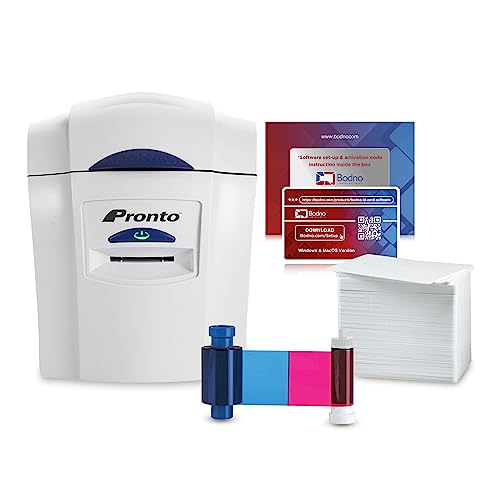
| Ready-to-Use Bundle | Print Type: Print only (single-sided/simplex) | Card Size Supported: Standard PVC card size (includes 100 PVC cards, standard credit-card size) | Color Printing Capability: Full-color (MA100YMCKO ribbon included) | VIEW LATEST PRICE | Read Our Analysis |
| Avery Durable Laser-Printable Double-Sided ID Cards (80) |

| Heavy-Duty Cards | Print Type: Printable cards (laser-printable sheets for use in printers) | Card Size Supported: Credit-card size 3.375 x 2.125 inches (sheeted cards) | Color Printing Capability: Full-color via laser-printer (double-sided printable sheets) | VIEW LATEST PRICE | Read Our Analysis |
More Details on Our Top Picks
IDP SMART-21S ID Card Printer Kit
If you need a compact, desktop-ready solution that’s optimized for small to mid‑volume ID production, the IDP SMART‑21S ID Card Printer Kit is a solid choice-its included PC‑only IDesigner software, EasyCapture web photo tool, and a starter supply of 100 YMCKO ribbons and 100 PVC cards mean you can start printing professional 300 dpi color or 1200 dpi monochrome badges right away. You’ll appreciate the small footprint, easy hand-feed design, and straightforward USB setup for Windows 10/11. It prints single-sided, uses dye-sublimation YMCKO ribbons, holds up to 100 input cards, and produces about 150 color or 600 mono cards per hour.
- Print Type:Print only (single-sided/simplex)
- Card Size Supported:Standard ID card ~3.4 x 2.2 inches (credit-card size)
- Color Printing Capability:Full-color (YMCKO dye-sublimation)
- Included Software/Templates:PC-only IDesigner software + EasyCapture web tool
- Connectivity / Interface:USB 2.0
- Target Use / Audience:Small business to large corporations (ID/access/student/membership)
- Additional Feature:EasyCapture web photo tool
- Additional Feature:Compact hand-feed design
- Additional Feature:Includes 100 YMCKO ribbons
Bodno Seaory S26 ID Card Printer Bronze Edition
The Bodno Seaory S26 Bronze Edition is a great pick for small offices that need a reliable, all-in-one ID card solution-its included camera, drag-and-drop software with lifetime support, and YMCKO ribbon make it easy for you to design and print professional badges right away. You’ll get single-sided printing at 300 x 1200 dpi color (24-bit) and 300 dpi monochrome, about 30 seconds to first page, and up to 12 ppm black-and-white. The kit includes a 300-print ribbon, templates, camera, and cross-platform software. USB and Ethernet connectivity, 30-card output, ~300-card input, two-year hardware warranty, and lifetime software support streamline office use.
- Print Type:Print only (single-sided/simplex)
- Card Size Supported:Standard ID card 3.375 x 2.125 inches (credit-card size)
- Color Printing Capability:Full-color (YMCKO ribbon)
- Included Software/Templates:Complete ID software with templates; lifetime license/support
- Connectivity / Interface:USB 2.0 and Ethernet
- Target Use / Audience:Office use / professional ID badge production
- Additional Feature:Ethernet + USB ports
- Additional Feature:Lifetime software support
- Additional Feature:Includes camera and ribbon
Badgy100 Plastic Card Printer with Badge Studio
For small offices or event organizers who need one-off, on-demand plastic badges, the Badgy100 delivers fast, high-resolution color printing right at your desk. You’ll print tamper-proof ID badges in seconds using dye-sublimation at up to 300 x 300 dpi and 24-bit color. The compact unit fits a desk, holds 25 cards, and supports manual duplex for two-sided needs. Badge Studio software and online templates let you design professional badges quickly on PC or iOS. USB 2.0 connects the printer; it runs on 60W and includes a limited warranty from EVOLIS for reliable, on-demand ID printing.
- Print Type:Print only (single-sided; manual duplex possible)
- Card Size Supported:Credit-card size 3.37 x 2.125 inches (and up to larger media)
- Color Printing Capability:Full-color dye-sublimation
- Included Software/Templates:Badge Studio ID design software with template library
- Connectivity / Interface:USB 2.0
- Target Use / Audience:On-demand personal or small business ID badges
- Additional Feature:Single-sheet instant output
- Additional Feature:Low memory (16 MB)
- Additional Feature:App-controlled via iOS
Bodno Magicard Pronto ID Card Printer Bronze Edition
Want a straightforward, all-in-one solution for small businesses or clubs that need professional photo ID or membership cards quickly? You get the Bodno Magicard Pronto Bronze Edition: the Magicard Pronto printer paired with Bodno Bronze design software. It ships with an MA100YMCKO color ribbon and 100 durable white PVC cards, so you can print professional-grade IDs right away. The software’s templates and drag-and-drop tools let you design without experience. Setup is simple and you’ll produce cards within minutes. Hardware carries a two-year warranty, and the software includes lifetime support for ongoing design and printing help.
- Print Type:Print only (single-sided/simplex)
- Card Size Supported:Standard PVC card size (includes 100 PVC cards, standard credit-card size)
- Color Printing Capability:Full-color (MA100YMCKO ribbon included)
- Included Software/Templates:Bodno Bronze ID design software with templates
- Connectivity / Interface:(Includes USB; controlled by software) USB interface
- Target Use / Audience:Immediate out-of-box professional photo ID card printing
- Additional Feature:Includes 100 PVC cards
- Additional Feature:Out-of-the-box ready bundle
- Additional Feature:Two-year hardware warranty
Avery Durable Laser-Printable Double-Sided ID Cards (80)
If you need rugged, laser-printable ID cards that hold up in industrial settings, Avery’s Durable Double-Sided Cards (80) are a smart choice-they’re PET, 11 mil thick, waterproof, chemical- and abrasion-resistant, and print on standard desktop laser printers. You’ll get 10 sheets snapping into 80 credit-card–sized, rounded-corner cards (2.125″ x 3.375″) that handle UV exposure, tearing, and heavy use. Use Avery’s free templates to create safety certifications, forklift licenses, staff IDs, visitor passes, medical or emergency IDs, and membership or event badges. They’re also writable with ballpoint pens or permanent markers for quick, on-demand customization.
- Print Type:Printable cards (laser-printable sheets for use in printers)
- Card Size Supported:Credit-card size 3.375 x 2.125 inches (sheeted cards)
- Color Printing Capability:Full-color via laser-printer (double-sided printable sheets)
- Included Software/Templates:Free Avery ID templates on Avery website
- Connectivity / Interface:Designed for standard desktop printers (USB/network depending on printer) – sheets compatible with common laser printers
- Target Use / Audience:Broad use (staff IDs, certifications, visitor passes, membership, industrial/field use)
- Additional Feature:Laser-printable double-sided sheets
- Additional Feature:11 mil waterproof PET
- Additional Feature:Snap-apart credit cards
Factors to Consider When Choosing Printers for ID Cards
When choosing an ID card printer, you’ll want to match print resolution to the level of detail and security features you need. Decide whether color printing is necessary or if monochrome will suffice, and set realistic expectations for print speed and throughput. Also check media compatibility and the connectivity options the printer offers so it fits your cards and workflow.
Print Resolution Needs
Because the clarity of photos, text, and security elements hinges on print resolution, you should match a printer’s dpi and color depth to how the card will be used. If you need professional photo IDs, prioritize higher dpi-color printing around 300 dpi or more gives vibrant, accurate images, while black-and-white options can reach up to 1200 dpi for razor-sharp text and fine-line details. That higher monochrome dpi is useful for barcodes, small fonts, and security engraving. Also check color depth: 24-bit color lets you reproduce millions of hues for richer images. For simple staff badges with basic text, you can opt for lower resolution and save cost; for visitor or access cards with photos and security elements, invest in higher dpi and full color depth.
Color Versus Monochrome
Having matched resolution to your card’s purpose, you’ll next decide between color and monochrome printing. Color uses dye sublimation and 24-bit depth to produce vivid, professional badges-ideal for photo IDs, logos, and visual security features. It requires layered yellow, magenta, cyan, and black inks, so it uses more consumables and takes longer per card. Monochrome focuses on high-quality black-and-white output, often up to 1200 dpi, making it excellent for crisp text, barcodes, and simple graphics. It’s typically faster and far more economical for high-volume, function-first cards. Choose color when recognition and branding matter; choose monochrome when cost, speed, and barcode/text clarity are your priorities. Consider mixed workflows if you need both.
Print Speed Expectations
If you expect to run large batches, consider print speed early in your decision: card printers can output anywhere from a handful of cards per minute to more than 150 per hour, and color, high-resolution jobs, or smaller feeder capacities will slow that rate. You’ll want to match printer throughput to your typical volume: daily front-desk issuance differs from infrequent visitor badges. Remember color jobs usually take longer than monochrome because dye-sublimation or ribbon layering adds steps, and boosting resolution further reduces speed. Check input/output hopper sizes and how often you must reload-these affect continuous printing efficiency. Estimate peak demand, factor in job complexity, then choose a model that balances quality and capacity so workflows don’t bottleneck.
Media Compatibility Range
When you’re choosing an ID card printer, check its media compatibility range early so you don’t end up with unusable cards or stalled workflows: confirm supported card dimensions (from standard credit-card size up to any larger formats you need), the card materials it accepts (PVC, PET, specialty stocks), whether it prints single- or dual-sided automatically, and the maximum input/output capacities for batch runs; also verify which ribbon types it requires (for example, YMCKO) so print quality and adhesion stay reliable. You’ll want clear specs on minimum and maximum card thickness, whether manual duplex is an option, and realistic hopper and output tray capacities for your typical batches. Match printer capabilities to your card stock and production volume to avoid wasted media and downtime.
Connectivity And Interfaces
Because connectivity determines who can print and how smoothly your system runs, check interfaces and network options before you buy an ID card printer. USB 2.0 ports remain a reliable wired choice for single-user setups, while Ethernet lets multiple staff share a single device without routing jobs through one PC. If you want mobile printing, look for wireless support and smart device compatibility so tablets and smartphones can send jobs directly. Confirm driver support for Windows, Mac, and Linux to avoid OS roadblocks. Also consider the printer’s processor: single-core models handle basic transfers fine, but multi-core units manage concurrent network jobs and complex files faster. Match interfaces to your workflow to prevent bottlenecks and downtime.
Software And Templates
Although hardware determines how cards print, software and templates shape what you’ll actually put on them, so pick a printer that bundles intuitive design tools and robust template libraries. You’ll want drag-and-drop editors that let you customize logos, photos, and text without design training, plus pre-made templates to speed production and keep badges consistent. Check that the software supports your operating system so it integrates smoothly with existing workflows and networked systems. Access to online libraries of icons, backgrounds, and new templates helps you refresh designs quickly. Finally, prioritize printers offering lifetime or extended software support so you receive updates, security patches, and new templates over time, avoiding disruption as your badge needs evolve.
Durability And Materials
You’ve picked software and templates that make your badges look professional, but the materials and construction determine how long they’ll last in the real world. Choose polyester (PET) cards when you need top resistance to water, chemicals, abrasion, tearing, and UV exposure. Card thickness, measured in mils, matters: thicker cards endure heavy-duty use and outdoor conditions better.
If you print with dye-sublimation, expect vibrant full-color images, but plan for protective laminates or overlays to prevent fading and surface damage. Laminated or coated cards resist physical wear and tampering, preserving text and photos longer. Look for cards with reinforced edges and rounded corners to minimize edge fraying and damage from frequent handling, so your badges stay professional throughout daily use.
Warranty And Support
When shopping for an ID card printer, prioritize warranty and support so you’re protected against early failures and downtime; a robust warranty typically covers one to two years and reassures you against manufacturing defects and hardware malfunctions. Check whether terms include customer service for repair, maintenance, and replacement of faulty components so you won’t face unexpected repair bills. Look for lifetime software support or extended licensing that delivers updates, troubleshooting, and help with design and printing tools. Prefer all-encompassing support packages that bundle hardware warranty and software licensing to simplify upkeep. Before you buy, evaluate the scope and duration of coverage, response times, and what’s excluded-doing so prevents surprises and minimizes operational downtime over the printer’s life.




