

You might call it picky perfection, and that’s okay because your hand deserves better; you’ll want a mouse that fits tasks and feels like an extension of you. You’ll see five great options that balance precision, comfort, and customization so you can work, create, or play without friction. Each pick covers different needs like extra buttons for macros, multi device pairing, quiet scrolling, or weight tuning. Keep going if you want the right features for your setup and grip style.
| Razer Basilisk V3 Ergonomic Gaming Mouse (Classic Black) |
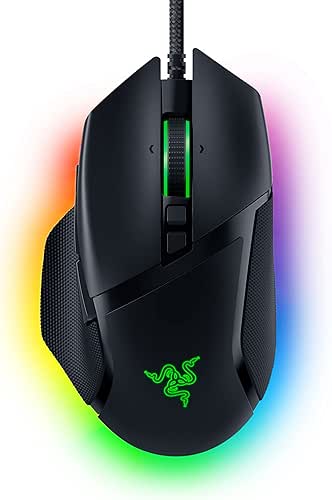
| Best for FPS Precision | Programmable Buttons: 11 programmable buttons | Connectivity: Wired USB (desktop gaming mouse) | DPI / Sensor Sensitivity: Focus+ 26,000 DPI optical sensor | CHECK LATEST PRICE | Read Our Analysis |
| Logitech MX Master 3S Bluetooth Wireless Mouse (Graphite) |

| Best for Productivity | Programmable Buttons: Multi-button customization via Logi Options+ (several thumb/gesture buttons; supports app-specific profiles) – connects/configurable for up to 3 devices | Connectivity: Bluetooth only (multi-device Bluetooth) | DPI / Sensor Sensitivity: 8,000 DPI optical sensor (customizable) | CHECK LATEST PRICE | Read Our Analysis |
| UtechSmart Venus RGB Wired Gaming Mouse (16400 DPI) |

| Best for MMO Power | Programmable Buttons: 12 fully programmable side buttons + 5 profiles | Connectivity: Wired USB (braided cable) | DPI / Sensor Sensitivity: Adjustable 200–16,400 DPI (Avago laser sensor) | CHECK LATEST PRICE | Read Our Analysis |
| Redragon M612 Predator RGB Gaming Mouse |

| Best Budget Gamer | Programmable Buttons: 11 programmable buttons (including macro/rapid-fire) | Connectivity: Wired USB | DPI / Sensor Sensitivity: 5 definable DPI levels (default up to 4,000; software to 8,000) | CHECK LATEST PRICE | Read Our Analysis |
| Acer Wireless Ergonomic Rechargeable Multi-Device Mouse |

| Best Multi‑Device Ergonomics | Programmable Buttons: 5 programmable buttons (each can store up to 16 functions) | Connectivity: 2.4 GHz (USB-A/C receivers), Bluetooth 5.2, and wired USB-C | DPI / Sensor Sensitivity: Five DPI settings: 1,200 / 1,600 / 2,400 / 3,200 / 4,000 DPI | CHECK LATEST PRICE | Read Our Analysis |
More Details on Our Top Picks
Razer Basilisk V3 Ergonomic Gaming Mouse (Classic Black)
If you play fast-paced games and want a mouse that feels like it was made for your hand, the Razer Basilisk V3 is a strong choice. You’ll notice the ergonomic shape and thumb rest support your grip, so buttons sit where your fingers reach without strain. With 11 programmable buttons, you can map macros, push-to-talk, ping, and more for quick reactions. The Focus+ 26K sensor tracks precisely, and Gen 2 optical switches act in 0.2 ms to avoid misclicks. The HyperScroll wheel shifts between free-spin and tactile modes. Customize lighting and performance in Synapse, and turn off Enhance pointer precision.
- Programmable Buttons:11 programmable buttons
- Connectivity:Wired USB (desktop gaming mouse)
- DPI / Sensor Sensitivity:Focus+ 26,000 DPI optical sensor
- Ergonomic Design:Iconic ergonomic shape with thumb rest (right-handed)
- Lighting / RGB:11 Razer Chroma RGB zones (16.8M colors, dynamic effects)
- Software / Customization Support:Razer Synapse for button mapping, lighting, performance tuning
- Additional Feature:HyperScroll tilt wheel
- Additional Feature:11 Chroma RGB zones
- Additional Feature:0.2 ms actuation
Logitech MX Master 3S Bluetooth Wireless Mouse (Graphite)
You’ll love the MX Master 3S Bluetooth if you want a high-precision, work-focused mouse that feels comfortable all day and connects wirelessly without a dongle. You’ll notice its 8000 DPI sensor gives you fine control and adjustable sensitivity, so you can move from editing photos to scrolling spreadsheets with ease. It pairs to three devices via Bluetooth and uses FLOW to move files and text between Windows and macOS, which makes multitasking feel natural. The ergonomic shape and thumb controls keep your hand relaxed, while Magspeed scrolling and Quiet Clicks make long sessions calmer. It’s built with recycled plastic, though no cable’s included.
- Programmable Buttons:Multi-button customization via Logi Options+ (several thumb/gesture buttons; supports app-specific profiles) – connects/configurable for up to 3 devices
- Connectivity:Bluetooth only (multi-device Bluetooth)
- DPI / Sensor Sensitivity:8,000 DPI optical sensor (customizable)
- Ergonomic Design:Ergonomic silhouette for natural wrist posture (right-handed)
- Lighting / RGB:(No dedicated RGB spec listed) – customizable UI/flows via software; physical RGB not specified
- Software / Customization Support:Logi Options+ for button customization, app-specific profiles, FLOW cross-computer control
- Additional Feature:FLOW cross-computer control
- Additional Feature:Any-surface (glass) tracking
- Additional Feature:Quiet Clicks (90% less)
UtechSmart Venus RGB Wired Gaming Mouse (16400 DPI)
MMO players who need a lot of buttons and precise tracking will love the UtechSmart Venus RGB wired gaming mouse, because it pairs a full set of 12 programmable side buttons with a high-precision Avago laser sensor that reaches 16400 DPI. You’ll get smooth, fast response with 1000 Hz polling, 12000 FPS, and crisp micro switches. You can map keys, combos, and an Auto Fire button across five profiles and switch them on the fly with the bottom Special Setting Switch. The ergonomic right-handed shape, thumb rest, adjustable weights, RGB lighting, and braided cable make long sessions comfortable and reliable.
- Programmable Buttons:12 fully programmable side buttons + 5 profiles
- Connectivity:Wired USB (braided cable)
- DPI / Sensor Sensitivity:Adjustable 200–16,400 DPI (Avago laser sensor)
- Ergonomic Design:Right-handed ergonomic shape with textured thumb rest
- Lighting / RGB:RGB backlit with 16M+ colors and multiple modes (LED can be disabled)
- Software / Customization Support:On-device profile switching (Special Setting Switch) and software-accessible profiles/macros
- Additional Feature:Adjustable weighted system
- Additional Feature:12 fully programmable side-buttons
- Additional Feature:Auto Fire rapid-fire button
Redragon M612 Predator RGB Gaming Mouse
The Redragon M612 Predator RGB puts precise control where you need it, making it a great pick for gamers and creators who want on-the-fly customization without fuss. You get five definable DPI steps out of the box, and the software lets you stretch sensitivity up to 8000 DPI, so you can fine-tune speed for different tasks. Eleven programmable buttons give you macros, a rapid-fire trigger, and two side keys for quick actions. The claw-grip shape and frosted finish keep your hand steady, while rubber texture adds control. Dynamic RGB and five lighting modes let you match your setup.
- Programmable Buttons:11 programmable buttons (including macro/rapid-fire)
- Connectivity:Wired USB
- DPI / Sensor Sensitivity:5 definable DPI levels (default up to 4,000; software to 8,000)
- Ergonomic Design:Streamlined claw-grip ergonomic design with left-side rubber texture
- Lighting / RGB:Dynamic RGB lighting with 5 backlit modes
- Software / Customization Support:Software support for DIY keybinds and macro programming
- Additional Feature:Rapid-fire dedicated button
- Additional Feature:Claw-grip streamlined shape
- Additional Feature:Skin-friendly frosted coating
Acer Wireless Ergonomic Rechargeable Multi-Device Mouse
If you hop between a laptop, a desktop, and a tablet during your day, this Acer Wireless Ergonomic Rechargeable Multi-Device Mouse will feel like it was made for you. You can pair up to four devices and switch seamlessly using 2.4 GHz USB-A or USB-C receivers, Bluetooth 5.2, or a wired USB-C connection. Buttons are handy: five programmable buttons store up to 16 functions each for commands, macros, and shortcuts without a driver. The high-precision sensor offers five DPI levels for pixel-perfect tracking. A 500 mAh battery charges via USB-C while you work, and an OLED shows power. Silent clicks keep noise low.
- Programmable Buttons:5 programmable buttons (each can store up to 16 functions)
- Connectivity:2.4 GHz (USB-A/C receivers), Bluetooth 5.2, and wired USB-C
- DPI / Sensor Sensitivity:Five DPI settings: 1,200 / 1,600 / 2,400 / 3,200 / 4,000 DPI
- Ergonomic Design:Ergonomic design for laptop/desktop use (multi-device comfort)
- Lighting / RGB:OLED screen for battery/status (no RGB lighting specified)
- Software / Customization Support:Built-in button programming without driver; on-device storage for functions (no driver required)
- Additional Feature:OLED battery level screen
- Additional Feature:Stores USB-A/C receiver
- Additional Feature:Silent-click operation (35 dB)
Factors to Consider When Choosing Programmable Computer Mice
When you pick a programmable mouse you’ll want to think about sensor accuracy and DPI so your cursor moves exactly how you expect it to. Also check button customization and scroll wheel features alongside ergonomics and grip style so the mouse fits your hand and workflow. Finally compare connectivity and compatibility to make sure the mouse works with your devices and software without surprises.
Sensor Accuracy And DPI
Because precise tracking combines more than just a big DPI number, you should look beyond marketing claims and focus on the sensor’s real behavior and specs. You want high DPI only if you use a high resolution screen or prefer fast cursor travel. More important is sensor quality and firmware. Choose sensors with high polling rates, like 500 to 1000 Hz, and low latency so the cursor feels smooth and responsive.
Also check for consistent reporting without smoothing, prediction, or acceleration, since those can ruin fine control. Look at maximum tracking speed in IPS and acceleration tolerance, for example 20 to 30G or higher, so fast flicks stay accurate. Finally, prefer true-to-surface performance and low lift-off distance to keep accuracy across pads.
Button Customization Options
After you’ve checked that the sensor gives you steady, honest tracking, you’ll want the buttons to match that level of control since they shape how you actually use the mouse. Check how many programmable buttons you get and match that to your tasks, whether macros, media control, or push-to-talk. Look for software that makes per-application profiles so mappings change when you switch apps. Confirm buttons can run complex actions like macro sequences, key combos, or system shortcuts and note any macro length or timing limits. See if the mouse offers on-the-fly profile or DPI switches and onboard memory so your settings travel with the device. Finally, make certain the customization app is intuitive, lets you remap every button, and supports exporting and importing profiles.
Ergonomics And Grip Style
If your hand spent hours on a mouse, you’d want it to feel like it was made for you, and that starts with choosing the right shape and size. Pick a shape that matches your primary grip: palm grips need larger contoured bodies and thumb rests, claw grips like a mix of support and agility, fingertip users want smaller lightweight shells for fine control. Also check handedness and button placement so you won’t twist your wrist or overstretch fingers. Measure height, length, and width against your hand size to avoid strain and loss of precision. Textured surfaces, coated finishes, and thumb rests keep grip steady when you sweat. Finally, weigh how weight and adjustability affect speed and steadiness for long sessions.
Connectivity And Compatibility
Wondering which connection will keep your mouse feeling fast and fuss-free? Pick wired if you need the lowest input lag. Choose 2.4 GHz wireless with a USB receiver when you want near-wired responsiveness without the cable. Bluetooth adds convenience and multi-device freedom, though it can be slightly slower.
Think about switching between devices. Many mice pair with 2 to 4 machines and let you toggle with a button. That matters if you work on a laptop, tablet, and desktop.
Check platform support too. macOS, Windows, Linux, and Chrome OS vary in driver and macro support, so make sure programmable features work where you do.
Also verify receivers and ports. Some include USB-A and USB-C receivers, others rely on Bluetooth. Finally, watch for interference in crowded RF environments.
Scroll Wheel Functionality
Think about the scroll wheel like a tiny toolbox on your mouse; it can speed you through long documents, let you flick through weapons in a game, or add extra buttons without cluttering your hand. You should check for both free-spin and tactile modes, since free-spin lets you zip long pages while tactile gives steady, per-notch control for precise swaps. Also look for tilt scrolling and a programmable wheel click, because they give you extra inputs for macros, side-scrolling, or push-to-talk. Pay attention to encoder resolution and detent consistency so steps feel steady and accidental activations drop. Finally, test responsiveness and latency in milliseconds, and choose a wheel you can customize in software to remap clicks, switch modes, or tweak inertia per profile.
Battery Life And Charging
You’ve just picked a wheel that clicks and scrolls exactly how you like, so now let’s look at how long that mouse will run before it needs power. Check the reported battery capacity and typical runtime so the mouse matches your daily use. Look at charging method and connector type like USB-C, Micro-USB, or a dock, and see if you can use the mouse while charging to avoid downtime. Compare rechargeable cells to replaceable AA or AAA options for quick swaps. Note power-saving features such as auto sleep, adjustable polling rate, and turning off LEDs to stretch runtime. Favor fast charge and realistic charge to runtime ratios so short charges give several hours of use and keep you working.
Software And Macros
When you pick a programmable mouse, the companion software and macro system become the heart of how it will fit your workflow, so don’t treat them as afterthoughts. You want software that records full macros: keystrokes, delays, repeats, and mouse actions, not just simple remaps. Also check whether the mouse stores macros to onboard memory so you can use them on another computer without installing software and note how many profiles or slots it offers.
Make sure the app supports app specific profiles and per profile button mappings so actions switch automatically with different programs. Look for advanced features like conditional actions, loops, modifiers, and import export of macro files for sharing. Finally confirm the software runs on your OS and offers stable cloud sync or backups for easy portability.




