

You want a keyboard that adapts to your play, not the other way around, so you can execute complex combos, stream commands, and tweak lighting without fuss. This list covers budget combos, one-handed keypads, wireless options, and macro decks-each chosen for durability, customization, and practical features. Keep going to match your style and priorities; the right pick could change how you game.
| Redragon S107 RGB Gaming Keyboard and Mouse Combo |
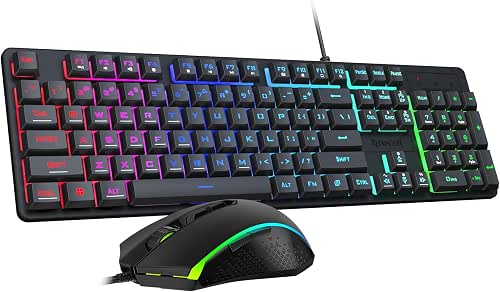
| Best Value Bundle | Programmability: Software macros, DPI/report-rate/button customization via Redragon software; plug & play supported | Software Customization: Professional Redragon software (downloadable) for macros, DPI, report rate, RGB, button mapping | RGB / Lighting: RGB keyboard (6 lighting modes) and mouse RGB (8 effects) | VIEW LATEST PRICE | Read Our Analysis |
| AZERON Cyborg II One-Handed Gaming Keypad (Galaxy Purple) |

| Best for Precision Control | Programmability: 30 mappable inputs, on-device layouts (6), advanced Azeron software for macros/analog tuning | Software Customization: Exclusive Azeron software for profile management, thumbstick tuning, analog/diagonal mapping | RGB / Lighting: RGB lighting tied to game profiles (Cyborg II) | VIEW LATEST PRICE | Read Our Analysis |
| AULA 99 Wireless Creamy Grey Gaming Keyboard |

| Best Multi-Device Flexibility | Programmability: Full-key macro programming, 3 programmable shortcut keys (M1/M2/M3) via software | Software Customization: Macro software for lighting and macro customization (multi-device switching supported) | RGB / Lighting: 16.8 million RGB colors, 16 preset effects, adjustable via knob or software | VIEW LATEST PRICE | Read Our Analysis |
| Redragon K512 Shiva RGB Membrane Gaming Keyboard |
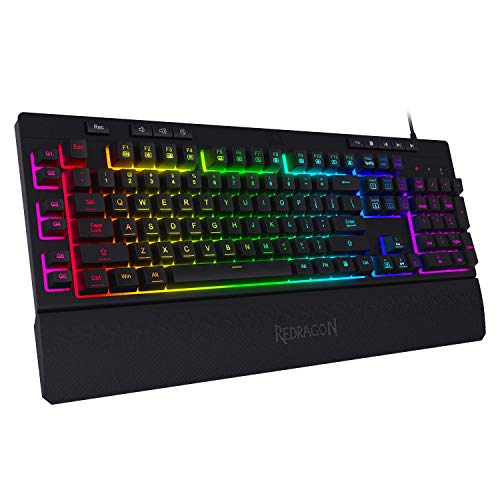
| Best for Macro Power | Programmability: 6 onboard macro keys (G1–G6) programmable on-the-fly; optional software for more macros | Software Customization: Optional Redragon software available to configure macros and lighting modes | RGB / Lighting: True RGB backlighting with multiple preset and customizable modes | VIEW LATEST PRICE | Read Our Analysis |
| VSDINSIDE 18-Key Macro Stream Controller Deck |

| Best for Streamers & Creators | Programmability: 18 programmable keys (15 LCD + 3 physical); supports multi-step macros, app/scene/media shortcuts | Software Customization: Desktop companion software for key graphics, macros, plugins, OBS/stream integrations | RGB / Lighting: Surrounding RGB light ring; per-key LCDs with custom images/animations | VIEW LATEST PRICE | Read Our Analysis |
More Details on Our Top Picks
Redragon S107 RGB Gaming Keyboard and Mouse Combo
If you want a budget-friendly starter kit that’s ready out of the box, the Redragon S107 RGB combo delivers a plug-and-play keyboard and mouse with customizable RGB and software-configurable macros and DPI-ideal for casual and entry-level gamers who need responsive performance without a steep learning curve. You get a keyboard with 6 lighting modes, 25-key anti-ghosting, 12 multimedia keys, floating keycaps, and a foldable stand. The mouse offers onboard DPI up to 5000 (software to 10000) and programmable polling up to 1000 Hz. Redragon’s software customizes macros, lighting, DPI, and buttons; basic use needs no driver.
- Programmability:Software macros, DPI/report-rate/button customization via Redragon software; plug & play supported
- Software Customization:Professional Redragon software (downloadable) for macros, DPI, report rate, RGB, button mapping
- RGB / Lighting:RGB keyboard (6 lighting modes) and mouse RGB (8 effects)
- Connectivity / Platform Compatibility:Wired USB plug & play for PC/laptop (Windows)
- Target Use – Gaming / Streaming / Productivity:Gaming-focused keyboard + mouse combo (gaming performance, multimedia keys)
- Physical Controls / Extra Inputs:Keyboard with 12 multimedia keys, 25-key anti-ghosting; mouse with DPI button and programmable buttons
- Additional Feature:25-key anti-ghosting
- Additional Feature:1K Hz programmable mouse
- Additional Feature:36-month warranty
AZERON Cyborg II One-Handed Gaming Keypad (Galaxy Purple)
The Azeron Cyborg II Galaxy Purple is ideal for right-handed gamers who want a compact, highly customizable left-hand controller that replaces a conventional keyboard-especially if you play FPS, MOBA, or RPG titles and value precise analog control from a Hall Effect thumbstick that eliminates drift. You get a medium-sized, 3D-printed keypad with advanced adjustability and ergonomic parts tailored to 6.3–7.5 inch hands (smaller hands may still use it). Map 30 individually wired inputs to keys, mouse, controller commands, or macros; store six on-device layouts and manage more in Azeron software. The Hall Effect thumbstick supports 360° analog, mouse mode, dead zones, smoothing, and RGB profiles.
- Programmability:30 mappable inputs, on-device layouts (6), advanced Azeron software for macros/analog tuning
- Software Customization:Exclusive Azeron software for profile management, thumbstick tuning, analog/diagonal mapping
- RGB / Lighting:RGB lighting tied to game profiles (Cyborg II)
- Connectivity / Platform Compatibility:Wired connection for PC (right-handed left-hand keypad use with mouse on right) – compatible with PC/games (uses Azeron software)
- Target Use – Gaming / Streaming / Productivity:One-handed gaming keypad for competitive/genre play (FPS, MOBA, RPG)
- Physical Controls / Extra Inputs:30 individually wired buttons + Hall Effect analog thumbstick (mid-click)
- Additional Feature:Hall Effect thumbstick
- Additional Feature:30 individually wired inputs
- Additional Feature:3D-printed customizable chassis
AULA 99 Wireless Creamy Grey Gaming Keyboard
Choose the AULA 99 Wireless if you want a compact, multi-device keyboard that switches instantly between Bluetooth, 2.4GHz, and wired USB-C modes while letting you program full-key macros and three dedicated shortcut keys for complex commands. You’ll pair up to five devices and flip between them with one key. The 96% layout keeps a numeric pad while saving desk space; a foldable two-stage stand adjusts typing angle. Dual-mode knob toggles gaming and office controls; knob or FN combos set RGB brightness and speed across 16.8 million colors and 16 effects. Membrane keys are quiet, and 48-month support covers issues.
- Programmability:Full-key macro programming, 3 programmable shortcut keys (M1/M2/M3) via software
- Software Customization:Macro software for lighting and macro customization (multi-device switching supported)
- RGB / Lighting:16.8 million RGB colors, 16 preset effects, adjustable via knob or software
- Connectivity / Platform Compatibility:Tri-mode: Bluetooth 5.0, 2.4 GHz wireless, USB-C wired; multi-OS compatible (Windows, Mac, Android, iOS)
- Target Use – Gaming / Streaming / Productivity:Gaming and office use (dual-mode knob, multi-device switching)
- Physical Controls / Extra Inputs:96% layout with integrated numpad, dual-mode knob, 3 shortcut keys, full-key macro capability
- Additional Feature:Tri-mode connectivity
- Additional Feature:5-device multi-pairing
- Additional Feature:Dual-mode control knob
Redragon K512 Shiva RGB Membrane Gaming Keyboard
Want reliable, budget-friendly programmability for competitive play? The Redragon K512 Shiva gives you six onboard G-keys you can program on the fly, or use its software for layered macros and lighting setups. True RGB lets you pick from seven preset modes and six custom slots, with full brightness control. Its linear, mechanical-feel switches and 26-key anti-ghosting handle simultaneous inputs cleanly. Dedicated media keys and a detachable magnetic wrist rest improve ergonomics and workflow. Built to last, it passed a 10 million-keystroke test and uses double-shot keycaps so legends won’t fade, making it a durable, affordable choice.
- Programmability:6 onboard macro keys (G1–G6) programmable on-the-fly; optional software for more macros
- Software Customization:Optional Redragon software available to configure macros and lighting modes
- RGB / Lighting:True RGB backlighting with multiple preset and customizable modes
- Connectivity / Platform Compatibility:Wired USB for PC (typical gaming keyboard compatibility with Windows)
- Target Use – Gaming / Streaming / Productivity:Gaming keyboard with media controls and ergonomic wrist rest (gaming/typing)
- Physical Controls / Extra Inputs:6 macro keys (G1–G6), 26 anti-ghosting keys, dedicated media controls, detachable wrist rest
- Additional Feature:On-the-fly macros
- Additional Feature:Detachable magnetic wristrest
- Additional Feature:Double-shot keycaps
VSDINSIDE 18-Key Macro Stream Controller Deck
If you stream, edit, or run complex workflows, the VSDINSIDE 18-Key Macro Deck puts 18 programmable keys and a full-color LCD on your desk so you can trigger multi-step macros, switch OBS scenes, or launch apps with a single tap. You’ll get 15 visual LCD keys plus three physical buttons, USB-C connectivity, and Windows/macOS support. Assign hotkeys, text, file/website launches, media, or audio clips; Operation Follow runs sequences or simultaneous actions. The RGB light ring and customizable LCD images add style, while companion software integrates with OBS, Streamlabs, Photoshop, Excel, and more. It’s compact, solidly built, and backed by warranty.
- Programmability:18 programmable keys (15 LCD + 3 physical); supports multi-step macros, app/scene/media shortcuts
- Software Customization:Desktop companion software for key graphics, macros, plugins, OBS/stream integrations
- RGB / Lighting:Surrounding RGB light ring; per-key LCDs with custom images/animations
- Connectivity / Platform Compatibility:USB-C wired; compatible with Windows 11+ and macOS 14+; integrates with streaming apps
- Target Use – Gaming / Streaming / Productivity:Stream controller and macro deck for streaming, productivity, gaming hotkeys
- Physical Controls / Extra Inputs:15 LCD programmable keys + 3 physical buttons, audio/soundboard controls, media and plugin buttons
- Additional Feature:15 LCD programmable keys
- Additional Feature:OBS/Streamlabs integration
- Additional Feature:Built-in operation scheduler
Factors to Consider When Choosing Programmable PC Gaming Keyboards
When choosing a programmable gaming keyboard, you’ll want to weigh switch type choice for feel, the number of programmable keys, and how flexible the software is. Also consider connectivity options and whether the build materials match the durability you need. We’ll compare these factors so you can pick a keyboard that fits your playstyle and setup.
Switch Type Choice
Choose switches that match how you play and type, because the right actuation, feel, and durability shape performance and comfort. Pick linear switches for smooth, quiet keystrokes and fast, consistent inputs; tactile switches if you want a bump to confirm presses; and clicky switches if audible feedback helps your timing, though they’re louder. Consider actuation force-lighter (≈35g) for speed and less fatigue, heavier (up to 80g) to reduce accidental presses. Look at actuation point and travel: shorter actuation (around 1.2–2.0 mm) with moderate total travel (3.5–4.0 mm) boosts responsiveness. Check durability ratings (50–100M keystrokes) for longevity. If you value customization, choose hot-swappable sockets to change switch feel and sound without soldering.
Programmable Key Count
Decide how many programmable keys you actually need by matching them to your typical tasks-6–12 covers basic macros and media controls, 15–30 suits stream-deck style setups or complex bindings, and 30+ replaces WASD plus modifier layers for full key remapping. Next, confirm whether those keys store profiles on-device or rely on software only; on-device storage keeps your macros intact when you switch PCs or run without drivers. Check for isolated wiring and anti-ghosting so simultaneous macro combos register during intense play. Inspect the keypad layout and available modifier layers (shift/alt/ctrl) to avoid excessive mode switching while maximizing unique binds. Finally, choose key types and durability ratings suited to heavy macro use-tactile or rated switches last far longer than low-end membranes.
Software Flexibility
Because your keyboard’s software is the bridge between hardware and workflow, you should prioritize flexibility and reliable on-device profile storage so your macros, lighting, and layer maps work without constantly running an app. Check that the app saves profiles to the keyboard so you can boot or switch machines without reloading settings. Verify macro power: multi-step sequences, conditional triggers, repeats, and complex key assignments let you automate combos and utility actions. Confirm the configuration exposes all hardware controls-RGB zones, macro keys, function-layer mapping, DPI/report-rate options-rather than only basic lighting. Prefer cross-platform support and regular driver updates to avoid obsolescence. Finally, choose software with easy import/export, backups, and preset grouping or sharing so you can transfer and restore setups quickly.
Connectivity Options
Good software won’t help if your connection can’t keep up, so next you should look closely at how the keyboard links to your PC. Wired USB-C or USB-A gives the lowest latency and highest polling rates (typically 500–1000 Hz), so choose wired for competitive play. Wireless options-Bluetooth or proprietary 2.4 GHz dongles-offer freedom from cables but can increase latency or face interference unless the keyboard uses high-performance wireless protocols. Tri-mode models let you switch between wired, Bluetooth, and 2.4 GHz, balancing low-latency gaming with multi-device convenience and one-key switching. For wireless use, check battery life and charging method (USB-C fast-charge preferred). Finally, confirm that drivers and OS support full macro programming, profile syncing, and advanced lighting over your chosen connection.
Build Quality Materials
When you’re evaluating build quality, focus on the materials and construction that determine how the keyboard feels and how long it lasts. Look for double-shot or PBT keycaps; they resist legend wear and oil buildup far longer than ABS. Choose a sturdy chassis-aluminum or reinforced plastic-with metal stabilizers to cut flex during intense sessions. Verify the switch mounting: plate-mounted switches on a metal plate deliver firmer, more consistent feedback and better durability than PCB-mounted setups. Consider protective coatings and finishes-matte or skin-friendly treatments help repel sweat, grease, and minor spills. Finally, check rated lifespans for switches and key rollover/anti-ghosting circuitry (50M+ keystrokes is a solid baseline) as indicators of internal longevity.
Ergonomics And Layout
Though often overlooked, ergonomics and layout shape how comfortably and efficiently you’ll play and type, so pick a form factor that fits your desk space and mouse range-full-size or 96% if you need a numpad, tenkeyless for more room, or 60–75% for compact setups. Choose adjustable tilt and height plus a detachable wrist rest to keep your wrists neutral and reduce strain during long sessions. Match keycap profile and spacing-sculpted OEM or Cherry-with your typing habits to preserve muscle memory. Prefer low-travel or linear switches and solid stabilizers to limit finger fatigue. Finally, make certain programmable keys or remappable layers sit within comfortable reach so you can use macros without awkward hand shifts or breaking posture.




