

If you’re tired of messy inventory and slow shipping labels, these five serial label printers can change how you work. They offer Bluetooth or USB connections, rugged thermal engines, and easy software for barcodes, asset tags, and shipping. I’ll walk you through compact portable options and heavy‑duty desktop models, plus what matters when choosing one-so you can pick the right printer for your workflow.
| NIIMBOT B1 Thermal Label Maker (Blue) |

| Best for Home Use | Connectivity: Bluetooth; USB (PC via cable) | Thermal Printing: Thermal (direct/inkless) | Mobile App / Software Support: NIIMBOT app (iOS/Android) | VIEW LATEST PRICE | Read Our Analysis |
| Phomemo T310-BT Bluetooth 4″ Thermal Label Printer |

| Best for Shipping | Connectivity: Bluetooth, Ethernet, USB, Serial | Thermal Printing: Thermal transfer and direct thermal | Mobile App / Software Support: Labelife app (iPhone, PC) | VIEW LATEST PRICE | Read Our Analysis |
| Zebra GC420D Direct Thermal USB Serial Label Printer |

| Best Refurb Choice | Connectivity: USB, Serial, Parallel | Thermal Printing: Direct thermal | Mobile App / Software Support: Compatible with EPL/ZPL languages (software drivers) | VIEW LATEST PRICE | Read Our Analysis |
| Brother P-touch PT-D610BT Bluetooth Professional Label Maker |

| Best for Professionals | Connectivity: Bluetooth, USB | Thermal Printing: Thermal (uses TZe thermal tapes) | Mobile App / Software Support: Brother P-Touch Editor software / mobile support | VIEW LATEST PRICE | Read Our Analysis |
| Bluetooth 4×6 Portable Thermal Shipping Label Printer |
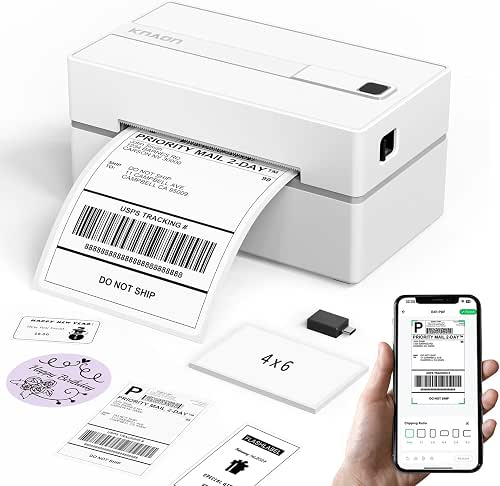
| Best Portable Option | Connectivity: Bluetooth, USB | Thermal Printing: Direct thermal (thermal paper) | Mobile App / Software Support: FlashLabel Pro app (iOS/Android/Mac) | VIEW LATEST PRICE | Read Our Analysis |
More Details on Our Top Picks
NIIMBOT B1 Thermal Label Maker (Blue)
If you need a compact, ink-free labeler for fast, customizable tags around home or a small business, the NIIMBOT B1 delivers. You’ll pair it via Bluetooth to iOS or Android through the NIIMBOT app (download, select B1, pair), or connect to a PC with USB using drivers from NIIMBOT’s site; it’s not compatible with tablets. The app detects label size, offers 30+ fonts, multilingual support, 100+ borders, 1500+ symbols, and saves templates for one-tap reprints. Thermal printing needs no ink; two 1.18″ rolls are included. The rechargeable battery, auto-shutoff, and sturdy ABS housing suit office, retail, school, and home tasks.
- Connectivity:Bluetooth; USB (PC via cable)
- Thermal Printing:Thermal (direct/inkless)
- Mobile App / Software Support:NIIMBOT app (iOS/Android)
- Label/Media Size Support:Small label rolls (includes 1.18″ rolls; app auto-detects size)
- Use-case Versatility:Office, home, small business, retail, jewelry tags, organization
- Includes Drivers / Setup Resources:NIIMBOT app; PC driver available on official site
- Additional Feature:Built-in rechargeable battery
- Additional Feature:Auto-shutoff after inactivity
- Additional Feature:Includes two 1.18″ rolls
Phomemo T310-BT Bluetooth 4″ Thermal Label Printer
Choose the Phomemo T310-BT when you need fast, high-resolution 4″ labels for shipping and inventory-its 300 dpi printhead and up to 127 mm/s speed deliver crisp barcodes, logos, and text without jams. You’ll handle shipping, postage, asset tags, food labels, and name tags with thermal transfer or direct thermal media across printable widths of 20–115 mm. Connect via Bluetooth, Ethernet, USB, or serial and use the Labelife app to design or import platform labels from USPS, UPS, eBay, Etsy, Shopify, or Amazon. Ribbons install in seconds, preserve prints over ten years, and included consumables let you start printing immediately.
- Connectivity:Bluetooth, Ethernet, USB, Serial
- Thermal Printing:Thermal transfer and direct thermal
- Mobile App / Software Support:Labelife app (iPhone, PC)
- Label/Media Size Support:20–115 mm printable width (up to 4.4″)
- Use-case Versatility:Shipping, postage, mailing, asset tags, food labels, barcodes
- Includes Drivers / Setup Resources:Labelife software; professional support included
- Additional Feature:300 dpi high-resolution
- Additional Feature:Thermal transfer ribbon included
- Additional Feature:Multi-interface (Ethernet/Serial)
Zebra GC420D Direct Thermal USB Serial Label Printer
The Zebra GC420D Direct Thermal USB Serial Label Printer is ideal for small businesses and workstations that need a reliable, no-fuss label solution-especially when space and budget matter. You’ll get a certified refurbished unit tested and cleaned to look and work like new, backed by a minimum 90-day warranty and shipped with all relevant accessories. Its direct thermal engine supports EPL/EPL2 and ZPL/ZPL II, and connects via parallel, serial, or USB for flexible integration. Expect basic throughput-about 4 inches per minute-which suits low-to-moderate labeling tasks. It’s compact, dependable, and straightforward to deploy.
- Connectivity:USB, Serial, Parallel
- Thermal Printing:Direct thermal
- Mobile App / Software Support:Compatible with EPL/ZPL languages (software drivers)
- Label/Media Size Support:Designed for standard label rolls (desktop label widths; GC420D common sizes)
- Use-case Versatility:Labeling for commercial/desktop printing tasks (refurbished desktop use)
- Includes Drivers / Setup Resources:Drivers/compatibility with EPL/ZPL; ships with accessories
- Additional Feature:Certified refurbished condition
- Additional Feature:EPL/ZPL language support
- Additional Feature:Parallel port available
Brother P-touch PT-D610BT Bluetooth Professional Label Maker
For small teams that need fast, professional labeling on the go, the Brother P-touch PT-D610BT delivers Bluetooth and USB connectivity so you can print from computers or mobile devices and share access across users. You’ll get 17 fonts, 17 styles, 160 frames, 900 symbols and 175 business templates for asset management or inventory tracking, with deeper customization in Brother P-Touch Editor. Print high-resolution barcodes and logos on TZe tapes up to 1″ wide. A QWERTY keyboard, automatic cutter, and memory for 90 labels speed workflows. The large two-line color LCD previews labels to reduce waste and guarantee polished results.
- Connectivity:Bluetooth, USB
- Thermal Printing:Thermal (uses TZe thermal tapes)
- Mobile App / Software Support:Brother P-Touch Editor software / mobile support
- Label/Media Size Support:TZe tapes up to 1″ wide
- Use-case Versatility:Business asset management, inventory, professional labeling
- Includes Drivers / Setup Resources:P-Touch Editor software; built-in templates and memory
- Additional Feature:Physical QWERTY keyboard
- Additional Feature:Automatic label cutter
- Additional Feature:20-character color LCD
Bluetooth 4×6 Portable Thermal Shipping Label Printer
If you ship frequently or run a small business on the go, this Bluetooth 4×6 portable thermal shipping label printer gives you fast, compact, no-fuss printing that fits in a bag. You’ll get up to 180 mm/s printing, support for 1.5–4.2 inch paper, and a white 7.17 x 3.9 x 3.43-inch chassis that tucks into a kit. Pair via the FlashLabel Pro app on iOS, Android, or Mac (M1–M4); use USB for Windows, macOS, ChromeOS, and Linux. The app offers thousands of templates, icons, and fonts; shipping PDFs import easily. Ten test papers are included.
- Connectivity:Bluetooth, USB
- Thermal Printing:Direct thermal (thermal paper)
- Mobile App / Software Support:FlashLabel Pro app (iOS/Android/Mac)
- Label/Media Size Support:Supports 1.5–4.2″ paper widths (4×6 shipping labels)
- Use-case Versatility:Shipping labels, barcode/thank-you/mailing/price/name tags
- Includes Drivers / Setup Resources:Built-in USB drive with drivers and tutorial videos; FlashLabel Chrome extension for ChromeOS
- Additional Feature:Built-in USB drive
- Additional Feature:Preloaded tutorial videos
- Additional Feature:FlashLabel Pro app required
Factors to Consider When Choosing Serial Label Printers
When choosing a serial label printer, you’ll want to check connectivity options to make sure it hooks up to your systems reliably. Consider print technology, resolution and speed to match the label quality and throughput you need. Also confirm supported label sizes and available software/drivers so integration and workflow setup are smooth.
Connectivity Options
Why choose a specific connectivity option for a serial label printer? You’ll match connection type to your workflow: RS-232 serial ports give reliable, low-latency point-to-point links that legacy systems and industrial gear often require. USB delivers plug-and-play convenience and higher data rates, though you might need drivers or virtual COM software to emulate serial. Ethernet lets you share printers across a wired LAN with static IPs or DHCP, supports remote management, and handles high-volume throughput. Bluetooth and Wi‑Fi add wireless flexibility for mobile or desktop setups but need pairing or credentials and can suffer variable latency and range limits. If you need broad compatibility, pick a multi-interface model (serial + USB + Ethernet/Wi‑Fi) to simplify migration from legacy to modern networks.
Print Technology Choice
Now that you’ve matched connectivity to your workflow, pick a print technology that fits the labels you’ll actually use. Choose direct thermal if you want simplicity and no ribbons-it’s cheap and low-maintenance, but expect fading and sensitivity to heat and sunlight, so avoid it for long-term or outdoor labels. Opt for thermal transfer when you need durability: a wax/resin ribbon bonds ink to paper or synthetic films for harsh environments, giving prints that can last 10+ years with proper materials and storage. Consider consumable compatibility-direct thermal paper versus thermal transfer paper plus ribbon affects ongoing cost and archival life. Match your choice to label material needs and expected lifespan rather than to speed or resolution alone.
Resolution And Speed
How sharp do your labels need to be, and how fast must they come off the roll? Decide based on dpi and ips: 203 dpi handles standard text and barcodes, 300 dpi suits high-resolution needs, and 600 dpi covers very fine detail. Match print speed (ips or mm/s) to daily volume-desktop units run a few ips, while production models exceed 100 mm/s. Remember higher dpi usually lowers top speed, so balance quality versus throughput. For barcode reliability, pick a dpi that produces the correct module (X) size; insufficient resolution yields unscannable codes even at slow speeds. Also factor in media width and thermal-transfer versus direct thermal, since wider labels and transfer ribbons can change ideal dpi/speed trade-offs.
Supported Label Sizes
When you choose a serial label printer, confirm it supports the exact widths and lengths you use-both minimums (around 20 mm or about 1–1.5 inches for narrow specialty labels) and maximums (commonly up to ~115 mm or 4 inches for shipping labels), plus the common standard sizes like 4×6 and 4×2 if those match your workflows. Check minimum and maximum printable widths and lengths to cover your widest and longest labels. Verify acceptance of standard sizes versus custom roll widths so you don’t need new stock. Confirm support for narrow and larger labels if you’ll switch tasks. Make certain the printer handles your roll core and outer diameters. Finally, make sure it lets you detect or manually set label size, gap, and sensor type for reliable alignment.
Software And Drivers
Which software and drivers will keep your label workflows reliable and adaptable? Check OS and interface support first: make certain drivers or kernel modules exist for Windows, macOS, Linux, or embedded platforms and for USB, serial/RS-232, or virtual COM over Bluetooth. Prefer printers with native label languages (EPL, ZPL, etc.) or reliable emulation-native languages print complex formats and barcodes faster and with less overhead. Verify official driver and firmware availability and update cadence so you stay compatible with OS changes and get fixes. Choose software that handles the barcode symbologies, variable data, graphics, template editing, batch/CSV printing, and print preview you need to reduce waste. Finally, confirm SDKs, command-line tools, or APIs exist for programmatic integration with your systems.
Durability And Build
Because your printers will often run under tough conditions, prioritize solid construction and serviceability to keep uptime high. Choose units with metal or high‑grade ABS housings and reinforced internal frames to resist drops, vibration, and heat warping during continuous use. Check rated duty cycle or MTBF-higher‑duty models handle thousands of labels daily without failing. Verify operating temperature and humidity ranges (for example, −10°C to 50°C and tolerance to high humidity) so performance matches your environment. Inspect moving parts: steel gears, sealed bearings, and robust printheads withstand heavy feeding, rewinding, and cutter cycles. Finally, confirm service options and availability of replaceable wear parts, plus their expected lifespans in meters printed or cut cycles, to plan maintenance and minimize downtime.
Power And Portability
A printer’s power and portability determine how freely you can move and use it in the field, so pick a model whose power options, battery life, and size match your mobility needs. Check whether the unit is battery-powered for true mobility or AC-only, which limits you to mains or an external UPS. Compare battery capacity (mAh) and estimated runtime to cover your typical shifts; larger batteries and fast-charge support cut downtime. Evaluate physical dimensions and weight to guarantee comfortable carrying, pocket fit, cart placement, or vehicle mounting. Confirm power management-auto-shutoff, sleep modes, and quick wake-to conserve energy during intermittent use. Finally, assure mobile connectivity (Bluetooth/Wi‑Fi) and support for USB or wired power delivery while printing.
Consumables And Cost
When you evaluate consumables and long‑term costs, focus on label media, ribbons, and how they affect your per‑label price and longevity. Choose between direct thermal (no ribbon) and thermal transfer (requires wax/resin ribbon); thermal transfer typically preserves prints for over 10 years, while direct thermal fades sooner. Factor media cost and available sizes – wider, thicker, synthetic, or weather‑resistant stocks raise unit price. Include recurring ribbon expense for thermal transfer and check ribbon width/length compatibility to avoid frequent replacements. Calculate total cost‑per‑label by combining media price, ribbon cost (if any), and expected yield at your usual print density and label size. Finally, assess availability, packaging (bulk vs small packs) and vendor support to lower unit cost and downtime.


