

If you shoot a lot of photos or handle bulky video files, you’ll want a card reader that actually keeps up. Look for USB 3.x or USB‑C interfaces, UHS‑II/SD4.0 support, and true simultaneous-slot controllers so transfers aren’t bottlenecked. Durable aluminum builds and short, braided cables matter for portability. I’ll walk you through top models and what features make the biggest real‑world difference-so you can pick one that fits your workflow.
| Dockteck USB-C 3-Slot SD/Micro SD/USB-A Reader |

| Best for Power Users | Interface Type: USB-C (with USB-A compatibility; USB 3.1) | SD / microSD Support: SD and microSD (SD4.0, UHS-I/II; up to V90 etc.) | Plug-and-Play: Yes (plug-and-play, OTG supported) | VIEW LATEST PRICE | Read Our Analysis |
| uni USB 3.0 Dual-Slot SD/MicroSD Card Reader |

| Reliable Workhorse | Interface Type: USB 3.0 (USB-A) | SD / microSD Support: SD and microSD (SD/SDHC/SDXC, UHS-I) | Plug-and-Play: Yes (driver-free, plug-and-play) | VIEW LATEST PRICE | Read Our Analysis |
| 5-in-1 Multi Memory Card Reader Adapter |

| Most Versatile | Interface Type: USB-A / USB-C / Lightning (multi-interface) | SD / microSD Support: SD and microSD (plus many other card types) | Plug-and-Play: Yes (plug-and-play, no drivers) | VIEW LATEST PRICE | Read Our Analysis |
| SmartQ C350 USB-C & USB 3.0 SD Card Reader |
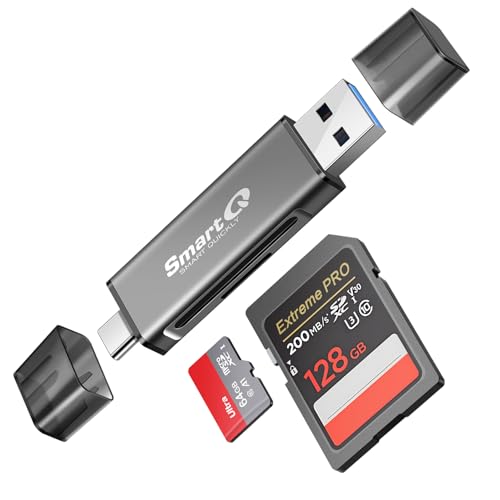
| Travel-Friendly Compact | Interface Type: USB 3.0 and USB-C | SD / microSD Support: SD and microSD (SD + TF slots) | Plug-and-Play: Yes (plug-and-play, no drivers) | VIEW LATEST PRICE | Read Our Analysis |
| IOGEAR USB 3.0 2-Slot Memory Card Reader |

| Simple & Dependable | Interface Type: USB 3.0 (USB-A) | SD / microSD Support: SD and microSD (SD/SDHC/SDXC, mini/micro) | Plug-and-Play: Yes (plug-and-play) | VIEW LATEST PRICE | Read Our Analysis |
More Details on Our Top Picks
Dockteck USB-C 3-Slot SD/Micro SD/USB-A Reader
If you need blistering transfer speeds and flexible ports for professional photo and video work, the Dockteck USB-C 3‑Slot reader is a smart pick – it supports SD4.0 speeds up to 312 MB/s, handles SD and microSD UHS-II cards plus USB‑A devices, and plugs directly into USB‑C or USB‑A hosts for fast, plug‑and‑play transfers. You’ll move large files in seconds via its USB 3.1 interface (backward compatible). The three-slot layout (SD, microSD/TF, USB‑A) lets you access multiple media at once. It’s OTG-capable, includes a 5.9‑inch cable, and fits easily in camera bags. Compatible with many modern devices.
- Interface Type:USB-C (with USB-A compatibility; USB 3.1)
- SD / microSD Support:SD and microSD (SD4.0, UHS-I/II; up to V90 etc.)
- Plug-and-Play:Yes (plug-and-play, OTG supported)
- Simultaneous Card Access:Yes (3-slot simultaneous access)
- Bus-Powered / No External Power:Yes (powered via host USB port)
- Cross-Platform Compatibility:Yes (Windows, macOS, iOS/Android via OTG; USB-C/A hosts)
- Additional Feature:SD4.0 up to 312 MB/s
- Additional Feature:OTG mobile support
- Additional Feature:5.9-inch cable included
uni USB 3.0 Dual-Slot SD/MicroSD Card Reader
Photographers and content creators who juggle multiple cards will appreciate the uni USB 3.0 Dual-Slot SD/MicroSD Card Reader’s simultaneous read/write capability and USB 3.0 speeds-transfer rates up to 5 Gbps let you offload footage from two cards at once without waiting. You’ll get broad format support (SD/SDHC/SDXC, MMC, RS-MMC, Micro SD variants, UHS-I) and capacities up to 2 TB, all driver-free across Windows, macOS, Chrome OS, and Linux. The aluminum housing dissipates heat, spring-loaded slots simplify swaps, and a braided cable reduces interference. It’s bus-powered, plug-and-play, backed by 24/7 support and an 18-month warranty.
- Interface Type:USB 3.0 (USB-A)
- SD / microSD Support:SD and microSD (SD/SDHC/SDXC, UHS-I)
- Plug-and-Play:Yes (driver-free, plug-and-play)
- Simultaneous Card Access:Yes (dual-slot simultaneous read/write)
- Bus-Powered / No External Power:Yes (bus-powered via USB)
- Cross-Platform Compatibility:Yes (Windows, macOS, Chrome OS, Linux)
- Additional Feature:Aluminum housing durability
- Additional Feature:Spring-loaded slots
- Additional Feature:18-month warranty
5-in-1 Multi Memory Card Reader Adapter
The 5-in-1 Multi Memory Card Reader Adapter is ideal for creators and mobile professionals who need fast, direct transfers between cameras, phones, and laptops – it lets you plug in SD, microSD, CF, M2, MS, Memory Stick Pro Duo, and CFast cards and move files without apps or drivers. You’ll appreciate its multiple connectors – USB-A, USB-C, and Lightning – plus an iPhone charging port for convenience. It’s plug-and-play with iOS 13+, Android, and computers, handles JPEG, RAW, SD/HD video, and supports cards up to 1 TB. Constructed from aluminum, it’s durable, offers two-way transfers, and reaches up to 480 Mbps.
- Interface Type:USB-A / USB-C / Lightning (multi-interface)
- SD / microSD Support:SD and microSD (plus many other card types)
- Plug-and-Play:Yes (plug-and-play, no drivers)
- Simultaneous Card Access:Yes (multiple slots for concurrent use)
- Bus-Powered / No External Power:Yes (powered by host device)
- Cross-Platform Compatibility:Yes (iOS, Android, computers; iOS 13+ compatible)
- Additional Feature:Lightning + USB-C + USB-A
- Additional Feature:CF / M2 / MS support
- Additional Feature:USB 2.0 theoretical 480 Mbps
SmartQ C350 USB-C & USB 3.0 SD Card Reader
Ideal for travelers and content creators who need quick, portable transfers, the SmartQ C350 combines USB-C and USB 3.0 connectivity with simultaneous SD and microSD reading so you can copy large video and photo files fast without swapping cards. You’ll plug it into Windows, macOS, or Android devices and enjoy high-speed transfers over USB 3.0 without installing drivers. The compact reader draws power from the host port, so you don’t need an external supply. Its dual slots handle SD and TF cards at once, making it great for photographers and videographers who want reliable, portable, plug-and-play performance.
- Interface Type:USB 3.0 and USB-C
- SD / microSD Support:SD and microSD (SD + TF slots)
- Plug-and-Play:Yes (plug-and-play, no drivers)
- Simultaneous Card Access:Yes (simultaneous SD and TF reading)
- Bus-Powered / No External Power:Yes (powered via host USB; no external supply)
- Cross-Platform Compatibility:Yes (Windows, macOS, Android)
- Additional Feature:Simultaneous SD+TF reading
- Additional Feature:Compact travel design
- Additional Feature:No drivers required
IOGEAR USB 3.0 2-Slot Memory Card Reader
If you need quick, reliable transfers for multiple cards at once, the IOGEAR SuperSpeed 2-Slot USB 3.0 Flash Memory Card Reader (GFR305SD) fits the bill. You’ll plug it into any USB 3.0 port and get up to 5 Gbps transfers while still working with USB 2.0/1.1. It accepts SD/SDHC/SDXC, miniSD, microSD (up to 128GB), T-Flash, and various MMC formats (128GB max). The compact, USB-powered, plug-and-play design lets you read two cards simultaneously without an AC adapter. It’s compatible with Windows, macOS, Linux, and some Android devices for versatile workflow integration.
- Interface Type:USB 3.0 (USB-A)
- SD / microSD Support:SD and microSD (SD/SDHC/SDXC, mini/micro)
- Plug-and-Play:Yes (plug-and-play)
- Simultaneous Card Access:Yes (2-slot simultaneous use)
- Bus-Powered / No External Power:Yes (USB powered; no AC adapter)
- Cross-Platform Compatibility:Yes (Windows, macOS, Linux, some Android)
- Additional Feature:Model GFR305SD listed
- Additional Feature:Supports miniSD / T-Flash
- Additional Feature:SuperSpeed 5 Gbps compliant
Factors to Consider When Choosing SuperSpeed USB Memory Card Readers
When choosing a SuperSpeed USB memory card reader, you’ll want to check transfer speed standards to make certain it actually supports USB 3.x throughput. Look for the slot compatibility range and a clear device compatibility list so your cards and gadgets will work without adapters. Also pay attention to build quality materials and whether the reader supports bus power or needs an external supply.
Transfer Speed Standards
Because transfer speed depends on every link between your card and computer, you should match the reader, card, USB generation, and host to avoid bottlenecks. Check that your reader and host support the same USB generation-USB 3.0 (5 Gbps) or USB 3.1 Gen 2 (10 Gbps)-or you’ll cap throughput. Match reader support to the card’s speed class (UHS‑I, UHS‑II, V30/V60/V90); high‑end SD4.0/UHS‑II cards can push toward ~312 MB/s but need compatible controllers. Remember real‑world rates equal the slowest link: card tech, reader controller, USB interface, or host bus. Avoid older hosts if you need speed-USB 2.0 tops at ~480 Mbps. If you transfer multiple cards concurrently, prefer readers with dedicated high‑bandwidth channels to prevent per‑card slowdowns.
Slot Compatibility Range
Matching your reader, card, USB generation, and host for speed is only half the job – you also need to confirm that each slot physically and logically supports the media you’ll use. Check which card types the reader accepts (full-size SD, microSD/TF, CF, CFast, Memory Stick, M2) so you won’t need adapters. Verify UHS and SD standard support (UHS-I, UHS-II, SDHC, SDXC, SD4.0) so the slot handles your card’s speed class and capacity. Confirm maximum per-slot capacity (for example up to 1 TB or 2 TB) to guarantee large SDXC/microSDXC cards work. Prefer multi-slot designs if you need simultaneous access or card-to-card transfers. Finally, note the slot mechanism-spring-loaded versus fixed-and form factor for easy, safe insertion and removal.
Device Compatibility List
If you want fast, reliable transfers, confirm the reader physically and logically fits every device you plan to use it with. Check the host interface-USB-C, USB-A/USB 3.0, or Lightning-to guarantee a proper connection and top speeds. Match interface speed (USB 3.x vs USB 2.0) to your device to avoid bottlenecking UHS or SD4.0 cards. Verify OS compatibility (Windows, macOS, Linux, Chrome OS, Android, iOS) and whether it’s driver-free for your platform. Confirm supported card formats and capacities (SD/SDHC/SDXC, microSD, CF, and up to the card’s TB limit). If you’ll connect phones or tablets, make sure OTG support. Cross-check these items before buying to prevent frustrating incompatibilities.
Build Quality Materials
Build quality matters when you want a reader that survives heavy use and sustains SuperSpeed transfers, so opt for metal housings like aluminum or alloys rather than plastic to improve heat dissipation and reduce thermal throttling. Choose compact unibody or screw-secured assemblies over snap-fit plastics to avoid flexing and protect internal PCBs. Inspect card slots for spring-loaded, precision-fit mechanisms and gold-plated contacts to guarantee stable electrical connection and minimize wear. Check connectors and cable junctions for reinforcement-braided cables and molded strain relief prevent fraying and failure from repeated plugging. If you travel or work outdoors, evaluate ingress resistance and surface finishes such as anodizing or powder coating for corrosion protection. Prioritize durable materials to keep performance consistent and extend reader lifespan.
Power And Bus Support
Because power constraints directly affect throughput and reliability, you should confirm whether a reader is bus-powered or needs an external adapter and what USB spec the host port supports (USB 3.0/3.1/3.2), since those determine available current and whether the reader can sustain SuperSpeed transfers-especially when multiple cards are active or you’re connecting to a mobile device via OTG. Check if the reader draws power from the port (more portable) or requires an adapter (more reliable for heavy loads). Verify the host supplies the standard current (about 900 mA for USB 3.0, higher for newer specs). For multi-card use, confirm the reader’s internal power budget to avoid throttling or errors. If using OTG or USB-C, make sure support for PD or negotiated power modes to prevent disconnects or battery drain.
Portability And Cable Length
When packing a SuperSpeed card reader for shoots or travel, pick a compact, lightweight model that slips into your camera bag or laptop sleeve without adding bulk; pay attention to cable length too-short (~15 cm) cables keep things tidy and fit tight setups while longer (30–60 cm) leads reach recessed ports or awkwardly placed laptops. Choose pocket-sized readers so you can grab and go, and favor low-profile designs that slide into pockets and resist wear. Consider detachable or retractable cables to prevent kinks and to store neatly. If you need multi-slot capability, check that the extra slots don’t noticeably increase the packed footprint. Prioritize durable materials and snag-free finishes so the reader survives frequent travel and daily handling without fuss.
Simultaneous Card Access
If you plan to offload multiple cards at once, check whether the reader can actually access more than one slot concurrently and whether its controller and USB 3.x interface can sustain full-speed transfers on each card; otherwise you’ll end up swapping cards or seeing per-card speeds fall because the device time-multiplexes slots or the host bus is saturated. You should verify support for simultaneous slots (SD + microSD or dual SD) so you can read/write two cards without swapping. Confirm the controller handles concurrent operations rather than time-sharing slots. Check interface bandwidth-USB 3.x at 5 Gbps or higher-to avoid saturating the host connection. Look for per-slot sustained MB/s numbers with multiple cards inserted, and make sure your OS and drivers handle multiple streams to prevent bottlenecks.




