

A pocket-sized lighthouse in your bag, these USB modems guide you through dead zones and travel days with calm confidence. You’ll get fast 4G/5G sticks that double as hotspots, Wi‑Fi 6E adapters for low latency, and even reliable dial-up/fax options for niche needs. I’ll walk you through top models, what to check for like SIM compatibility and security, and how to pick the right features so you can stay connected anywhere without extra stress.
| 4G LTE Portable USB Modem & Travel Hotspot |

| Best for Travelers | Connection Type: USB (also functions as travel hotspot / USB modem) | Networking Capability: Cellular data (4G LTE) + local Wi‑Fi hotspot | Operating System Compatibility: Windows (2000–10), macOS 10.4+, Linux | CHECK LATEST PRICE | Read Our Analysis |
| HiRO V92 56K USB External Dial-Up Modem |
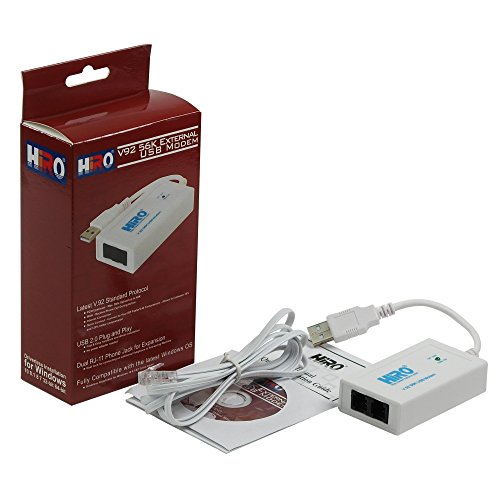
| Legacy Connectivity Pick | Connection Type: USB (external USB dial-up modem) | Networking Capability: Dial‑up internet (PSTN) | Operating System Compatibility: Windows 7/8/8.1/10 (32/64‑bit) | CHECK LATEST PRICE | Read Our Analysis |
| NETGEAR Nighthawk WiFi 6E USB Adapter (A8000) |

| High-Speed Powerhouse | Connection Type: USB 3.0 (USB WiFi adapter dongle) | Networking Capability: Wi‑Fi client/adapter (WiFi 6E tri‑band) | Operating System Compatibility: Windows (desktop/laptop) – designed for Windows PCs | CHECK LATEST PRICE | Read Our Analysis |
| Tenda AX900 USB WiFi Adapter (U11) |

| Budget WiFi 6 Option | Connection Type: USB (USB WiFi adapter/dongle) | Networking Capability: Wi‑Fi client/adapter (WiFi 6 dual‑band, hotspot sharing) | Operating System Compatibility: Windows 7/10/11 (x86/x64) – not macOS/Linux | CHECK LATEST PRICE | Read Our Analysis |
| AGPtek External USB 56K Dial-Up Modem with Fax |
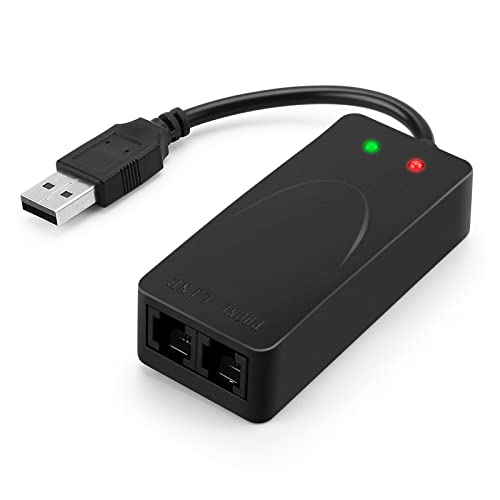
| Fax & Voice Specialist | Connection Type: USB 2.0 (external USB modem) | Networking Capability: Dial‑up data/fax/voice over PSTN | Operating System Compatibility: Windows 98SE/2000/ME/XP/Vista/7 | CHECK LATEST PRICE | Read Our Analysis |
More Details on Our Top Picks
4G LTE Portable USB Modem & Travel Hotspot
If you travel a lot or need reliable internet away from home, this G LTE portable USB modem and travel hotspot is a smart choice that makes staying connected easy. You’ll plug it into a USB port to power it, or use it as a modem on your laptop. It takes a 3G or 4G SIM card so you don’t need broadband. You’ll enjoy up to 300 Mbps on a 4G LTE chipset and share it with up to ten devices. It works with Windows, macOS, and Linux, supports firewall setup, and gives steady coverage to about ten meters.
- Connection Type:USB (also functions as travel hotspot / USB modem)
- Networking Capability:Cellular data (4G LTE) + local Wi‑Fi hotspot
- Operating System Compatibility:Windows (2000–10), macOS 10.4+, Linux
- Portability / Form Factor:Compact portable USB modem / travel hotspot
- Fax Capability:Not applicable / no fax support noted
- Power Source:USB‑powered (via host USB port)
- Additional Feature:Up to 300 Mbps
- Additional Feature:Connects up to 10 devices
- Additional Feature:10-meter effective range
HiRO V92 56K USB External Dial-Up Modem
You’re going to appreciate the HiRO V92 56K USB External Dial-Up Modem if you need a simple, reliable way to bring fax and dial-up internet back into your routine without wrestling with drivers or extra power bricks. You plug it into any USB 2.0 port and Windows usually finds it, so setup feels easy and calm. You get dual RJ-11 ports to run a phone and an answering machine together, plus a buzzer that helps with alerts. It uses V.92 for 56K data and 14.4 kbps fax, and it even lets calls through while online. Read the guide for tips.
- Connection Type:USB (external USB dial-up modem)
- Networking Capability:Dial‑up internet (PSTN)
- Operating System Compatibility:Windows 7/8/8.1/10 (32/64‑bit)
- Portability / Form Factor:External compact USB dongle/modem (portable)
- Fax Capability:Fax send/receive supported (V.92, up to 14.4 kbps)
- Power Source:USB‑powered (no external adapter)
- Additional Feature:Dual RJ-11 jacks
- Additional Feature:Built-in buzzer
- Additional Feature:V.92 modem class
NETGEAR Nighthawk WiFi 6E USB Adapter (A8000)
Looking for a simple way to get the fastest WiFi on your laptop or desktop without opening up your PC? You can plug in the NETGEAR Nighthawk WiFi 6E USB 3.0 Adapter A8000 and feel the speed upgrade instantly. It gives AXE3000 tri-band performance up to 3 Gbps, which is about 2.5 times faster than WiFi 5. You’ll get 2.4 GHz, 5 GHz, and the new 6 GHz band for smooth streaming and gaming, as long as your router supports WiFi 6E. The compact dongle and cradle sit neatly on your desk, with a flippable antenna to boost reception.
- Connection Type:USB 3.0 (USB WiFi adapter dongle)
- Networking Capability:Wi‑Fi client/adapter (WiFi 6E tri‑band)
- Operating System Compatibility:Windows (desktop/laptop) – designed for Windows PCs
- Portability / Form Factor:USB dongle with cradle (portable)
- Fax Capability:Not applicable / no fax support noted
- Power Source:USB‑powered (USB 3.0 interface)
- Additional Feature:Tri-band including 6GHz
- Additional Feature:Up to 3 Gbps
- Additional Feature:Flippable antenna/cradle
Tenda AX900 USB WiFi Adapter (U11)
Choose the Tenda AX900 USB WiFi Adapter U11 when you want a simple, fast way to add WiFi 6 to an older desktop without buying a new router. You’ll get WiFi 6 performance up to 900 Mbps combined, with 600 Mbps on 5 GHz and 286 Mbps on 2.4 GHz, so 4K streaming and gaming feel smooth with low latency. It’s dual-band and can both receive WiFi and share it as a hotspot, which gives you flexibility. Plug it into a Windows 7, 10, or 11 PC and it works right away. Keep it within 30 feet of your router and use WPA or WPA2.
- Connection Type:USB (USB WiFi adapter/dongle)
- Networking Capability:Wi‑Fi client/adapter (WiFi 6 dual‑band, hotspot sharing)
- Operating System Compatibility:Windows 7/10/11 (x86/x64) – not macOS/Linux
- Portability / Form Factor:USB dongle (compact for desktop)
- Fax Capability:Not applicable / no fax support noted
- Power Source:USB‑powered (USB dongle)
- Additional Feature:AX900 combined throughput
- Additional Feature:Acts as hotspot transmitter
- Additional Feature:Built-in Windows drivers
AGPtek External USB 56K Dial-Up Modem with Fax
If you still need a reliable way to send faxes, make voice calls, or get online where broadband is slow or absent, the AGPtek External USB 56K Dial-Up Modem with Fax is a solid, no-nonsense choice for home users and small offices. You plug it into USB 2.0, connect phones or a fax to the two RJ11 ports, and it handles V.92 and V.90 connections up to 56K down. It supports caller ID, distinctive ring, auto answer, and clear fax protocols like V.17 and V.29. You’ll like Quick Connect, Modem-on-Hold, and easy Windows setup.
- Connection Type:USB 2.0 (external USB modem)
- Networking Capability:Dial‑up data/fax/voice over PSTN
- Operating System Compatibility:Windows 98SE/2000/ME/XP/Vista/7
- Portability / Form Factor:External USB box (portable USB modem)
- Fax Capability:Fax send/receive supported (V.17/V.29/V.27ter, 14.4K)
- Power Source:USB‑powered (USB 2.0)
- Additional Feature:3-in-1 data/voice/fax
- Additional Feature:Caller ID & ring detect
- Additional Feature:V.42/V.42bis compression
Factors to Consider When Choosing USB Modems
When you shop for a USB modem, start by checking connection type compatibility and the modem’s supported network speed limits so you won’t buy something that can’t keep up with your needs. Think about device compatibility range and whether the modem will work with your laptop, tablet, or phone, and pay close attention to security and encryption to keep your data safe. Also factor in portability and size since you’ll want a model that’s easy to carry and fits how you live and work.
Connection Type Compatibility
Although the device looks small, the connection type you pick will shape how fast and reliable your link is, so you’ll want to check details carefully. You should verify the USB interface type, since USB 3.0 or 3.1 gives more bandwidth than USB 2.0 and helps high speed cellular or Wi‑Fi adapters run well. Also confirm the network technology the modem supports, like 4G LTE, 3G, or older dial up, because each needs the right protocol. Check SIM or phone line slots and whether it accepts nano, micro, or standard SIM, or an RJ11 phone cable, and if it’s locked to a carrier. Make sure drivers work on your operating system and consider multi mode devices that can act as modem, hotspot, or router.
Network Speed Limits
Because network speed depends on several moving parts, you’ll want to look past the headline numbers and focus on what actually limits your connection. First, check the cellular generation and the modem chipset. 3G, 4G, and 5G offer very different peak rates, and chipset categories like LTE Cat-4 or Cat-12 set real hardware ceilings and features such as carrier aggregation that raise throughput. Next, match the modem to the USB interface. USB 2.0 can top out near 480 Mbps while USB 3.0 handles multi-gigabit links, so the cable and port matter. Remember real-world factors too. Signal strength, tower distance, congestion, and interference all reduce speeds. Also, if you share through a hotspot, connected devices split bandwidth and slow each user down.
Device Compatibility Range
If you want a USB modem that just works, start by checking exactly what your devices and networks expect, because small mismatches cause big headaches. First, confirm operating system support down to exact versions and 32 or 64 bit so drivers install cleanly. Next, match the physical interface like USB 2.0 versus 3.0 and note power needs so a laptop port or powered hub will run the modem. Also verify network tech and SIM form factor for the carriers and regions you’ll use. Think about antenna strength, range, and how many connections the modem supports at once for your household or travel needs. Finally, pick modems with ongoing firmware and driver updates to stay compatible as systems change.
Security And Encryption
You’ve just checked device and network compatibility, and now you’ll want to protect the connection itself. Pick a modem that supports modern encryption like WPA2 for hotspots and AES for VPN tunnels so your data stays private. Also choose one that lets you run a trusted VPN client or passes VPN traffic through, because end to end encryption matters on public networks. Check that management uses HTTPS or SSH and that you can set strong admin passwords to block remote tampering. Verify firmware can be updated and the vendor issues timely security patches, since old firmware exposes holes. Finally, confirm SIM PIN support and proper cellular authentication to reduce SIM swapping and unauthorized access to your mobile link.
Portability And Size
Many travelers want a USB modem that slips into a pocket and barely adds weight, so prioritize compact, lightweight models under about 50 to 100 g and with slim dimensions that fit travel organizers. You’ll want a device that feels natural to carry, so look for low profile dongles that tuck into laptop pockets. Also consider multi function designs that work as USB plug in modems or standalone hotspots, since that flexibility saves you gear and gives untethered use when needed. Pay attention to antenna style and SIM access. Foldable or external antenna parts can boost range but add bulk. Removable SIM slots help with international trips and ease swapping. Choose what matches your daily carry and travel plans.
Power And Bus Requirements
When you plug a USB modem into your laptop or hub, power and bus limits decide whether it will work smoothly or cause headaches, so pay attention to both the current draw and the USB protocol. Check the USB power spec because many modems draw from USB 2.0 ports with a 500 mA limit or USB 3.0 ports with 900 mA. Match the modem peak draw to the host so you avoid brownouts. If the modem needs more surge or sustained current, use a powered hub or external adapter. Also verify bus bandwidth and protocol compatibility since a USB 2.0 bus can bottleneck throughput on fast modems. Finally, confirm power management and wake behavior so sleep states do not drop your connection.
Multi-Device Support
Think about how many gadgets you want online at once and pick a modem that can handle that load without choking. Start by checking the maximum simultaneous connections, whether five, ten, or more, so your group won’t lose access when everyone streams or works. Next, confirm the modem supports both Wi-Fi tethering and USB modem modes, since some units only allow one host while others serve many Wi-Fi clients. Also compare aggregate throughput ratings and LTE Wi-Fi speeds under multiuser load because higher bandwidth keeps things snappy. Pay attention to antenna performance and coverage radius so weak links do not slow everyone down. Finally look for session limits, guest network options, and per user bandwidth control to stop a single device from hogging the pipe.
Legacy Phone Features
Start by checking the legacy phone features your setup really needs so you don’t buy a USB modem that leaves you stuck. If you rely on dial-up fallbacks, confirm support for V.92 and V.90 so you get 56 kbps speeds and call resume. If you still send faxes, pick a modem with Group 3 and V.17 V.29 V.27ter support and at least 14.4 kbps fax baud rate for reliable transfers. Look for dual RJ11 ports, caller ID, distinctive ring detection, and the ability to attach an answering machine or phone. Also verify tone and pulse dialing, caller ID standards, and stored configuration profiles to match old phone behavior. Finally make sure voice data fax discrimination, Auto Answer Auto Dial, and Modem on Hold functions work smoothly.




