

If you need fast, reliable Wi‑Fi whether you’re home, traveling, or gaming on a desktop, you’ll want the right USB or compact router. You’ll see options from simple plug‑and‑play adapters to portable Wi‑Fi 7 units and full‑feature Wi‑Fi 6 routers that handle many devices without overheating. I’ll compare performance, modes, and compatibility so you can pick what fits your setup – and avoid costly mistakes.
| UGREEN AX900 USB WiFi 6 Adapter for Desktop PCs |

| Best for Desktops | Wi‑Fi Standard: Wi‑Fi 6 (802.11ax) | Dual‑Band Support: Dual‑band (5 GHz + 2.4 GHz) | Portable/Form Factor: USB adapter for desktop (compact) | CHECK LATEST PRICE | Read Our Analysis |
| TP-Link BE3600 Wi‑Fi 7 Portable Travel Router |

| Cutting-Edge Traveler | Wi‑Fi Standard: Wi‑Fi 7 (802.11.be) with backward compatibility (incl. 802.11ax) | Dual‑Band Support: Dual‑band (5 GHz + 2.4 GHz) | Portable/Form Factor: Portable travel router (pocketable) | CHECK LATEST PRICE | Read Our Analysis |
| TP-Link AX1500 Ultra-Portable Travel Wi‑Fi Router |

| Compact Travel Pick | Wi‑Fi Standard: Wi‑Fi 6 (802.11ax) | Dual‑Band Support: Dual‑band (5 GHz + 2.4 GHz) | Portable/Form Factor: Ultra‑portable pocket router | CHECK LATEST PRICE | Read Our Analysis |
| TP-Link Archer AX55 AX3000 Wi‑Fi 6 Router |
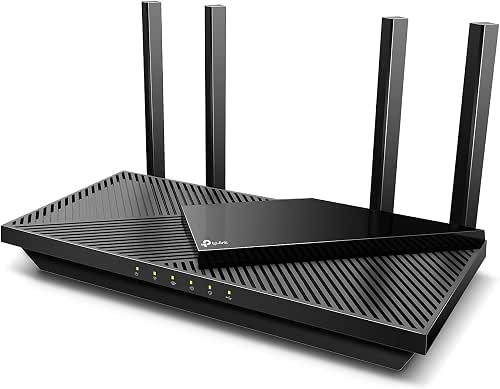
| Best Home Performance | Wi‑Fi Standard: Wi‑Fi 6 (802.11ax) | Dual‑Band Support: Dual‑band (5 GHz + 2.4 GHz) | Portable/Form Factor: Home router (desktop, larger) | CHECK LATEST PRICE | Read Our Analysis |
| H3C AX3000 WiFi 6 Router (NX30) |

| Best for Many Devices | Wi‑Fi Standard: Wi‑Fi 6 (802.11ax) | Dual‑Band Support: Dual‑band (5 GHz + 2.4 GHz) | Portable/Form Factor: Compact vertical desktop router | CHECK LATEST PRICE | Read Our Analysis |
More Details on Our Top Picks
UGREEN AX900 USB WiFi 6 Adapter for Desktop PCs
If you need a simple plug-and-play WiFi 6 upgrade for a Windows desktop, the UGREEN AX900 USB adapter delivers low-latency dual-band performance (up to 600 Mbps on 5 GHz and 287 Mbps on 2.4 GHz) and installs without a CD-just plug into Windows 10/11 and go. You’ll get WiFi 6 (802.11ax) speeds when paired with a compatible router, low latency for video, and built-in drivers for x86/x64 Windows. It won’t work on macOS, Linux, or older Windows versions. You can receive and share networks, use WPA/WPA2 encryption, and expect best results within about 30 feet.
- Wi‑Fi Standard:Wi‑Fi 6 (802.11ax)
- Dual‑Band Support:Dual‑band (5 GHz + 2.4 GHz)
- Portable/Form Factor:USB adapter for desktop (compact)
- USB Connectivity:USB interface (plugs into PC)
- Security Features:WPA‑PSK / WPA2‑PSK / WPA/WPA2 mixed
- Target Use Cases:Desktop PC connectivity / low‑latency video, sharing network
- Additional Feature:Built-in Windows drivers
- Additional Feature:Low-latency video transmission
- Additional Feature:30 ft recommended range
TP-Link BE3600 Wi‑Fi 7 Portable Travel Router
Pick the BE3600 when you need a pocketable Wi‑Fi 7 hub that turns hotel Ethernet, USB‑tethered phones, or 3G/4G/5G USB modems into fast, secure local networks. You’ll get a compact, durable unit (4.96 x 3.68 x 1.5 in, 8.8 oz) with USB 3.0, USB‑C power, 2.5 Gbps WAN and 1 Gbps LAN. Wi‑Fi 7 plus backward compatibility delivers up to 2882 Mbps (5 GHz) and 688 Mbps (2.4 GHz) with MLO for lower latency. Modes include router, hotspot, AP, RE and client. It supports 90 devices, VPNs (OpenVPN/WireGuard), captive‑portal login via Tether, USB file sharing and QoS.
- Wi‑Fi Standard:Wi‑Fi 7 (802.11.be) with backward compatibility (incl. 802.11ax)
- Dual‑Band Support:Dual‑band (5 GHz + 2.4 GHz)
- Portable/Form Factor:Portable travel router (pocketable)
- USB Connectivity:USB 3.0 (plus USB‑C power; USB file sharing)
- Security Features:VPN support (OpenVPN, WireGuard, PPTP, L2TP) + captive‑portal handling
- Target Use Cases:Travel use (hotels, airports, RVs), remote work, gaming, portable router tasks
- Additional Feature:Multi‑Link Operation (MLO)
- Additional Feature:2.5 Gbps WAN port
- Additional Feature:Up to 90 devices
TP-Link AX1500 Ultra-Portable Travel Wi‑Fi Router
For frequent travelers who need a pocketable, plug‑and‑play Wi‑Fi solution, the TP‑Link AX1500 delivers Wi‑Fi 6 speeds (up to 1201 Mbps on 5 GHz and 300 Mbps on 2.4 GHz) in a 4.09 × 3.54 × 1.10‑inch body that runs off USB‑C power banks. You’ll get reliable streaming, downloads, and gaming with AX performance in a no‑moving‑parts design built for trips. Switch between router, access point, range extender, hotspot, client, and 3/4G modem modes. Use the USB‑A port for file sharing or tether your phone. Setup’s one‑step via the Tether app; note it doesn’t support OpenWrt.
- Wi‑Fi Standard:Wi‑Fi 6 (802.11ax)
- Dual‑Band Support:Dual‑band (5 GHz + 2.4 GHz)
- Portable/Form Factor:Ultra‑portable pocket router
- USB Connectivity:USB Type‑A port (file sharing, tethering) and USB‑C power
- Security Features:Captive portal support via Tether app (standard Wi‑Fi security implied)
- Target Use Cases:Travel and mobile routing (hotels, cafes, RVs), USB tethering and file sharing
- Additional Feature:USB file sharing
- Additional Feature:9V/12V PD compatible
- Additional Feature:No moving parts
TP-Link Archer AX55 AX3000 Wi‑Fi 6 Router
Want reliable Wi‑Fi 6 performance and a USB 3.0 port for shared storage or printers? The TP‑Link Archer AX55 (AX3000) delivers dual‑band speeds-2402 Mbps on 5 GHz and 574 Mbps on 2.4 GHz-plus OFDMA and MU‑MIMO for smoother multi‑device use. You’ll get beamforming, Target Wake Time, and EasyMesh compatibility for expanded coverage via the four high‑gain external antennas. A larger heatsink and redesigned case aim to prevent throttling during sustained loads. TP‑Link HomeShield provides basic security, parental controls, and QoS; VPN server/client support and Alexa compatibility add flexibility. Setup is supported by TP‑Link phone help.
- Wi‑Fi Standard:Wi‑Fi 6 (802.11ax)
- Dual‑Band Support:Dual‑band (5 GHz + 2.4 GHz)
- Portable/Form Factor:Home router (desktop, larger)
- USB Connectivity:USB 3.0 port
- Security Features:WPA3 support implied by Wi‑Fi 6 features; HomeShield security service (par. controls, QoS)
- Target Use Cases:Home Wi‑Fi for many devices, gaming, streaming, whole‑home coverage
- Additional Feature:Four high‑gain antennas
- Additional Feature:EasyMesh compatible
- Additional Feature:USB 3.0 port
H3C AX3000 WiFi 6 Router (NX30)
If you need a compact home router that can handle 200+ devices without breaking a sweat, the H3C AX3000 (NX30) is built for you: its Wi‑Fi 6 with ultra‑wide 160 MHz channels and combined 3000 Mbps throughput keeps 4K streaming, gaming, and large downloads smooth, while the Qualcomm chipset and independent NPU speed up processing and the hollow chassis cuts operating temperatures for more reliable performance. You’ll get 574 Mbps on 2.4 GHz and 2402 Mbps on 5 GHz, adjustable external antennas, 256 MB memory, and a vertical, cooling design. Lifetime security, robust parental controls, easy app setup, and 24/7 email support complete the package.
- Wi‑Fi Standard:Wi‑Fi 6 (802.11ax)
- Dual‑Band Support:Dual‑band (5 GHz + 2.4 GHz)
- Portable/Form Factor:Compact vertical desktop router
- USB Connectivity:USB (for file sharing / management noted in app; USB supported)
- Security Features:WPA3, IDS, built‑in VPN server, guest isolation, lifetime free security
- Target Use Cases:Home/small‑office high‑capacity use (200+ devices), 4K streaming, gaming, parental control
- Additional Feature:Independent NPU chipset
- Additional Feature:Lifetime free security
- Additional Feature:Hollow thermal chassis
Factors to Consider When Choosing USB WiFi Routers
When picking a USB WiFi router for 2026, you’ll want to check compatibility with your operating system and make certain it supports the latest wireless standards and frequency bands. Compare advertised speed and real-world throughput, plus range and antenna design to match your space. Don’t forget to verify supported security protocols so your connections stay protected.
Compatibility With Operating Systems
How will the USB Wi‑Fi adapter play with your system? First, confirm the adapter’s drivers explicitly list your OS and architecture (Windows 10/11 x86/x64, specific macOS release, or Linux kernel) – missing drivers can make it unusable. Check whether the vendor supplies native drivers or forces third‑party/compiled installs; native drivers give better stability, automatic updates, and full features like WPA3 and power management. For Linux, verify kernel module support, upstream inclusion, or whether you’ll need DKMS, manual installs, or firmware blobs that complicate updates. On macOS, make certain official compatibility with the exact major release since kext and driver signing rules can block unsigned drivers. If you use VMs or multi‑boot, confirm host passthrough or cross‑platform drivers for reliable operation.
Wireless Standard And Bands
Because newer Wi‑Fi standards radically change what your USB adapter can do, pick the latest one your devices and budget support – Wi‑Fi 6 (802.11ax) boosts efficiency and multi‑device performance, while Wi‑Fi 7 (802.11be) promises even higher throughput and lower latency. You should check band support: dual‑band (2.4 GHz and 5 GHz) balances range and speed, while tri‑band or multi‑link devices can combine bands for better reliability. Remember 2.4 GHz penetrates walls and reaches farther but runs slower and faces more interference; 5 GHz is faster with less congestion but shorter range. Look for standard‑specific features like OFDMA, MU‑MIMO and wider channels (80/160 MHz) to improve multi‑device handling. Finally, make certain your adapter and router share the same standard and band capabilities to enable those features.
Speed And Throughput
Consider throughput as the single most practical measure of a USB Wi‑Fi adapter’s performance: it tells you how much real data you’ll actually move, not just the theoretical top speed. Check the Wi‑Fi standard-Wi‑Fi 6/802.11ax gives higher PHY rates, better spectral efficiency, and lower latency than Wi‑Fi 5, improving real‑world throughput. Compare maximum link rates on 5 GHz and 2.4 GHz; 5 GHz usually delivers higher Mbps, but advertised PHY speeds are peak values, not sustained rates. Note channel bandwidth support (20/40/80/160 MHz): wider channels can multiply raw throughput yet suffer more interference. Look for MU‑MIMO and OFDMA to boost multi‑client capacity and reduce contention. Finally, factor in USB version, host CPU/USB controller, and environmental constraints that can cut achievable throughput.
Range And Antenna Design
When you evaluate range and antenna design, focus on antenna type, frequency band, and placement because they determine how far and reliably your USB Wi‑Fi adapter will reach. Choose external adjustable antennas when you need longer reach and directional control; internal fixed antennas trade convenience for reduced range. Consider bands: 2.4 GHz penetrates walls and covers longer distances, while 5 GHz gives higher throughput but shorter effective range. Check antenna gain (dBi): higher dBi boosts range in a direction but narrows coverage angle. Position and orient antennas-angle, vertical, or pointing toward client devices-and place the adapter away from obstructions to improve real-world performance. Remember environmental factors like building materials, interference, and typical practical distances (around 30 feet) will limit usable range.
Security Protocols Supported
If you want strong protection for your network and devices, pick adapters and routers that support WPA3 (Personal or Enterprise) and secure management interfaces like HTTPS or SSH. Prefer WPA3-Personal for homes and WPA3-Enterprise or 802.1X with RADIUS for businesses or multi-user setups, since Enterprise gives per-user authentication and centralized credential control. If a device only offers WPA2, make sure it uses AES‑CCMP and avoid mixed WPA/WPA2 modes that allow TKIP fallback. For home use, WPA-PSK is acceptable if you use a strong, unique passphrase (12+ characters with mixed types). Also verify guest network isolation, VLAN tagging, and secure web/CLI access so you can limit attack surface even when wireless encryption is properly configured.
Power And Portability Options
Power-hunger and pocketability matter as much as raw speed: check what power sources the USB WiFi router accepts (USB‑C, USB‑A, PD/QC voltages or an AC adapter), whether it can run bus‑powered from a laptop or common power bank, and how its throughput modes affect battery drain-Wi‑6 and multiband aggregation typically raise power draw-so you know if it’ll last on the move or need external power. Also verify bus‑powered capability for true portability versus requiring a brick. Factor size, weight and cooling: compact, fanless units with passive cooling or vents reduce heat and avoid thermal throttling when USB‑powered. Finally, consider how tethering to phones or laptops impacts battery life; higher throughput will noticeably shorten runtime, so pick a model that matches your typical use.
Setup And Driver Ease
Don’t get stuck fiddling with drivers at the worst time – check that a USB Wi‑Fi router offers plug‑and‑play support for your OS and provides clear, up‑to‑date driver and firmware downloads. You should verify explicit OS compatibility (Windows 10/11 x86/x64, macOS, Linux) so you won’t discover missing drivers after purchase. Prefer adapters with built‑in drivers or automatic installers that streamline setup and captive‑portal logins. Confirm the vendor maintains an easy-to-navigate download page for firmware and driver updates to assure security and long‑term compatibility. Also check whether advanced features (VPN, hotspot sharing, tethering) need extra software and whether that software is available and supported on your platform. Clear documentation and prompt driver updates save time and headaches.
Multi‑Device Performance
Plan for real-world load: when you expect multiple phones, laptops, cameras, or smart‑home gadgets to be active at once, pick USB Wi‑Fi routers and adapters that explicitly support multi‑user technologies like OFDMA and MU‑MIMO, dual‑ or tri‑band operation, and features such as band steering or Multi‑Link Operation to spread traffic and keep latency low. Check the maximum concurrent device capacity or supported spatial streams and match it to your peak clients. Favor higher aggregate throughput and wide channel options (80/160 MHz) if many devices will stream or transfer large files. Don’t ignore router CPU, RAM, and any NPU/offload capabilities-weak processing causes latency and packet loss as load rises. Balance features with real household device counts.




