

Like a lighthouse cutting through fog, a good waveform monitor guides you to clean, reliable signals. You’ll get precise scopes, real-time LUTs, and color-accurate Rec.709 views so your exposure and color decisions land every time. Whether you need compact on-camera tools or a sun‑friendly field monitor, these five picks solve common signal headaches – and they’ll change how you handle critical shoots.
| FEELWORLD FW568 6″ DSLR Camera Field Monitor |
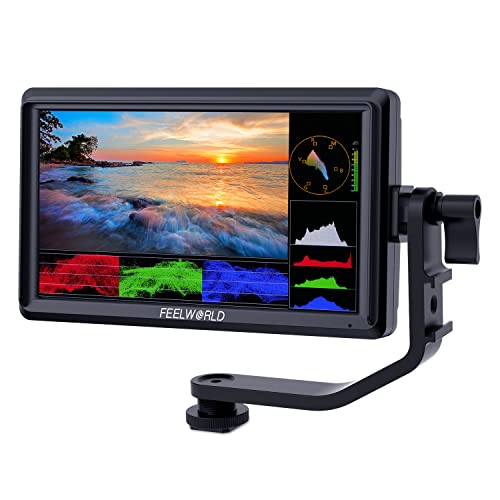
| Best Value | Screen Resolution: 1920 x 1080 (Full HD) | Waveform / Scopes: Built-in waveform monitoring (plus false color, zebra, focus assist) | 3D LUT / LUT Support: Supports up to 32 custom LUTs (real-time preview) | VIEW LATEST PRICE | Read Our Analysis |
| Portkeys PT6 5.2″ Touchscreen Camera Field Monitor |

| Professional Tool | Screen Resolution: 1920 x 1080 (Full HD) | Waveform / Scopes: Luma & RGB Waveform, Luma Histogram (adjustable) | 3D LUT / LUT Support: 3D LUT output support; monitor before/after 3D LUT loading | VIEW LATEST PRICE | Read Our Analysis |
| Portkeys PT5 II 5″ 4K Touchscreen Camera Monitor |

| Compact Powerhouse | Screen Resolution: 1920 x 1080 (Full HD) | Waveform / Scopes: Luma & RGB Waveform, Luma Histogram (adjustable) | 3D LUT / LUT Support: Supports 3D LUT loading and adjustment | VIEW LATEST PRICE | Read Our Analysis |
| FEELWORLD FW568 V3 6″ DSLR Field Monitor |

| Feature-Rich Upgrade | Screen Resolution: 1920 x 1080 (Full HD) | Waveform / Scopes: Built-in waveform monitoring (plus false color, zebra, focus assist) | 3D LUT / LUT Support: Supports up to 32 custom LUTs (real-time preview) | VIEW LATEST PRICE | Read Our Analysis |
| FEELWORLD F5 Pro V4 6″ Touchscreen Field Monitor |

| Touchscreen Pro | Screen Resolution: 1920 x 1080 (Full HD) | Waveform / Scopes: Histogram and false color (waveform noted as missing on older 5.5″ version but F5 Pro V4 includes exposure tools) | 3D LUT / LUT Support: 3D LUT/looks support implied via color calibration and image tools (menu LUT functions / pinch-to-zoom & color tools) | VIEW LATEST PRICE | Read Our Analysis |
More Details on Our Top Picks
FEELWORLD FW568 6″ DSLR Camera Field Monitor
If you need accurate color and on-the-spot exposure tools without lugging extra gear, the FEELWORLD FW568 is a lightweight 6″ field monitor that gives you Rec.709 color calibration, built-in waveform and false-color tools, and 4K HDMI support so you can judge image quality and exposure in real time. You’ll get a 1920×1080 Full HD IPS screen, support for UHD and DCI 4K inputs, and up to 32 custom LUTs to retain your look on set. At 175g and compact dimensions, it’s easy to mount. Package includes HDMI cable, sunshade, and tilt arm; batteries sold separately.
- Screen Resolution:1920 x 1080 (Full HD)
- Waveform / Scopes:Built-in waveform monitoring (plus false color, zebra, focus assist)
- 3D LUT / LUT Support:Supports up to 32 custom LUTs (real-time preview)
- HDMI 4K Compatibility:4K HDMI input/output (3840×2160, 4096×2160)
- Focus & Exposure Aids:Focus assist, zebra exposure, false color
- Battery Power Option:Uses external batteries (battery not included for used version; compatible combos available)
- Additional Feature:Real-time 32 LUTs
- Additional Feature:Lightweight 175g design
- Additional Feature:Includes tilt arm
Portkeys PT6 5.2″ Touchscreen Camera Field Monitor
The Portkeys PT6 5.2″ touchscreen monitor is ideal when you need a compact, high‑resolution field display that still gives you professional monitoring tools; you get a 5.2″ full‑fit OCR touchscreen with Full HD 1920×1080 at 400 PPI and a 178° viewing angle in a slim 0.37 lb body. It offers Luma and RGB Waveforms, Luma Histogram, zebra, false color, audio meters, and battery voltage check, with adjustable scope position/transparency and pre/post 3D LUT viewing. Features include 3D LUT output, peaking, anamorphic mode, image crop, menu transparency, extensive image adjustments, NP‑F/LP‑E6 battery support, one‑year warranty, and customer support.
- Screen Resolution:1920 x 1080 (Full HD)
- Waveform / Scopes:Luma & RGB Waveform, Luma Histogram (adjustable)
- 3D LUT / LUT Support:3D LUT output support; monitor before/after 3D LUT loading
- HDMI 4K Compatibility:HDMI 4K compatible inputs (monitor supports 4K sources)
- Focus & Exposure Aids:Peaking (focus), Zebra, False Color, Audio meters
- Battery Power Option:Compatible with Sony NP-F and Canon LP-E6 batteries (not included)
- Additional Feature:Full-fit OCR touchscreen
- Additional Feature:Menu transparency adjustment
- Additional Feature:Battery voltage checking
Portkeys PT5 II 5″ 4K Touchscreen Camera Monitor
Portkeys’ PT5 II is ideal for run-and-gun shooters who need a compact, color-accurate field monitor that still packs pro-level waveform and 3D LUT tools. You get a 5″ Full-Fit OCR 1920×1080 display (400 PPI) with 178° viewing, 4K30P I/O, and wide color gamut in a lightweight, slim body. High-precision Luma and RGB waveforms, histogram, and built-in verification before/after 3D LUTs keep exposure and color honest. You’ll also find zebras, false color, peaking, anamorphic de-squeeze, grids, audio meters, and battery voltage readout. It accepts NP-F and LP-E6 batteries and includes a one-year warranty.
- Screen Resolution:1920 x 1080 (Full HD)
- Waveform / Scopes:Luma & RGB Waveform, Luma Histogram (adjustable)
- 3D LUT / LUT Support:Supports 3D LUT loading and adjustment
- HDMI 4K Compatibility:Supports 4K30P input/output
- Focus & Exposure Aids:Peaking (focus), Zebra, False Color, Check Field
- Battery Power Option:Compatible with Sony NP-F and Canon LP-E6 batteries (not included)
- Additional Feature:Wide color gamut support
- Additional Feature:Compact 0.28 lb form
- Additional Feature:Menu transparency adjustment
FEELWORLD FW568 V3 6″ DSLR Field Monitor
Want a lightweight, pocketable monitor that still gives pro-level image analysis? The FEELWORLD FW568 V3’s 6″ Full HD IPS screen and Rec.709 calibration deliver crisp, accurate visuals for focus pulling and exposure decisions. You’ll get built-in waveform, false color, zebra, and focus assist, plus support for 32 custom LUTs to preview looks on set. It accepts 4K UHD and DCI 4K inputs, offers HDMI and 8.4V DC power, and ships with an F550 2200mAh battery, sunshade, micro HDMI cable, and tilt arm. Weighing just 175g, it’s compact, compatible with DSLRs/camcorders, and backed by FEELWORLD support.
- Screen Resolution:1920 x 1080 (Full HD)
- Waveform / Scopes:Built-in waveform monitoring (plus false color, zebra, focus assist)
- 3D LUT / LUT Support:Supports up to 32 custom LUTs (real-time preview)
- HDMI 4K Compatibility:4K UHD input/output (3840×2160, 4096×2160)
- Focus & Exposure Aids:Focus assist, zebra exposure, false color
- Battery Power Option:Includes F550 battery (2200mAh) in package
- Additional Feature:Includes F550 2200mAh
- Additional Feature:8.4V DC input
- Additional Feature:Package sunshade included
FEELWORLD F5 Pro V4 6″ Touchscreen Field Monitor
If you need a compact on-camera monitor that balances pro-level color accuracy with flexible power options, the FEELWORLD F5 Pro V4 is a strong pick; you get a 6″ 1920×1080 touchscreen with 500nit brightness and REC-709 calibration for accurate, rich color. Pinch-to-zoom, pixel-to-pixel, histogram, false color, and focus assist help nail exposure and detail, while embedded audio monitoring keeps sound in check. It accepts 4K HDMI in with loop-out, and offers Type-C, F970 plate, and 8.4V DC power, plus an F970 kit for mounting transmitters or lights. Included accessories cover basic setup and sunshade.
- Screen Resolution:1920 x 1080 (Full HD)
- Waveform / Scopes:Histogram and false color (waveform noted as missing on older 5.5″ version but F5 Pro V4 includes exposure tools)
- 3D LUT / LUT Support:3D LUT/looks support implied via color calibration and image tools (menu LUT functions / pinch-to-zoom & color tools)
- HDMI 4K Compatibility:Compatible with 4K HDMI input and loop-out
- Focus & Exposure Aids:Focus assist, false color, histogram, embedded audio monitoring
- Battery Power Option:F970 battery plate and USB-C power option; compatible with F970 batteries (battery not included)
- Additional Feature:Pinch-to-zoom gesture
- Additional Feature:500 nit brightness
- Additional Feature:F970 external power kit
Factors to Consider When Choosing Waveform Video Monitors
When choosing a waveform video monitor, you’ll want to compare display resolution and size so the image matches your shooting needs. Check color accuracy and gamuts, plus reliable waveform and scopes for precise exposure and color balance. Also confirm LUT support and preview, and make sure the monitor’s inputs and outputs match your cameras and recorders.
Display Resolution And Size
How big and sharp should your waveform monitor be? You want a balance: Full HD (1920×1080) gives the detail needed to inspect scopes and subtle image artifacts, while screen size affects portability and usability. Field monitors around 5–6 inches hit a sweet spot-easy to carry yet clear enough for critical focus and exposure checks. If you frequently work in bright or awkward environments, a larger screen improves visibility for adjustments. Choose an IPS panel to keep consistent image quality from wide viewing angles (about 178°), so teammates can see the same readouts. Remember brightness and proper calibration matter alongside resolution and size; they guarantee the display presents accurate, reliable information for confident monitoring on set.
Color Accuracy And Gamuts
Because accurate color lets you trust what you see on set, choose a waveform monitor that’s calibrated to Rec.709 (or the specific target gamut you’re working in) and maintains that fidelity in real time. You need precise gamut coverage so skin tones, highlights, and primaries display correctly for on-the-spot decisions. Look for monitors that support wide gamuts when your project demands richer colors, and that map those ranges consistently to prevent surprises in grading. Real-time accuracy avoids costly color-correction fixes later and guarantees footage matches post-production targets. Prefer units that accept and apply 3D LUTs so you can preview the final color space on set. In short, prioritize calibrated gamut fidelity and LUT support for reliable color judgement.
Waveform And Scopes
After locking in color fidelity and LUT previewing, you’ll want to check the actual exposure and channel balance with waveform scopes. Use waveform monitors to read luminance precisely so you can set exposure and avoid clipped highlights or crushed shadows. Choose RGB waveform scopes to isolate red, green, and blue channels; they make color imbalances obvious and speed corrective adjustments. Complement those scopes with luma histograms to see overall brightness distribution across the frame. Prefer scopes that let you adjust position and transparency so waveform overlays sit on your image without obscuring key detail. Finally, consider monitors that let you compare before-and-after 3D LUT views so you can confirm grading changes won’t introduce exposure or channel issues.
LUT Support And Preview
When you need to see your grading choices live, pick a waveform monitor with robust LUT support and preview so you can apply looks on-set and judge exposure and color in the context of the final image. You’ll want monitors that load and preview up to 32 custom LUTs, letting you switch looks quickly and maintain a consistent creative vision across shots. Seeing before-and-after comparisons with 3D LUTs helps you verify color adjustments for post workflows and catch mismatches early. Adjustable LUT application paired with waveform overlays lets you analyze exposure and color balance while the intended style is applied. That real-time feedback improves accuracy in color reproduction and guarantees what you capture matches your planned aesthetic.
Input Output Compatibility
Good LUT support is only part of the story – you also need a monitor that can actually accept and pass along the signals your camera and recorders use. Check for broad format support, from 1080p HD up through 4K UHD, so you won’t be limited by resolution. HDMI I/O is essential for DSLRs, camcorders, and many external sources; make sure inputs and outputs match your kit. Look for loop-out or pass-through so the monitor displays the feed while sending it to recorders or additional monitors without extra splitters. Confirm support for industry frame rates (23.98, 24, 25, 29.97, 30 Hz) to keep playback and waveform analysis accurate. Matching I/O and format support keeps your workflow smooth.
Power Options And Batteries
Because you’ll often be shooting away from mains power, choose a waveform monitor with flexible battery options that match your workflow. Look for models supporting lithium-ion and proprietary packs so you can swap cells quickly without interrupting a take. Industry-standard battery compatibility matters: it lets you borrow or buy common spares and keeps downtime minimal. Consider built-in battery plates or external power kits if you need to run accessories like wireless transmitters or LED lights from the same source. Think about runtime versus weight-lighter batteries improve portability but may shorten operating time. Finally, prefer monitors with battery voltage monitoring so you can track remaining power and avoid unexpected shutdowns on location.
Touchscreen And Controls
Power choices won’t matter much if you can’t control the monitor quickly on set, so next look at touchscreen and control ergonomics. You’ll find touchscreens make adjustments fast and intuitive, letting you tap directly to pull up waveform scopes, LUTs, and exposure tools. Prefer high-resolution panels with full-fit OCR so text and tiny scope details stay readable when you’re under time pressure. Adjustable menu transparency and customizable layouts cut clutter while keeping essential controls at your fingertips. Gesture support like pinch-to-zoom helps you magnify areas for focus checking without fumbling. Also value units that pair touch with physical buttons or dials-those give you redundant inputs for noisy environments or gloved operation, preserving speed and precision when it matters most.
Build Quality And Mounting
A rugged yet lightweight build makes a waveform monitor easier to carry, mount, and use all day without tiring you out. You’ll want compact dimensions so the unit integrates into shoulder rigs, gimbals, or cages without adding bulk. Look for multiple mounting options-tilt arms, articulating brackets, and sunshades-so you can position the screen for any angle or lighting condition. Guarantee compatibility with standard mounting accessories like 1/4″-20 and ARRI rosettes to secure the monitor firmly. Check power input versatility and integrated battery plates; they simplify setups, let you swap power sources quickly, and reduce cable clutter on set. Prioritize durable materials and thoughtful hardware so your monitor stays stable and reliable in real shooting conditions.




