

Yes – Wi‑Fi VoIP phones can match wired reliability with the right model and setup. Look for clear audio, simple setup, strong security, and long battery life for true cordless roaming.
This article lists five top Wi‑Fi VoIP phones that balance home ease and business features. Options include single‑line simplicity, multi‑line capability, large touchscreens, and secure enterprise designs.
| Ooma Telo VoIP Home Phone with HD3 Handset |
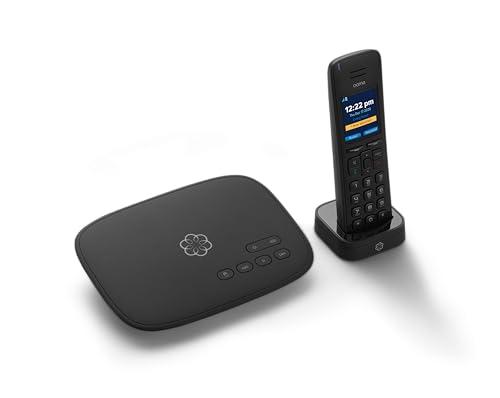
| Best for Home Use | Wi‑Fi: Works with Wi‑Fi networks via home internet (Starlink compatible) – mobile app for on‑the‑go | SIP/VoIP Service Support: VoIP home phone service (Ooma Telo) for U.S. calling | Color Display: HD3 handset with 2″ color display | VIEW LATEST PRICE | Read Our Analysis |
| OBi2182 WiFi VoIP Phone with Color Display |
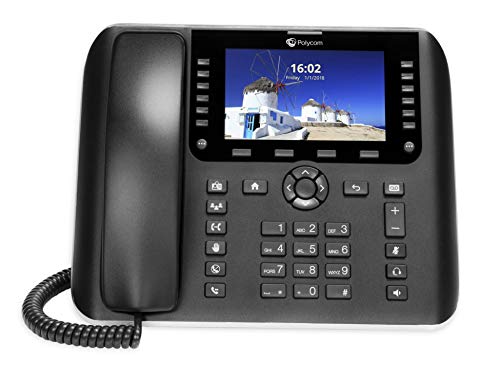
| Best for Scalability | Wi‑Fi: Built‑in dual‑band Wi‑Fi (2.4/5 GHz, 802.11ac) | SIP/VoIP Service Support: Wi‑Fi VoIP phone with cloud/OBiTALK and Google Voice support | Color Display: Color display (model marketed with color screen) | VIEW LATEST PRICE | Read Our Analysis |
| Yealink T57W IP Phone with 7″ Touchscreen |

| Best for Touchscreen Power Users | Wi‑Fi: 802.11ac Wi‑Fi (dual‑band) | SIP/VoIP Service Support: SIP IP phone supporting up to 16 SIP accounts | Color Display: 7″ color touchscreen (800×480) | VIEW LATEST PRICE | Read Our Analysis |
| Grandstream GRP2612W Wi‑Fi IP Phone (4-Line PoE) |

| Best for Enterprise Deployments | Wi‑Fi: Built‑in dual‑band Wi‑Fi (Wi‑Fi 5) | SIP/VoIP Service Support: IP phone supporting up to 4 SIP accounts (multi‑SIP support) | Color Display: 2.4″ color display | VIEW LATEST PRICE | Read Our Analysis |
| Grandstream Cordless WiFi IP Phone WP826 SIP Phone |

| Best for Mobile Flexibility | Wi‑Fi: Dual‑band Wi‑Fi 6 | SIP/VoIP Service Support: SIP cordless Wi‑Fi IP phone (SIP compatible) | Color Display: 4″ color LCD screen | VIEW LATEST PRICE | Read Our Analysis |
More Details on Our Top Picks
Ooma Telo VoIP Home Phone with HD3 Handset
If you want an easy, reliable landline replacement that keeps calls sounding clear and works with your home internet, the Ooma Telo with the HD3 handset is a smart pick. You’ll get crystal clear nationwide calling and unlimited U.S. minutes, so you won’t worry about surprise bills. The HD3 handset has a bright 2 inch color display and a full duplex speakerphone that makes conversations feel natural. You’ll use voicemail, caller ID, call waiting, and 911 with text alerts. The Ooma app lets you take your home number on the go, and it even works with Starlink internet.
- Wi‑Fi:Works with Wi‑Fi networks via home internet (Starlink compatible) – mobile app for on‑the‑go
- SIP/VoIP Service Support:VoIP home phone service (Ooma Telo) for U.S. calling
- Color Display:HD3 handset with 2″ color display
- HD Audio / Voice Quality:Pure Voice technology; crystal‑clear calling (HD quality)
- Mobility:Mobile app to take home phone on the go
- PoE / Power Options:Standard power via included handset/base (works with home power; no PoE)
- Additional Feature:Includes HD3 handset
- Additional Feature:Ooma mobile app
- Additional Feature:911 text alerts
OBi2182 WiFi VoIP Phone with Color Display
For teams that need fast setup, reliable mobile connectivity, and a bright, easy-to-read screen, the OBi2182 WiFi VoIP phone is a strong choice you can count on. You get a color display that makes menus clear and contacts easy to scan. It supports 12 lines out of a possible 48 so you can scale as demand grows. Built-in dual-band WiFi and Bluetooth 4.0 keep you connected to networks and headsets, and gigabit Ethernet adds wired speed. Cloud management through OBiTALK lets you provision devices, integrate directories, and enable third-party apps and messaging with minimal fuss, keeping admin simple.
- Wi‑Fi:Built‑in dual‑band Wi‑Fi (2.4/5 GHz, 802.11ac)
- SIP/VoIP Service Support:Wi‑Fi VoIP phone with cloud/OBiTALK and Google Voice support
- Color Display:Color display (model marketed with color screen)
- HD Audio / Voice Quality:HD audio support (enterprise voice quality implied)
- Mobility:Bluetooth 4.0 (mobile headset pairing) and Wi‑Fi for flexible placement
- PoE / Power Options:Gigabit Ethernet (likely supports PoE for desk deployment)
- Additional Feature:12-line support
- Additional Feature:Google Voice compatibility
- Additional Feature:Cloud-managed OBiTALK
Yealink T57W IP Phone with 7″ Touchscreen
Who needs a business desk phone that feels modern and stays reliable? You do, and the Yealink T57W delivers. You’ll like the 7-inch touchscreen with 800 by 480 resolution and 29 touch keys, and the screen angle adjusts so you always see it clearly. It supports 16 SIP accounts, so you can manage many lines without hassle. Audio stays crisp with HD Voice and Yealink Acoustic Shield, and you can record calls or use a wireless USB headset via the USB 2.0 port. You get 802.11ac Wi‑Fi, dual Gigabit Ethernet, and PoE support, though the power adapter isn’t included.
- Wi‑Fi:802.11ac Wi‑Fi (dual‑band)
- SIP/VoIP Service Support:SIP IP phone supporting up to 16 SIP accounts
- Color Display:7″ color touchscreen (800×480)
- HD Audio / Voice Quality:HD Voice with Acoustic Shield technology
- Mobility:Wi‑Fi and USB headset support for flexible use
- PoE / Power Options:802.3af Power over Ethernet supported (PoE)
- Additional Feature:7″ touchscreen display
- Additional Feature:USB 2.0 port
- Additional Feature:16 SIP accounts
Grandstream GRP2612W Wi‑Fi IP Phone (4-Line PoE)
Put simply, the Grandstream GRP2612W is ideal when you need a reliable office phone that can move from desk to desk without losing connection. You’ll get four SIP accounts and four multi-purpose line keys, so you can handle multiple calls without stress. It supports up to 16 BLF keys and HD audio with codecs like G.722 and Opus for clear speech. The 2.4-inch color display and swappable faceplate make it feel personal. Built-in dual-band Wi‑Fi works once Ethernet is unplugged, and PoE keeps power tidy. Enterprise security includes secure boot and dual firmware for peace of mind.
- Wi‑Fi:Built‑in dual‑band Wi‑Fi (Wi‑Fi 5)
- SIP/VoIP Service Support:IP phone supporting up to 4 SIP accounts (multi‑SIP support)
- Color Display:2.4″ color display
- HD Audio / Voice Quality:HD audio; supports wideband codecs including G.722 and Opus
- Mobility:Wi‑Fi support (can be used untethered from Ethernet)
- PoE / Power Options:PoE available (integrated PoE on GRP2612P/GRP2612W models)
- Additional Feature:Swappable faceplate
- Additional Feature:Secure boot/dual firmware
- Additional Feature:Up to 16 BLF keys
Grandstream Cordless WiFi IP Phone WP826 SIP Phone
If you need a truly mobile office handset that stays connected over your Wi‑Fi, the Grandstream WP826 delivers with dual-band Wi‑Fi 6 and cordless convenience, so you can move through a home or workplace without dropping calls. You’ll enjoy a 4-inch color LCD that shows callers and menus clearly, and an intuitive keypad with navigation buttons that make call handling simple. Because it’s a SIP phone that uses Wi‑Fi rather than a base station, you get true cordless freedom and wider placement options. The ergonomic shape fits your hand, the controls feel natural, and setup is straightforward for busy users.
- Wi‑Fi:Dual‑band Wi‑Fi 6
- SIP/VoIP Service Support:SIP cordless Wi‑Fi IP phone (SIP compatible)
- Color Display:4″ color LCD screen
- HD Audio / Voice Quality:Designed for clear call handling on IP networks (HD-capable handset)
- Mobility:Cordless Wi‑Fi design for full mobility while on calls
- PoE / Power Options:Wi‑powered cordless handset (battery/charger – no PoE)
- Additional Feature:Cordless Wi‑Fi operation
- Additional Feature:4″ color LCD
- Additional Feature:Wi‑Fi 6 support
Factors to Consider When Choosing Wi-Fi VoIP Phones
When you pick a Wi‑Fi VoIP phone, start by matching it to your network and checking audio quality so calls stay clear and reliable. You’ll also want to compare battery life and charging options, look for an easy display and interface, and make sure the phone has strong security features to protect your conversations. As you move between these points, think about how each choice affects the others so you get a phone that fits your daily needs and gives you peace of mind.
Network Compatibility
On a busy wireless network you’ll want a Wi‑Fi VoIP phone that matches your infrastructure and keeps calls clear as people move around the office. Pick phones that support your Wi‑Fi standard like 802.11ac or 802.11ax so you get the throughput and range you need. Also choose dual‑band models that work on 2.4 GHz and 5 GHz to dodge interference and use the faster band for voice. Make sure devices honor QoS such as WMM or 802.11e and offer VLAN tagging so voice traffic gets priority and stays separate from data. Confirm the phone supports your security setup, including WPA2, WPA3, or 802.1X, and look for fast roaming like 802.11r to keep calls from dropping.
Audio Quality
Because clear voice makes every call feel natural, pay close attention to a phone’s audio features before you buy. You want wideband or HD codecs like G.722 or Opus so speech sounds full and easy to understand. Also look for full duplex speakerphone so both sides can talk at once without clipping or awkward pauses.
Echo cancellation and strong noise suppression matter in busy spaces. They cut background sounds and keep your voice focused. Make sure the phone supports jitter buffers and packet loss concealment to avoid choppy audio when Wi Fi hiccups happen. Finally, check end to end QoS support such as 802.11e WMM and VLAN tagging, plus good Wi Fi band and antenna design, because they lower latency and keep calls crisp.
Battery And Power
Good audio helps your calls feel natural, but power and battery make sure those calls actually happen when you need them. You want clear specs like mAh and rated talk and standby times, since higher mAh usually means longer shifts between charges. Also check how the handset charges. Fast charge or Qi wireless can save you from scrambling during a busy day. For fixed setups, Power over Ethernet for base stations or docking chargers for handsets keeps devices running without interruption. Look for replaceable batteries and spare availability so you can swap cells instead of replacing units. Finally, test power management features like sleep mode, automatic dimming, and configurable Wi‑Fi radios. These settings work together to stretch real world battery life.
Display And Interface
You’ll often notice the display and interface shape how smoothly your day goes with a Wi‑Fi VoIP phone, so choosing the right screen and controls matters more than you might think. Pick a larger, high resolution screen, around 4 to 7 inches and 800×480 or higher, because it makes contacts, call history, and soft keys easy to read. If you like touch, get multi touch and many programmable touch keys to speed actions, while clear color, adjustable viewing angle, and backlight keep things visible in any light. Still want buttons Yes, physical keypad quality and good tactile feedback help with fast dialing and when gloves or noise make touch tricky. Favor intuitive menus, customizable soft keys, and dedicated buttons like hold transfer and voicemail to cut training time and smooth call handling.
Security Features
A clear, easy screen and reliable buttons help your day, but security keeps that phone working safely on your network. You should pick phones that use strong encryption like TLS for SIP and SRTP for calls so others can’t listen or tamper. Also look for secure boot, dual firmware images, and encrypted storage to stop unauthorized firmware changes and data extraction. Choose models with 802.1X and VLAN tagging so voice traffic stays isolated and access is controlled. Make sure provisioning and updates work over HTTPS with certificate management to avoid risky setups. Finally, confirm logging, audit trails, and centralized management with role based access so admins can monitor events and limit who changes settings.
Deployment Management
When you’re rolling out dozens or thousands of Wi‑Fi VoIP phones, deployment management decides how fast, safe, and painless the project will be. You’ll want phones that support cloud provisioning and centralized management so you can push bulk configurations and remote firmware updates without visiting desks. Make sure the system offers zero-touch provisioning and templates to auto-configure network, SIP, and security settings from first boot. Look for role-based access and multi-tenant administration so teams can share duties safely and limit exposure. Also choose platforms with built-in monitoring, logging, alerting, and exportable reports plus APIs to tie into your NOC tools. Finally confirm secure remote management features like TLS, encrypted configs, and dual firmware images for safe upgrades and quick rollbacks.
Mobility And Range
Move around confidently and expect your calls to stay clear, because mobility and range are what keep Wi‑Fi VoIP phones useful away from a desk. You should check the handset’s Wi‑Fi standard, since 802.11ax gives better range and stability in crowded places than older versions. Also look at antenna design and radio power in dBm, because higher gain and transmit power extend indoor reach though regulations may limit them. Test roam handoffs so your phone keeps SIP registration and active calls when you pass between access points. Battery life matters too, since long talk time keeps you moving without hunting for a charger. Finally, try real world range tests in your office layout, with walls and interference, to know what to expect.
Integration Options
You’ll want to check how a Wi-Fi VoIP phone hooks into your systems before you buy, because good integration keeps daily work smooth and stress low. Start by confirming support for SIP and WebRTC so the phone talks to PBX systems and hosted providers without drama. Then look for directory and presence features using LDAP or Active Directory plus SIP SIMPLE so teams find each other fast. Also make sure cloud provisioning and management APIs exist for bulk setup, firmware updates, and monitoring, which saves time. Check third party app and SDK support so CRM click to call and contact popups work. Finally verify enterprise security and authentication like 802.1X, OAuth, SAML, TLS, and SRTP to keep data safe while everything connects.
Frequently Asked Questions
Do These Phones Support Emergency (E911) Location Services?
Yes – many models support E911 location services, but you’ll need to configure your network, register accurate physical addresses, and make certain firmware and VoIP provider settings enable automatic location reporting to emergency responders. Check each phone’s specs.
Can I Connect Multiple Handsets to One Base or Account?
Yes – you can connect multiple handsets to one base or account for most DECT or VoIP systems; you’ll pair each handset, assign extensions, and manage settings in the base or cloud portal, though limits vary by model and provider.
Are There Options for Custom Ringtones or Downloadable Sounds?
Absolutely – you can-many phones let you set custom ringtones or download sounds; manufacturers and firmware vary, so you’ll check supported formats, storage limits, and admin restrictions, and maybe sneak in a triumphant theme song for calls.
Do Any Models Offer Integrated Bluetooth Headset Multipoint?
Yes – some models offer integrated Bluetooth headset multipoint, so you can pair multiple devices simultaneously. You’ll find high-end Wi‑Fi VoIP phones supporting multipoint for phone and PC audio, letting you switch seamlessly during calls.
What Are the Firmware Update Frequency and Rollback Options?
Expect regular updates-usually monthly to quarterly-and graceful rollback options; you’ll get staged releases, automatic or manual installs, and the ability to revert to a previous stable build if something’s not playing nicely after an update.




