

You could carry a workstation in your backpack and still catch a flight-if you pick the right Windows 10 laptop. You’ll want something that balances real performance with light, reliable design so you can work anywhere without compromise. Below are five solid options, from budget-friendly compacts to full‑blown mobile workhorses, plus what to weigh when choosing your next machine.
| Lenovo IdeaPad 3 15 Laptop – Ryzen 3 128GB |
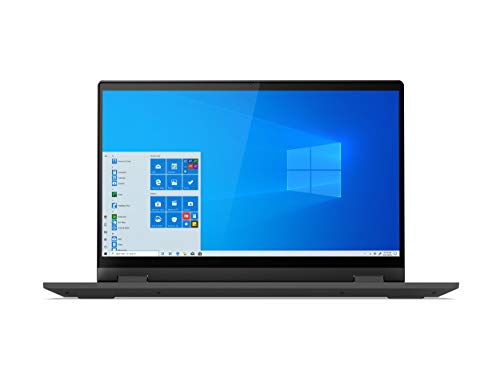
| Budget Everyday | Processor: AMD Ryzen 3 3250U | RAM: 4 GB DDR4 | Storage: 128 GB SSD (M.2 NVMe) | VIEW LATEST PRICE | Read Our Analysis |
| Dell Latitude E7440 14″ Ultrabook i5 8GB 128GB |

| Compact Business | Processor: Intel Core i5-4300U | RAM: 8 GB DDR4 | Storage: 128 GB SSD | VIEW LATEST PRICE | Read Our Analysis |
| HP Pavilion Intel Pentium Silver N5000 4GB 128GB SSD Windows 10 Laptop Red |
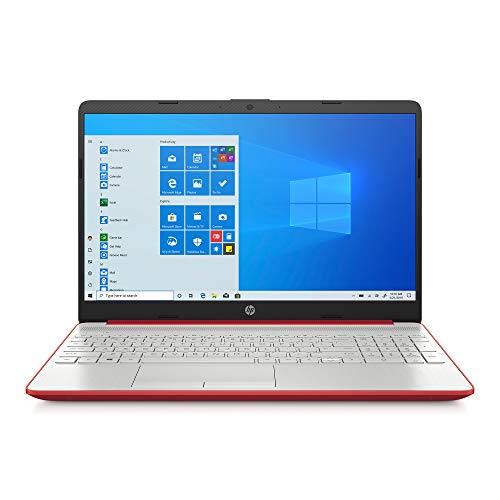
| Student Starter | Processor: Intel Pentium Silver N5000 | RAM: 4 GB DDR4-2400 | Storage: 128 GB SSD | VIEW LATEST PRICE | Read Our Analysis |
| ASUS VivoBook 15 F515 Laptop (i3 15.6″ FHD) |
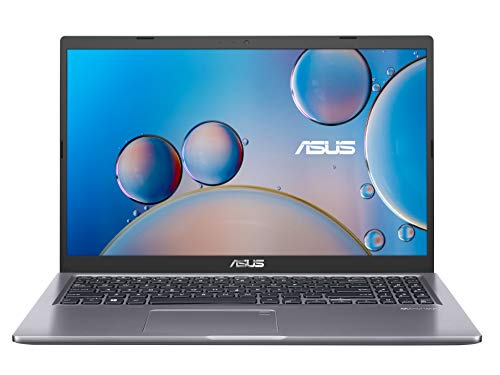
| Stylish Performer | Processor: Intel Core i3-1005G1 | RAM: 4 GB DDR4 | Storage: 128 GB PCIe NVMe M.2 SSD | VIEW LATEST PRICE | Read Our Analysis |
| Dell Precision 7540 15.6″ Laptop i7-9850H 32GB |

| Power Workstation | Processor: Intel Core i7-9850H | RAM: 32 GB DDR4 | Storage: 512 GB NVMe PCIe SSD | VIEW LATEST PRICE | Read Our Analysis |
More Details on Our Top Picks
Lenovo IdeaPad 3 15 Laptop – Ryzen 3 128GB
If you need a budget-friendly laptop for everyday tasks, the Lenovo IdeaPad 3 15 with Ryzen 3 and a 128GB NVMe SSD delivers reliable performance for students, remote workers, and casual users-offering a 15.6″ HD screen, up to about 9 hours of battery life, and useful extras like Dolby Audio and a physical webcam shutter to keep your video calls clear and private. You’ll get an AMD Ryzen 3 3250U, Vega 3 graphics, 4GB DDR4, and Windows 10 in S Mode in a 4.84-pound chassis. It includes Wi‑Fi 5, HDMI, SD reader, three USB ports, and Q‑Control modes.
- Processor:AMD Ryzen 3 3250U
- RAM:4 GB DDR4
- Storage:128 GB SSD (M.2 NVMe)
- Display Size & Resolution:15.6″ HD (1366 x 768)
- Operating System:Windows 10 in S Mode
- Wireless Connectivity:Wi‑Fi 5 (802.11ac) + Bluetooth 4.1
- Additional Feature:Physical webcam shutter
- Additional Feature:Dolby Audio speakers
- Additional Feature:Q‑Control performance modes
Dell Latitude E7440 14″ Ultrabook i5 8GB 128GB
The Dell Latitude E7440 is a compact, business-ready ultrabook that’s ideal for professionals who need reliable performance and portability-its Intel Core i5-4300U, 8 GB RAM, and 128 GB SSD handle everyday multitasking and fast boot times without weighing you down. You’ll appreciate the 14-inch 1366×768 display for spreadsheets and presentations, and Windows 10 Pro keeps business features intact. At 3.59 pounds and 0.8 inches thin, it fits travel bags easily. Integrated Intel HD Graphics and 802.11b/g/n Wi‑Fi cover typical office tasks. This renewed Grade A model is a practical, budget-conscious choice if you don’t need Windows 11.
- Processor:Intel Core i5-4300U
- RAM:8 GB DDR4
- Storage:128 GB SSD
- Display Size & Resolution:14.0″ (1366 x 768)
- Operating System:Windows 10 Pro
- Wireless Connectivity:802.11b/g/n (Wi‑Fi) (renewed unit)
- Additional Feature:Lightweight ultrabook chassis
- Additional Feature:Windows 10 Pro
- Additional Feature:Renewed Grade A condition
HP Pavilion Intel Pentium Silver N5000 4GB 128GB SSD Windows 10 Laptop Red
Choose this HP Pavilion if you want an affordable everyday laptop that boots quickly and handles web browsing, streaming, and light multitasking thanks to its Intel Pentium Silver N5000 and fast 128 GB SSD. You’ll get a 15.6″ HD micro-edge display with BrightView and DTS Studio Sound for clearer visuals and improved audio. The Intel UHD Graphics 605 supports casual media and productivity tasks. With 4 GB DDR4 memory and Windows 10 Home, performance is basic but adequate; storage is responsive thanks to the SSD. Ports include HDMI, two USB 3.1, one USB 2.0, and dual-band Wi‑Fi. It weighs 3.95 lbs.
- Processor:Intel Pentium Silver N5000
- RAM:4 GB DDR4-2400
- Storage:128 GB SSD
- Display Size & Resolution:15.6″ HD (1366 x 768)
- Operating System:Windows 10 Home 64-bit
- Wireless Connectivity:Wi‑Fi 802.11a/b/g/n/ac
- Additional Feature:DTS Studio Sound
- Additional Feature:Micro-edge BrightView display
- Additional Feature:Red color finish
ASUS VivoBook 15 F515 Laptop (i3 15.6″ FHD)
Looking for an affordable everyday laptop that won’t slow you down? The ASUS VivoBook 15 F515 (i3, 15.6″ FHD) gives you a 15.6-inch Full HD NanoEdge display with an 83% screen-to-body ratio, ergonomic backlit keyboard, and fingerprint reader for fast logins. It runs Windows 10 Home in S Mode on an Intel Core i3-1005G1 (up to 3.4 GHz), 4 GB DDR4 RAM, and a 128 GB PCIe NVMe SSD-enough for basic multitasking and quick boot times. You’ll get Intel UHD graphics, Wi‑Fi 802.11ac, Bluetooth, USB-C, HDMI, SD reader, and a slim slate-grey chassis.
- Processor:Intel Core i3-1005G1
- RAM:4 GB DDR4
- Storage:128 GB PCIe NVMe M.2 SSD
- Display Size & Resolution:15.6″ Full HD (1920 x 1080)
- Operating System:Windows 10 Home in S Mode (upgradeable)
- Wireless Connectivity:802.11ac Wi‑Fi + Bluetooth
- Additional Feature:Fingerprint reader (Windows Hello)
- Additional Feature:Backlit ergonomic keyboard
- Additional Feature:USB-C port included
Dell Precision 7540 15.6″ Laptop i7-9850H 32GB
If you need workstation-class performance for CAD, 3D rendering, or heavy multitasking, the Dell Precision 7540 pairs a six-core i7-9850H with 32 GB RAM and an NVIDIA Quadro T2000 so you can run demanding professional apps on a durable 15.6″ UltraSharp FHD display. You’ll get a 512 GB NVMe SSD, Thunderbolt 3, HDMI 2.0 and Mini DisplayPort for fast storage and multi-monitor workflows, plus Intel Wi‑Fi 6 and Bluetooth 5.1 for modern connectivity. The long-life 97 WHr battery and robust chassis keep you productive away from the desk, while a backlit keyboard and dual pointing provide practical daily control.
- Processor:Intel Core i7-9850H
- RAM:32 GB DDR4
- Storage:512 GB NVMe PCIe SSD
- Display Size & Resolution:15.6″ Full HD (1920 x 1080)
- Operating System:Windows 10 Home
- Wireless Connectivity:Intel Wi‑Fi 6 AX200 (802.11ax) + Bluetooth 5.1
- Additional Feature:NVIDIA Quadro T2000 GPU
- Additional Feature:Thunderbolt 3 ports
- Additional Feature:97 WHr long-life battery
Factors to Consider When Choosing Windows 10 Laptops
When choosing a Windows 10 laptop, you’ll want to balance performance and CPU with how long the battery will actually last on the go. Think about display quality and size alongside portability and build, since a great screen won’t help if the laptop’s too heavy to carry. Finally, pick the right mix of storage and memory so your system stays responsive for the tasks you do.
Performance And CPU
Start by matching the CPU to how you actually use the laptop: choose at least a dual‑core chip with good base/turbo clocks for smooth multitasking, but opt for quad‑ or six‑core processors with higher turbo speeds and more threads if you do compiling, run virtual machines, edit video, or game. Pick dual‑cores around 1.8–2.6 GHz for light office tasks; choose H‑series or performance mobile CPUs with turbo above 3.5 GHz for heavier workloads. Favor CPUs with hyper‑threading/SMT when you need parallel throughput. Check TDP and the laptop’s cooling, since sustained performance depends on thermal headroom and whether boost clocks hold. If there’s no discrete GPU, evaluate the integrated graphics for light gaming, playback, and GPU‑accelerated apps.
Battery Life Expectations
Estimating battery life means balancing what you do with the laptop’s components and settings: expect about 4–10 hours for typical Windows 10 notebooks, with lighter tasks and power‑efficient hardware at the high end and gaming, video editing, or heavy CPU use at the low end. You should favor low‑voltage CPUs, integrated graphics, SSDs, and smaller or lower‑resolution panels if long runtime matters. Remember manufacturer claims are often measured under light workloads and reduced brightness, so real‑world use can be shorter. Use power‑saving modes, CPU scaling, adaptive brightness, and turn off Wi‑Fi/Bluetooth to squeeze 20–50% more life out of a charge. Finally, factor battery aging (commonly 10–30% capacity loss after 1–2 years) and replaceability into long‑term plans.
Display Quality And Size
If you want a laptop that fits your workflow and travel habits, choose a screen size and quality that balance portability, workspace, and visual clarity. Pick 13–14″ if you travel a lot, 15.6″ for everyday use, and 17″ when you need desktop-level productivity. Prefer higher resolution: Full HD (1920×1080) is the practical minimum on 15.6″ and larger; 1366×768 is only acceptable on very budget or tiny models. Check panel type-IPS or other high-quality LCDs give wider viewing angles and better color than TN. Aim for at least 250–300 nits and a strong contrast ratio for outdoor visibility and deeper blacks. If you do photo/video work, target 90%+ sRGB or plan to calibrate the display.
Portability And Build
After you pick a display that suits your workflow, think about how the laptop’s size, weight and construction will affect how you actually use it day to day. Choose weight and dimensions that match your mobility: ultraportables under 3.5 lbs and ~13–14″ footprints for heavy travelers, 15–16″ machines at 4–5.5 lbs if you need more screen. Prioritize battery capacity and real-world life-aim for 8–10+ hours or 50–70 Wh cells for all‑day use. Favor aluminum or magnesium-alloy chassis for stiffness and better heat dissipation; thin plastics can flex. Check screen size and bezel width to minimize footprint. Finally, balance port selection against thinness-thin designs may drop full-size HDMI or several USB-A ports, so pick what fits your peripherals.
Storage And Memory Options
Think about how much memory and fast storage you actually need, because they have the biggest impact on day‑to‑day responsiveness. Aim for at least 8 GB of RAM for general multitasking; 4 GB is minimal and will constrain browser tabs and background apps. If you run virtual machines, heavy productivity apps, or large datasets, choose 16 GB or more to avoid swapping. Prioritize an SSD-NVMe PCIe drives deliver much faster boot and app loads than HDDs. Pick capacity by use: 128 GB may suit light users, while 256–512 GB or larger fits media, games, and heavier workflows. Finally, check upgradeability: laptops with accessible M.2 slots and extra RAM slots let you expand storage and memory as needs grow.




