

Picture a clean desk that suddenly feels like a creative studio, with a slim 2‑in‑1 unfolding into a pen-ready canvas. You’ll get vivid OLED or 2K screens, pen support, and AI-backed performance that keeps apps responsive. I’ll walk you through the best Yoga models for creators, commuters, and multitaskers so you can spot the right fit for your workflow-keep going to compare specs and real‑world tradeoffs.
| Lenovo Yoga 7 14″ OLED 2-in-1 Laptop |

| Creator’s Compact | Form factor: 2-in-1 convertible (flip/tent/tablet modes) | Touchscreen: Yes – 14″ OLED touchscreen | RAM: 16 GB | VIEW LATEST PRICE | Read Our Analysis |
| Lenovo Yoga 7 16″ 2-in-1 AI Laptop |
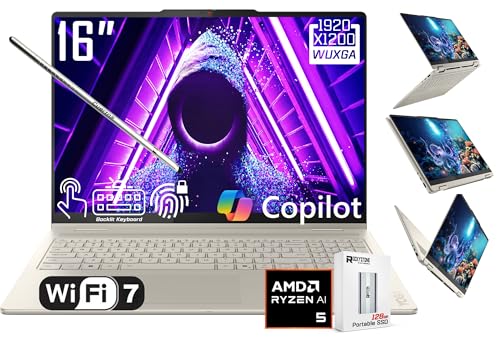
| AI Powerhouse | Form factor: 2-in-1 convertible (360° hinge) | Touchscreen: Yes – 16″ PureSight touchscreen | RAM: 16 GB LPDDR5x | VIEW LATEST PRICE | Read Our Analysis |
| Lenovo Yoga 7i 16″ 2-in-1 Laptop (Core Ultra 7) |

| Performance Pro | Form factor: 2-in-1 convertible (360° flip-and-fold) | Touchscreen: Yes – 16″ 2K touchscreen | RAM: 16 GB DDR5 | VIEW LATEST PRICE | Read Our Analysis |
| Lenovo ThinkPad L13 Yoga 2-in-1 Laptop (Renewed) |

| Business Workhorse | Form factor: 2-in-1 convertible | Touchscreen: Yes – 13.3″ FHD touchscreen | RAM: 16 GB DDR4 | VIEW LATEST PRICE | Read Our Analysis |
| Lenovo Yoga 7 16″ 2-in-1 Laptop (Ryzen 5) |
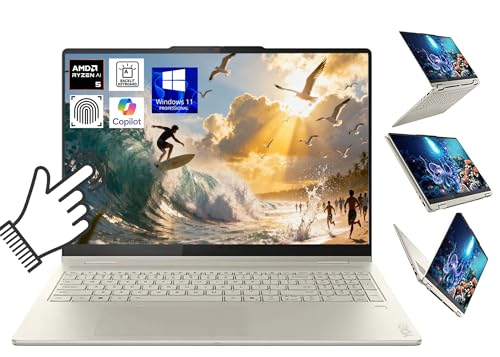
| Content Creator’s Choice | Form factor: 2-in-1 convertible (360° hinge) | Touchscreen: Yes – 16″ PureSight WUXGA touchscreen | RAM: 16 GB LPDDR5X | VIEW LATEST PRICE | Read Our Analysis |
More Details on Our Top Picks
Lenovo Yoga 7 14″ OLED 2-in-1 Laptop
If you want a compact 2‑in‑1 that blends vivid color and on‑device AI for creative work and business tasks, the Lenovo Yoga 7 14″ OLED is a strong pick: its 14″ 1920×1200 OLED (100% DCI‑P3, 600 nits HDR) delivers striking visuals, the Ryzen AI 5 340 brings up to 50 TOPS of AI acceleration, and the convertible design plus Wi‑Fi 7 and a good selection of ports make it a flexible daily driver. You get 16 GB RAM, 512 GB SSD, Radeon 840M graphics, Dolby Atmos sound, a 5 MP IR camera, fingerprint login, backlit keyboard, MicroSD, HDMI 2.1, two USB‑C, one USB‑A, and a bundled USB‑C hub. Copilot AI integration helps streamline creative and business workflows on Windows 11 Home.
- Form factor:2-in-1 convertible (flip/tent/tablet modes)
- Touchscreen:Yes – 14″ OLED touchscreen
- RAM:16 GB
- Storage (SSD):512 GB SSD
- Biometric security:Fingerprint reader
- Wireless connectivity (Wi‑Fi):Wi‑Fi 7
- Additional Feature:14″ OLED display
- Additional Feature:600 nits HDR peak
- Additional Feature:Included USB-C hub
Lenovo Yoga 7 16″ 2-in-1 AI Laptop
Choose the Lenovo Yoga 7 16″ 2-in-1 if you want a versatile, on-the-go machine that blends solid performance with AI features and a touchscreen convertible design. You get a 360° hinge, optional Yoga Pen and Cuertns stylus, plus a 16″ WUXGA PureSight touchscreen with Dolby Vision. The AMD Ryzen AI 5 340 (6c/12t) and 40+ TOPS NPU accelerate AI tasks while Radeon 840M handles graphics. It ships with 16 GB LPDDR5x, a 512 GB PCIe 4.0 boot SSD and 128 GB external SSD, microSD, Wi‑Fi 7, HDMI 2.1, fingerprint reader, 70 WHr battery, and 65 W USB‑C charging.
- Form factor:2-in-1 convertible (360° hinge)
- Touchscreen:Yes – 16″ PureSight touchscreen
- RAM:16 GB LPDDR5x
- Storage (SSD):512 GB PCIe 4.0 SSD (plus 128 GB external SSD)
- Biometric security:Fingerprint reader
- Wireless connectivity (Wi‑Fi):Wi‑Fi 7 (802.11be)
- Additional Feature:40+ TOPS NPU
- Additional Feature:Includes 128 GB SSD
- Additional Feature:1080p webcam
Lenovo Yoga 7i 16″ 2-in-1 Laptop (Core Ultra 7)
Perfect for creators and multitaskers who need both power and portability, the Yoga 7i 16″ blends Intel Core Ultra 7 performance with a 360° convertible design so you can switch seamlessly between laptop, tablet, tent, or stand modes. You’ll get a 12‑core 155U CPU with up to 4.8 GHz and fourteen‑way processing for efficient power distribution. The 16GB DDR5 and 512GB PCIe SSD keep apps snappy. A 16″ 2K IPS touchscreen supports natural touch and Windows 11 gestures. You’ll find Wi‑Fi 6E, Thunderbolt 4, HDMI, microSD, Gigabit LAN, backlit keyboard, fingerprint reader, webcam, and PD charging.
- Form factor:2-in-1 convertible (360° flip-and-fold)
- Touchscreen:Yes – 16″ 2K touchscreen
- RAM:16 GB DDR5
- Storage (SSD):512 GB PCIe SSD
- Biometric security:Fingerprint reader
- Wireless connectivity (Wi‑Fi):Wi‑Fi 6E
- Additional Feature:Intel Core Ultra 7
- Additional Feature:Thunderbolt 4 ports
- Additional Feature:Gigabit LAN port
Lenovo ThinkPad L13 Yoga 2-in-1 Laptop (Renewed)
For professionals who need a balance of portability and input flexibility, the renewed Lenovo ThinkPad L13 Yoga gives you a 13.3″ FHD touchscreen with a handy stylus and a convertible design that shifts between laptop and tablet modes, so you can sketch ideas, take notes, or work on spreadsheets without swapping devices. You’ll get an anti-glare panel, Intel Core i5-10310U (1.7–4.4 GHz, 4 cores/8 threads), 16 GB DDR4, and a 256 GB SSD for responsive multitasking. Ports include USB-A, two USB-C (one for power), HDMI, microSD, and a combo jack; Windows 11 Pro supports virtualization and multiple languages.
- Form factor:2-in-1 convertible
- Touchscreen:Yes – 13.3″ FHD touchscreen
- RAM:16 GB DDR4
- Storage (SSD):256 GB SSD
- Biometric security:(Not explicitly listed as separate, but device includes Windows 11 Pro and likely authentication) – (specs list shows no explicit fingerprint; stylus included)
- Wireless connectivity (Wi‑Fi):(Wireless supported – exact standard not listed)
- Additional Feature:Intel Core i5-10310U
- Additional Feature:Windows 11 Pro
- Additional Feature:Includes stylus pen
Lenovo Yoga 7 16″ 2-in-1 Laptop (Ryzen 5)
If you want a versatile 2-in-1 that blends solid everyday performance with on-device AI, the Lenovo Yoga 7 16″ (Ryzen 5) is a strong pick-its Ryzen AI 5 340 processor with a 40+ TOPS NPU accelerates tasks like Cocreator image generation and Live Captions while the 16″ PureSight touchscreen and 360° hinge make it easy to work, create, or present in laptop, tablet, or tent modes. You’ll get 6 cores/12 threads up to 4.8 GHz, Radeon 840M graphics, 16 GB LPDDR5X, 1 TB PCIe Gen4 SSD, Wi‑Fi 7, HDMI 2.1, fingerprint reader, 70 Wh battery, and Windows 11 Pro.
- Form factor:2-in-1 convertible (360° hinge)
- Touchscreen:Yes – 16″ PureSight WUXGA touchscreen
- RAM:16 GB LPDDR5X
- Storage (SSD):1 TB PCIe Gen4 NVMe SSD
- Biometric security:Fingerprint reader
- Wireless connectivity (Wi‑Fi):Wi‑Fi 7 (802.11be)
- Additional Feature:1 TB PCIe Gen4 SSD
- Additional Feature:TÜV eye-comfort certified
- Additional Feature:Windows 11 Pro
Factors to Consider When Choosing Yoga Laptops
When choosing a Yoga laptop, you’ll want to balance CPU performance with battery life so it handles your workload without dying midday. Check the display for color accuracy and brightness, and make sure the build feels sturdy enough for regular use. Also confirm the port selection and upgrade options so you won’t be stuck without the connections you need.
Performance And CPU
Although raw clock speed grabs headlines, you should prioritize a CPU that matches the kinds of workloads you actually run-aim for at least 6 cores/12 threads for smooth multitasking and light content creation, and 8+ cores if you do heavier editing or encoding. Check peak clock speeds and boost behavior (up to ~4.8 GHz) for single‑threaded snappiness in browsers and legacy apps. Consider on‑device AI acceleration (TOPS) if you’ll use transcription or real‑time image tools; higher TOPS improves inference. Balance raw power with sustained thermal design: efficient cooling preserves boost during long jobs. Finally, match CPU generation and architecture to platform features-newer Zen or Intel core families bring better PCIe/LPDDR support, power efficiency, battery life, and I/O performance.
Display Quality And Color
Why settle for mediocre visuals when the display is the part of your Yoga you interact with most? You should prioritize resolution and pixel density – a 1920×1200 panel on 14–16″ gives sharp text and images without killing battery. Pick panel tech for your work: OLED delivers deep blacks and contrast for creative tasks, IPS/LCD offers even brightness and usually longer runtime. Check color gamut and accuracy: aim for wide DCI‑P3 or full sRGB coverage with low Delta‑E if you edit photos or video. Consider peak brightness and HDR (300–600 nits improves visibility and dynamic range). Finally, confirm refresh rate and surface finish – 60–120 Hz smooths motion, while glossy or anti‑fingerprint coatings change vibrancy and touch responsiveness.
Battery Life Expectations
Often you’ll find battery life makes or breaks the real-world experience of a Yoga laptop, so pay attention to stated watt-hours and manufacturer runtime claims but plan for 20–40% less in everyday use. Check the Wh rating-around 70 Wh usually gives longer mixed-task runtime. Note the CPU family: newer low-power mobile processors and integrated NPUs stretch battery life under light to moderate loads. Evaluate the display: size, resolution, peak brightness, OLED vs. LCD and refresh rate all drive power use-brighter, higher-res, or high-refresh panels cut runtime noticeably. Memory and storage choices matter modestly; LPDDR and modern NVMe SSDs tend to draw slightly less power than older DDR and SATA drives. Treat manufacturer estimates as optimistic and size the battery to your typical workflow.
Build Quality And Durability
Battery life matters, but you’ll also want a Yoga that withstands daily handling and the extra stresses of folding between laptop, tent, and tablet modes. Check for a convertible hinge rated at least 20,000 open/close cycles and smooth 360° rotation so modes stay reliable. Favor aluminum or magnesium-alloy chassis over plastic for better torsional rigidity and dent resistance. Inspect keyboard and touchpad for spill resistance, firm key travel, and reinforced mounting to avoid flex and premature wear. Verify MIL‑STD or equivalent drop, vibration, and temperature test claims to guarantee real-world resilience. Finally, look for hinge and port reinforcement-metal-lined ports, captive screws-and replaceable service panels to simplify repairs and extend usable life.
Port Selection And Expandability
When picking a Yoga, prioritize a balanced port lineup so you can charge, connect modern peripherals, and still plug in older devices without carrying adapters. Make sure you get USB‑C with Thunderbolt or USB‑PD plus at least one USB‑A so you’re ready for current and legacy gear. Verify a DisplayPort-capable output-HDMI or USB‑C with DP Alt Mode-to drive external monitors at native resolution and refresh rate. A built-in SD or microSD reader speeds media offloads for photographers and creators. Look for multiple high-speed ports (USB 3.2 Gen2 or better), a headphone/mic jack, and Ethernet or docking-compatible options for reliable wired networks. Check internal expandability: spare PCIe/NVMe slots and user-upgradeable RAM/storage help future-proof your Yoga.
AI Features And Acceleration
Because on-device AI can dramatically change how you work and create, prioritize Yogas with dedicated NPUs rated in TOPS and complementary CPU/GPU acceleration so local models run fast and reliably. Look for NPUs in the tens of TOPS to handle real‑time transcription, image generation, and noise reduction without cloud round trips. Verify the CPU and integrated GPU also accelerate AI workloads-combined CPU/GPU/NPU processing improves multitasking and media performance. Confirm OS-level integration (copilot or AI hubs) and support for popular AI frameworks/APIs so generative tools and camera effects behave predictably. Check memory bandwidth (LPDDR5/LPDDR5x) and NVMe throughput for model caching and dataset handling. Finally, weigh battery capacity and thermal design, since sustained AI acceleration raises power draw and heat, risking throttling and shorter runtimes.
Input Methods And Stylus
Think about how you’ll actually use the pen: prioritize active stylus support with high pressure sensitivity (4,096+ levels) and tilt detection for natural strokes, palm rejection with capacitive touch to avoid stray marks, and low-latency tracking with a high report rate so sketches and handwriting feel immediate and fluid. Also check compatible pen protocols (Wacom AES, Microsoft Pen Protocol, MPP) for lower latency and wider app support. Pick a hinge and form factor that comfortably convert to tablet or tent modes so you can draw at a natural angle. Compare latency (ms), report rate (Hz), and screen coating since they affect responsiveness and drag. Finally, consider pen storage and charging-built-in silo or rechargeable via USB-C/wireless-to keep the stylus ready when creativity strikes.
Connectivity And Wireless Standards
Connectivity shapes how your Yoga fits into your day-to-day setup, so prioritize modern wireless and port standards that cut latency and reduce dongle dependence. Pick Wi‑Fi 6E or Wi‑Fi 7 for higher throughput, wider channels, and lower latency than Wi‑Fi 5. Confirm Bluetooth 5.2 or newer so pens, mice, and headphones stay responsive with better range and battery life. Prefer Thunderbolt 4 or USB‑C supporting Power Delivery and DisplayPort Alt Mode to charge quickly, drive external displays, and move large files through one jack. Make sure you have at least one full‑size HDMI (HDMI 2.1 ideal) or DisplayPort for high‑resolution, high‑refresh external screens. A mix of USB‑A, USB‑C, and a microSD or SD reader avoids constant dongles.




