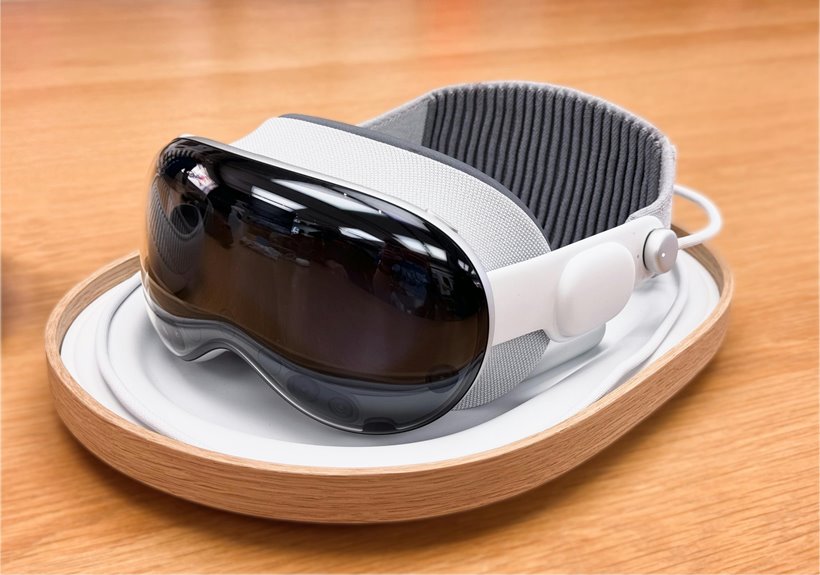
When you put on a VR headset, you’re not just viewing a screen—you’re entering a system that tracks your motion, renders separate images for each eye, and uses low latency to keep the world stable around you. The result is depth, presence, and convincing spatial audio. But the experience depends on more than resolution alone, and the next layer of performance can change how real it feels.
What Makes VR Headsets Immersive?
Accurate inside-out tracking preserves your hand positions and head orientation, reinforcing presence cues that help you feel like you belong inside the experience. Spatial audio adds another layer, placing sounds where you expect them and making interactions feel local and immediate. Whenever latency stays low, your actions and the headset’s response merge smoothly, which prevents disconnect and supports sustained immersion.
How VR Headsets Create Depth
Depth in VR comes from how the headset separates the left and right eye views and keeps each image tightly aligned with your head and hand motion. You perceive depth because your brain fuses binocular disparity into a single 3D scene, just like you belong inside the space. Motion parallax adds another cue: as you lean or turn, nearer objects shift faster than distant ones, reinforcing scale and position.
| Cue | Effect |
|---|---|
| Binocular disparity | Creates stereoscopic separation |
| Motion parallax | Confirms spatial distance |
| Head tracking | Keeps viewpoint stable |
| Hand tracking | Links actions to space |
Together, these cues make virtual objects feel anchored, not painted on a screen. Your movements update the viewpoint instantly, so depth stays coherent and precise, and the scene responds as though it’s shared with you.
VR Headset Display Types Explained
Whenever you compare VR headset displays, LCD panels usually give you higher pixel density and can reduce the screen-door effect, while OLED panels deliver deeper blacks and higher contrast.
You’ll also notice that refresh rate and panel response time affect motion clarity, so the display type directly shapes comfort and realism.
Newer micro-OLED systems push this further with per-pixel dimming and sharper optics, raising the standard for premium headsets.
LCD vs OLED Panels
LCD and OLED panels shape how a VR headset looks and feels, and the tradeoff usually comes down to contrast, brightness control, and resolution.
With OLED, you get deeper blacks and stronger panel contrast, so dark scenes feel more convincing and you stay more absorbed. LCD can’t match that black level, but it often delivers higher pixel density in cost-effective headsets, which helps reduce visible screen door artifacts.
Whenever you choose between them, you’re really choosing how your eyes and brain will read the image: OLED favors richness and immersion, while LCD often favors sharpness and consistent brightness. Should you want to feel at home in your headset, match the panel type to the experiences you care about most.
Micro-OLED And Beyond
Micro-OLED pushes VR displays beyond conventional LCD and standard OLED through shrinking pixel structures and improving light control at the panel level, so you see sharper imagery, better local dimming, and less of the screen door effect. In premium headsets, you’ll notice:
- micro oled brightness stays high enough for vivid highlights without crushing shadow detail.
- pixel level dimming gives each pixel its own light response, so blacks look cleaner.
- You get denser resolution, which reduces visible subpixels and enhances text clarity.
- You belong in a display tier built for precision, where optical coherence and low glare support long sessions.
Beyond micro-OLED, newer panel stacks could combine foveated rendering and advanced waveguides, so your view feels natural, responsive, and technically refined.
Display Features That Matter Most
For VR headsets, the display is where immersion either holds or breaks, because panel type, resolution, and refresh rate directly shape what you see and how comfortable it feels.
You’ll notice OLED’s high contrast and true blacks, while LCD can push sharper pixel counts in some models. Higher resolution cuts the screen-door effect, so text and fine edges stay readable. Refresh rate matters just as much: 90 Hz or higher keeps motion fluid and reduces eye strain, helping you stay present. Brightness and comfort also depend on how the panel handles glare and color balance across the field of view. Whenever you choose well, contrast and clarity work together, and you feel like you belong inside the scene, not outside it.
Best VR Uses for Gaming, Training, and Socializing
What can VR do best? You can use it to practice skills, compete, and connect in shared spaces. In gaming, precise tracking, 6DoF controllers, and low-latency motion let you build VR gaming strategies that rely on timing, spatial awareness, and teamwork.
- You train hand-eye coordination in flight, driving, and rhythm simulations.
- You rehearse procedures in safe, repeatable environments for work or study.
- You join VR social hangouts where avatars, voice chat, and proximity cues make you feel present.
- You team up in co-op games, where shared goals help you belong and communicate clearly.
VR works best whenever interaction feels immediate, so you respond naturally, learn faster, and stay engaged with others.
How to Choose the Right VR Headset
Once you know how you’ll use VR, the right headset choice becomes a trade-off among display quality, tracking, comfort, and software support. You should match the form factor to your setup: tethered models favor maximum fidelity, standalone units give you wireless freedom, and hybrid designs let you switch modes.
Check resolution, refresh rate, and field of view, because sharper panels and 90 Hz or higher usually feel smoother and reduce fatigue. Test comfort fit, strap balance, and facial padding, since long sessions expose poor ergonomics fast. Verify inside-out tracking, controller haptics, and app availability in the ecosystem you want to join. Finally, compare budget compatibility against your performance targets so you don’t overpay for features you won’t use.
How VR Differs From AR and Mixed Reality
If you use VR, the headset replaces your visual field with a fully synthetic scene, while AR overlays digital content onto your view of the real world.
Mixed reality sits between them, because you can see and interact with physical objects while virtual elements remain spatially anchored to the environment.
The boundary isn’t always fixed, since hardware, passthrough cameras, and software determine how much of the real scene you can still perceive.
Virtual Vs Augmented
Virtual reality (VR) fully replaces your view of the physical world with a computer-generated environment, while augmented reality (AR) overlays digital elements onto what you still see around you, and mixed reality sits between them via allowing virtual objects to interact more naturally with real space. In VR, you’re inside a sealed simulation; in AR, you stay anchored in your room, seeing virtual overlays and augmented annotations.
- VR blocks the outside scene.
- AR preserves it and adds data.
- VR depends on head tracking and low-latency rendering.
- AR prioritizes framework-aware placement.
When you choose among them, you’re joining a workflow built for your task, whether that means focused immersion, on-site guidance, or collaborative visualization.
Mixed Reality Boundaries
Mixed reality keeps the physical environment visible while anchoring digital objects to it, so its boundary with VR is defined via how much of the real world remains in the frame.
In VR, you lose the room; in mixed reality, you still see your desk, hands, and walls, and the system merges them with rendered content.
You’ll notice scene blending when the headset composites live video or passthrough views with graphics, matching lighting and depth cues.
Object occlusion matters too: a virtual cube should pass behind your real monitor, not float over it, or the illusion breaks.
Should you want a device that feels like part of your space, mixed reality gives you that shared milieu while VR fully replaces it, creating a stronger sense of isolation and presence.
Common VR Headset Problems and Fixes
Because VR headsets combine displays, tracking, and software into a tight system, common problems usually come from one of those layers: blur or the screen door effect from lower resolution, motion sickness from low refresh rates, tracking loss from poor camera coverage, and discomfort from poor fit or glare. You can fix most issues quickly and stay in the experience together.
- Recenter and run tracking calibration whenever controllers drift or jitter.
- Increase render clarity, clean lenses, and adjust IPD to reduce blur.
- Raise refresh rate, lower motion intensity, and take short breaks whenever nausea starts.
- Check cables, mute audio distortion, and tighten the head strap to remove pressure and noise.
What’s Next for VR Displays?
As display hardware advances, VR headsets are moving toward higher pixel density, better local dimming, and faster response times that cut blur and the screen door effect. You’ll notice sharper text, cleaner edges, and more stable motion as display pipeline advances reduce latency from panel to lens.
Micro-OLED and high-end LCD panels can push brighter highlights while preserving black levels, so you stay immersed without visual fatigue. Inside-out tracking and smarter foveated rendering will help your system spend pixels where your eyes actually look.
That path points toward the varifocal future, where focus shifts with depth cues and near objects feel natural. Should you value precision and comfort, these improvements should make you feel like you belong in the next generation of virtual spaces, not just observing them.
Frequently Asked Questions
Which VR Headset Types Need a PC or Console?
PC tethered headsets need a computer, and console required headsets need a game system. These wired setups usually deliver sharper visuals, steadier frame rates, and access to platform specific games and features.
What Refresh Rate Reduces Motion Sickness in VR?
A 90 Hz refresh rate can reduce motion sickness by making motion smoother and frame delivery more consistent. You may notice less lag, fewer stutters, and steadier visuals, especially during quick head movements.
How Does Inside-Out Tracking Work in Headsets?
You move through the space while four wide angle camera sensors capture the room from different angles. Tracking software combines those images to estimate your headset position and orientation in real time. Because the system maps movement continuously, you do not need external base stations or cables.
Which Display Technology Gives True Blacks in VR?
OLED delivers true blacks because each pixel can turn off completely, creating very high contrast. This produces deeper shadows and more vivid images than LCD. Future microLED displays may achieve similar black levels while improving efficiency.
Do VR Storefronts Limit Which Apps I Can Use?
Yes, VR storefronts can limit which apps you can use. One store may support many apps, while another may only work with a narrower selection. Check platform compatibility before you buy so you can stay within the right ecosystem.