If you are choosing an HDMI 2.0 gaming monitor in 2026, you will want more than a high refresh rate on paper. You need sharp motion, reliable console support, and a panel that fits how you actually play. From QHD IPS options to budget-friendly 144Hz picks, the right screen can change your setup in ways you might not expect. A few standouts do more than look good, and one of them may surprise you.





More Details on Our Top Picks
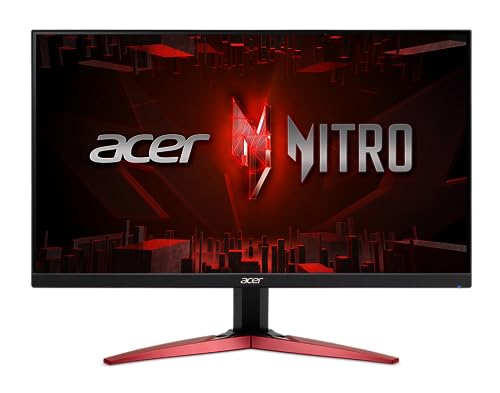
Acer Nitro 27″ QHD IPS Gaming Monitor (KG271U)
If you want a fast, sharp 27-inch gaming display that still handles everyday work well, the Acer Nitro KG271U stands out with its QHD IPS panel, 180Hz refresh rate, and HDMI 2.0 support. You get 2560 x 1440 resolution, 95% DCI-P3 color, and HDR10 for vivid, accurate images. AMD FreeSync helps cut tearing and stutter, and 0.5ms GTG response keeps motion crisp. You can connect through one DisplayPort 1.2 or two HDMI 2.0 ports, tilt the stand, or mount it on a wall. Built-in speakers and a three year warranty add value.
- Screen Size:27-inch
- Resolution:2560 x 1440
- Panel Type:IPS
- Refresh Rate:Up to 180Hz
- HDMI Ports:2 x HDMI 2.0
- VESA Mount:Wall-mount support
- Additional Feature:DCI-P3 95% color
- Additional Feature:HDR 10 support
- Additional Feature:Low input lag
Acer Nitro 27″ WQHD Gaming Monitor (XV272U W2bmiiprx)
The Acer Nitro XV272U W2bmiiprx is a strong pick for you if you want a 27-inch WQHD gaming monitor with HDMI 2.0 support and a fast IPS panel. You get 2560 x 1440 resolution, AMD FreeSync Premium, and up to 144 Hz over HDMI, while DisplayPort reaches 240 Hz for smoother competitive play. Its 1 ms response time, DisplayHDR 400, and 99% sRGB coverage help games look crisp and vivid. You can also adjust height, tilt, swivel, and pivot, or mount it with VESA. Two HDMI 2.0 ports and built-in speakers add convenience.
- Screen Size:27-inch
- Resolution:2560 x 1440
- Panel Type:IPS
- Refresh Rate:Up to 240Hz
- HDMI Ports:2 x HDMI 2.0
- VESA Mount:100 x 100 mm
- Additional Feature:240Hz DisplayPort mode
- Additional Feature:400 nits brightness
- Additional Feature:Full Ergostand adjustability
Sceptre 22-Inch Gaming Monitor FHD 144Hz (E225W-FW144)
With its 22-inch FHD 1080p panel, 144 Hz refresh rate, and 1 ms response time, the Sceptre E225W-FW144G is a smart pick if you want a compact HDMI gaming monitor that feels fast without taking up much desk space. You get Adaptive Sync and FreeSync support, plus a matte, flat screen with a slim bezel that works well for dual-monitor setups. The built-in speakers and Blue-Light Shift help keep your setup clean and comfortable. With HDMI, DisplayPort, wall mount support, and a one-year warranty, it suits gaming, work, and editing.
- Screen Size:22-inch
- Resolution:1920 x 1080
- Panel Type:LED
- Refresh Rate:Up to 144Hz
- HDMI Ports:1 x HDMI
- VESA Mount:Wall mount compatible
- Additional Feature:2000:1 contrast ratio
- Additional Feature:Blue-Light Shift technology
- Additional Feature:Slim bezel design
Acer Nitro 23.8″ Full HD Gaming Monitor (KG241Y)
Acer’s Nitro KG241Y is a strong pick if you want a compact 23.8-inch gaming monitor that pairs Full HD clarity with fast performance. Its IPS panel gives wide viewing angles, and the 180Hz refresh rate with 1ms G to G response time helps keep motion smooth and sharp. AMD FreeSync Premium reduces tearing. HDR10 and 99% sRGB improve color and contrast. You also get two HDMI 2.0 ports and DisplayPort 1.2, a zero-frame design, tilt adjustment, and VESA mount support for flexible setup.
- Screen Size:23.8-inch
- Resolution:1920 x 1080
- Panel Type:IPS
- Refresh Rate:180Hz
- HDMI Ports:2 x HDMI 2.0
- VESA Mount:100 x 100 mm
- Additional Feature:HDR10 support
- Additional Feature:99% sRGB gamut
- Additional Feature:Zero-frame design
AOC 27-Inch QHD Gaming Monitor Q27G41ZE
If you want a 27-inch QHD gaming monitor that balances sharp image quality with fast-paced play, the AOC Q27G41ZE stands out thanks to its 240Hz refresh rate over DisplayPort and overclocking support up to 260Hz. You get a 27-inch IPS panel, 2560 x 1440 resolution, wide viewing angles, and 300-nit brightness for clear, vivid visuals. Its 0.3ms MPRT helps cut blur, and Adaptive-Sync, G-Sync compatibility, and HDR readiness keep gameplay smooth. Shadow Control, Game Mode presets, and the OSD let you fine-tune settings quickly. The three-sided frameless design, HDMI 2.0 ports, and three-year support add value.
- Screen Size:27-inch
- Resolution:2560 x 1440
- Panel Type:IPS
- Refresh Rate:240Hz / 260Hz OC
- HDMI Ports:2 x HDMI 2.0
- VESA Mount:100 x 100 mm
- Additional Feature:260Hz overclock mode
- Additional Feature:0.3ms MPRT response
- Additional Feature:Shadow Control
KTC 27-Inch 180Hz 1ms Gaming Monitor
The KTC 27-Inch 180Hz 1ms Gaming Monitor is a strong pick if you want fast, responsive gaming on a budget-friendly 27-inch display. You get a 180Hz refresh rate, 1ms response time, and smooth play on PC, Xbox, and PS5. Its Fast IPS panel delivers 108.08% sRGB, 97.32% DCI-P3, HDR10, and 300 cd/㎡ brightness for vivid visuals. FreeSync, flicker-free technology, and a blue light filter help reduce eye strain during long sessions. With two HDMI 2.0 ports, DisplayPort 1.4, tilt adjustment, and wall-mount support, it integrates easily into your setup.
- Screen Size:27-inch
- Resolution:1920 x 1080
- Panel Type:Fast IPS
- Refresh Rate:180Hz
- HDMI Ports:2 x HDMI 2.0
- VESA Mount:Wall-mount support
- Additional Feature:97.32% DCI-P3
- Additional Feature:Blue light filter
- Additional Feature:PS5 compatibility
Acer Nitro 27″ Curved Gaming Monitor (XZ270)
With its 27-inch curved VA panel, 280Hz refresh rate, and dual HDMI 2.0 ports, the Acer Nitro XZ270 is ideal if you want a fast, responsive monitor for gaming on a PC or console. You get a 1500R curve, Full HD resolution, and 1ms VRB response for sharp, fluid play. AMD FreeSync Premium and Adaptive Sync reduce tearing and stutter, and HDR10 adds extra punch. The ergonomic stand lets you tilt, swivel, and raise the screen, and you can also VESA mount it. Built-in speakers and included cables make setup easy.
- Screen Size:27-inch
- Resolution:1920 x 1080
- Panel Type:VA
- Refresh Rate:Up to 280Hz
- HDMI Ports:2 x HDMI 2.0
- VESA Mount:100 x 100 mm
- Additional Feature:1500R curved VA
- Additional Feature:280Hz refresh rate
- Additional Feature:100,000,000:1 contrast
Factors to Consider When Choosing Hdmi 2.0 Gaming Monitors
When choosing an HDMI 2.0 gaming monitor, first check how many HDMI 2.0 ports you need for your console, PC, or other devices. Match the resolution and screen size to your setup. Compare refresh rate and response time so gameplay feels smooth and responsive. Finally, pick a panel type that fits your priorities for color, contrast, and viewing angles.
HDMI 2.0 Port Count
A monitor’s HDMI 2.0 port count can make a big difference if you’re connecting more than one device, since some models offer just one input while others give you two. If you use a PC and a console, two HDMI 2.0 ports let you switch between them without unplugging anything. That is especially handy in shared setups, where you may want one screen for gaming, work, or entertainment. Do not treat the port number as a spec alone, it is a real connectivity limit that decides how many devices stay ready at once. Also check the HDMI refresh limit, since some monitors support lower rates over HDMI than over DisplayPort. Matching port count with performance helps you avoid surprises and keeps your setup flexible.
Resolution And Screen Size
Resolution and screen size matter just as much as port count because they shape how sharp your games look and how much space you have on screen. If you want a cleaner, more detailed image, a 27-inch monitor with 2560 × 1440 resolution usually beats 1920 × 1080 at the same size. You will notice less visible pixel structure, plus more room for game HUDs and desktop tasks. A 22-inch 1080p display can still look crisp at a normal desk distance, even though its pixel density is lower. For 23.8-inch models, 1920 × 1080 often hits the sweet spot between clarity, size, and system load. Match bigger screens with higher resolution, and you will keep images sharp. Use smaller screens, and lower resolutions feel more manageable.
Refresh Rate Needs
For HDMI 2.0 gaming monitors, check the maximum refresh rate at your target resolution, since some displays can reach 144 Hz over HDMI while others need DisplayPort to hit 180 Hz or more. If you play fast-paced games, look for at least 120 Hz to 144 Hz over HDMI 2.0, as that is a practical sweet spot for smooth motion. Do not assume a 180 Hz, 240 Hz, or 280 Hz monitor will deliver that speed through HDMI, many only reach their top rate on DisplayPort. The key is the refresh rate your HDMI 2.0 port can actually supply at 1080p or 1440p. Higher Hz can reduce blur and input lag, but only when the connection supports it. Compare the HDMI refresh rate first, not the headline number.
Response Time Performance
When you are choosing an HDMI 2.0 gaming monitor, prioritize low grey-to-grey response times, such as 1 ms or 0.5 ms, to reduce motion blur and ghosting in fast games. That speed helps you track enemies cleanly during rapid camera movement and quick scene changes. If a monitor lists multiple response figures, check whether the lower number comes from an overdrive or accelerated mode, because it may not reflect normal use. Around 1 ms is usually fast enough for competitive play, while slower panels can produce more smearing. Response time also works best with a high refresh rate, since frequent frame updates keep motion feeling smoother. For HDMI 2.0, confirm the monitor holds its rated speed at your chosen resolution and refresh rate, because input mode can change performance.
Panel Type Choices
Panel type shapes how an HDMI 2.0 gaming monitor feels in real use. IPS panels give you wide 178° viewing angles, steady color, and good screen uniformity, while VA panels usually deliver deeper contrast for richer dark scenes. If you want fast, responsive play with dependable image consistency, an IPS or fast IPS model can be the better fit, especially when it pairs 1 ms class response times with 180 Hz or 240 Hz refresh rates. VA panels can suit you better if you prefer stronger depth in shadowy scenes and do not mind slightly different motion behavior. A matte finish also helps cut glare on either panel type, keeping the screen easier to see in bright rooms. For balanced performance, choose Adaptive Sync, low latency, and broad coverage.
Color And HDR Support
Color and HDR support can make an HDMI 2.0 gaming monitor feel far more vivid and lifelike. Look for wide color gamut coverage, such as 95% DCI-P3 or 99% sRGB, so games and media show richer, more accurate tones. HDR also matters; standards such as HDR10 or DisplayHDR 400 can boost contrast and reveal more detail in bright scenes. Aim for 300 to 400 nits of brightness if you want HDR to pop and remain readable in lit rooms. Contrast ratio affects perceived depth as well. Around 1,000:1 is common on IPS panels, while higher ratios usually provide darker blacks and clearer shadow detail. Make sure the monitor still delivers its color and HDR performance at the refresh rate you will actually use over HDMI 2.0.
Ergonomics And Mounting
Ergonomics and mounting matter just as much as image quality, because a monitor that fits your setup well will feel better during long gaming sessions. You should look for tilt adjustment, ideally around -5° to 15° or -5° to 25°, so you can angle the screen toward you and ease neck strain. Height adjustment also helps you line up the top edge near eye level; some stands give you about 4.7 inches of travel. Swivel and pivot support are useful if you share your desk or rotate the panel for portrait use, with ranges like 360° swivel or plus or minus 90° pivot. Check for VESA 100 x 100 mm compatibility, and consider a quick release stand or wall mount support for easier setup and a cleaner desk.
Adaptive Sync Support
Once your monitor is positioned comfortably, the next thing to check is Adaptive Sync support, since it can make a bigger difference in gameplay smoothness than most people expect. Adaptive Sync lets your monitor match its refresh rate to your GPU’s frame output, which reduces tearing, stuttering, and some input lag. If you game through HDMI 2.0, do not assume every feature carries over from DisplayPort. The HDMI refresh ceiling may be lower, so verify the exact limits. Look for FreeSync, FreeSync Premium, or general Adaptive Sync compatibility. These labels usually indicate cleaner variable refresh gameplay. This matters most when your frame rate jumps around, because motion remains steadier and less distracting than with a fixed refresh rate alone.
Frequently Asked Questions
Does HDMI 2.0 Support 144HZ at 1440P?
Yes, sometimes. You will get 1440p at 144Hz only if both your monitor and source device support enough HDMI 2.0 bandwidth; otherwise you will be limited to a lower refresh rate. Check the specifications carefully, because it can be like opening a gate and finding a narrower path.
Can HDMI 2.0 Handle 4K Gaming Smoothly?
Yes. You can game at 4K over HDMI 2.0, but you are limited to 60 Hz. You will get smooth gameplay if your system sustains 60 fps, but you will not experience high-refresh 4K gaming without HDMI 2.1.
Is HDMI 2.0 Better Than Displayport for Gaming?
DisplayPort generally outperforms HDMI 2.0 for gaming, offering higher refresh rates, lower latency, and greater bandwidth. Use HDMI 2.0 only if your monitor or console does not support a better DisplayPort connection.
Do HDMI 2.0 Monitors Support VRR and Freesync?
Yes, many HDMI 2.0 monitors support VRR and FreeSync, though support varies by model. You will need a compatible GPU, monitor, and console, and not every HDMI 2.0 display includes these features.
Which Consoles Work Best With HDMI 2.0 Monitors?
You’ll get the best match with the PS4, PS4 Pro, Xbox One, Xbox One X, Nintendo Switch, and older PCs. They all work well over HDMI 2.0, though newer consoles may require compromises to reach 4K at 120 Hz.