

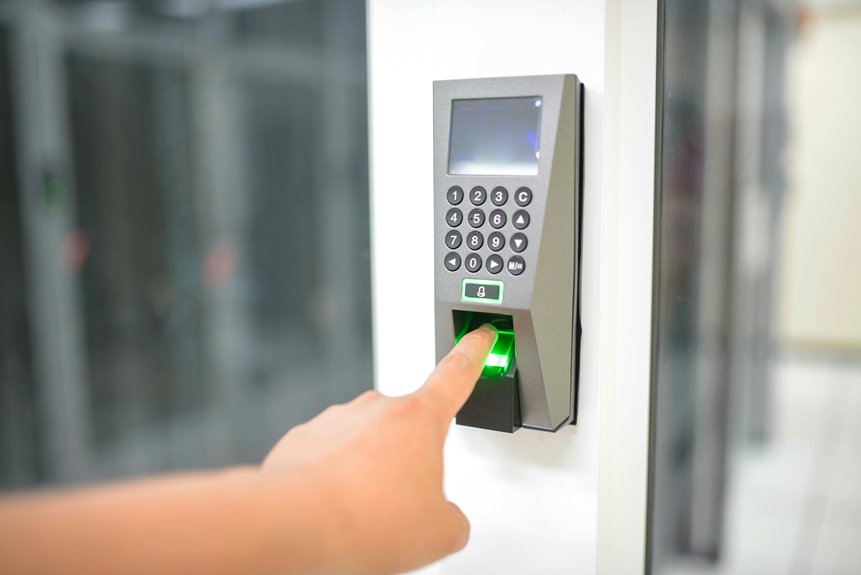
When you place your finger on a sensor, it doesn’t just “see” a print; it samples ridge and valley patterns, converts them into a digital template, and compares that template against a stored reference. You’ll find that the real story sits in the sensing method, matching threshold, and anti-spoofing checks. The difference between success and failure often comes down to details you can’t see yet.
What Is a Fingerprint Sensor
That makes it useful when you need secure access without friction. You can find these sensors in phones, laptops, door locks, and payment devices. Because they compare your print against a stored reference, they support reliable authentication while preserving privacy. In practice, they help you stay connected to systems that trust your presence.
How Fingerprint Sensors Capture a Print
When you place your finger on the sensor, it scans the ridge-and-valley pattern and records the surface geometry.
The scanner then converts that physical trace into a digital image by measuring reflected light, charge variation, sound echoes, or heat contrast, depending on the sensor type.
That image becomes the input for later feature extraction and authentication matching.
Finger Ridge Scanning
You place your fingertip so the sensor can sample ridge texture analysis and fingertip contour mapping with consistent pressure and orientation.
Each ridge edge, valley depth, and curved boundary forms a spatial signature that helps the system distinguish you from nearby users who share similar skin detail.
The sensor reads contrast, capacitance, heat, or echo response, depending on the hardware, and tracks fine surface variation across the contact area.
This process creates a reliable capture for your authentication flow, letting you belong to a trusted device group without sacrificing precision.
Accurate ridge scanning improves repeatability, lowers false rejects, and supports fast verification in daily use.
Image Conversion Process
Once your finger touches the sensor, it converts the ridge-and-valley pattern into a digital image using measuring light, charge, heat, or ultrasound response across the contact area. You’re not just pressing glass; you’re creating a measurable signal the system can trust. Optical image mapping uses reflected light to trace ridge peaks, while thermal contrast imaging records temperature differences between contact points. | Method | What it captures |
| — | — |
|---|---|
| Optical | Ridge reflection |
| Capacitive | Charge shifts |
| Thermal | Heat contrast |
| Ultrasound | Subsurface echoes |
Each mode resolves fine detail, then the processor normalizes brightness, contrast, and geometry. That cleaned image becomes the input for minutiae extraction and matching. Should your print be clear, the system can recognize you quickly, accurately, and with the confidence you deserve.
How Fingerprint Authentication Works
Fingerprint authentication works via converting your finger’s ridge-and-valley pattern into a digital template, then comparing that template against a stored baseline during verification.
You place your finger on the sensor, and the system captures enough detail to isolate minutiae points, such as ridge endings and bifurcations. It then encodes those features into a numerical template, not a raw image, so your biometric data stays limited and structured.
During login, the device checks whether the new scan statistically matches the enrolled template. When it does, you’re recognized as the rightful user, combining biometric possession factors with something you are.
Liveness spoof detection also checks for signs of a real finger, helping block replicas, photos, or other forged inputs before access is granted.
Capacitive, Optical, and Ultrasonic Sensors
The way a fingerprint system verifies you depends heavily on the sensor under the glass or reader. With capacitive sensing, you touch an electrode array, and sensor physics converts tiny charge shifts at ridge and valley contact into a map. Optical readers use light, prisms, and reflected contrast to capture a 2D ridge pattern with clean repeatability.
Ultrasonic sensors send high-frequency pulses into your finger and measure echoes, building a 3D subsurface profile that handles wet or worn skin better. In stronger platforms, multi modal sensing combines these approaches to improve capture quality and reduce missed reads. You get a more reliable match path, and the system keeps your experience fast, precise, and familiar, so you can belong in a secure workflow without extra friction.
Why Fingerprints Work for Login
Because your fingerprint is a stable biometric trait, login systems can use it as a fast inherence factor that’s hard to guess or share. You tap into login convenience because you don’t need to recall another secret or carry extra tokens. The sensor samples your ridge pattern, converts it into a secure template, and compares it with your enrolled baseline.
That process gives you identity confidence, since the system checks that the finger present is the one you registered. You also benefit from a strong fit between everyday use and security: the trait stays with you, but the template stays protected.
In group settings, that matters because you can join a trusted workflow without slowing others down, and your access feels both personal and consistent.
How Fingerprint Matching Grants Access
You place your finger on the sensor, and it captures ridge and valley data as a digital fingerprint image.
The system extracts minutiae and runs a matching algorithm that compares your live template with the stored baseline.
When the similarity score meets the approval threshold, it grants access; otherwise, it rejects the attempt.
Fingerprint Capture Process
When you place a finger on the sensor, the scanner captures the physical ridge-and-valley pattern and converts it into a digital image for analysis.
You then depend on sensor calibration to stabilize contrast, focus, or charge readings, so the device can separate your ridges from valleys with precision.
Environmental noise, such as moisture, skin oil, or temperature shifts, can distort the capture, so the system filters those effects before it records your print.
Optical units use reflected light, capacitive units measure charge changes, and ultrasonic units map subsurface echoes.
Thermal sensors read heat differentials.
In each case, you’re providing a biometric signal that the system can trust, helping you join a secure access flow without extra steps or passwords.
Template Matching Algorithm
After capture, the system converts your fingerprint into a compact numeric template and compares it against the stored baseline with statistical matching. You’re not sending an image; you’re testing how closely minutiae points, ridge flow, and orientation data align.
The algorithm computes distance metrics between corresponding features, then normalizes those scores to reduce noise from pressure, angle, or minor skin variation. Threshold tuning sets the acceptance boundary, so the engine balances strictness and usability for your device.
When your scan lands within the expected similarity range, the template pair behaves like a consistent biometric signature. This process lets you belong to the trusted user set without exposing raw fingerprint data, and it keeps each verification fast, repeatable, and analytically defensible.
Access Approval Decision
Once the template match finishes, the system turns similarity scores into an access decision. You’ll see your scan compared with the enrolled baseline, then the controller checks whether the score clears the access approval policy. If it does, the device opens, and you join the trusted session without entering a password. If it doesn’t, the system denies entry and might request another attempt. The biometric consent workflow matters because you’re authorizing each capture and the system logs that consent for compliance.
- Thresholds reduce false accepts and false rejects.
- Liveness checks verify that your finger is real.
- Audit logs preserve accountability for every decision.
This process keeps access fast, traceable, and secure, while helping you feel included in a protected environment.
Fingerprint Sensor Security: Strengths and Limits
Fingerprint sensors are secure because they compare a live scan against an encrypted numeric template rather than storing a raw fingerprint image, so the original biometric data can’t be reconstructed from the database. You benefit from template encryption, which limits exposure when storage is breached, and from liveness checks that reduce sensor spoofing by rejecting static molds, photos, or lifted prints.
Still, you shouldn’t treat the sensor as foolproof. Attackers can target the reader, the matching software, or the endpoint after authentication. Environmental noise, worn ridges, or partial contact can also lower match confidence and create false rejects.
For your team, the right model is layered trust: strong device security, secure enrollment, and monitored access policies. Fingertip data is private, but the system’s real strength comes from controlling risk, not eliminating it entirely.
Common Uses of Fingerprint Sensor Authentication
That layered security model is why fingerprint authentication shows up in everyday systems where quick, local verification matters. You use it to open smartphones, approve payments, and sign into computers without exposing passwords. In facilities, enterprise access control lets you enter restricted areas after the sensor matches your stored template. In shared environments, classroom attendance tracking records your presence fast and reduces manual errors.
- You verify identity at the edge, where the device can compare your scan locally.
- You support trust in groups that need fast, familiar access with minimal friction.
- You keep operations efficient because the same biometric token works across doors, apps, and attendance systems.
For you, this consistency builds a practical sense of inclusion while preserving control.
Why Fingerprint Sensors Sometimes Fail
Whenever the sensor can’t capture a clean ridge pattern, authentication fails because the system has too little reliable data to match against the stored template.
You can see this whenever sensor contamination blocks ridge detail or whenever wet fingers distort contact and scatter the signal.
Thin residues, dust, oil, and moisture reduce contrast, so the scanner extracts fewer minutiae points and the matching algorithm loses precision.
Should your skin be excessively dry, scarred, or pressed at an angle, the sampled image can diverge from the baseline template enough to trigger rejection.
Different sensor types also respond differently: optical units need clear light paths, while capacitive and ultrasonic designs depend on stable finger contact.
In each case, the device needs enough consistent biometric structure to recognize you accurately.
How To Improve Fingerprint Sensor Accuracy
You can improve fingerprint sensor accuracy while keeping the sensor surface clean, since oils, dust, and moisture distort ridge capture and reduce feature extraction quality.
Register multiple angles of the same finger to build a stronger baseline template that better matches real placement variation during authentication.
You should also update the device software, because sensor firmware and matching algorithms often refine image processing, liveness detection, and statistical matching performance.
Clean Sensor Surface
A clean sensor surface is essential for accurate fingerprint recognition because dust, oil, moisture, and residue can interrupt ridge capture and reduce contrast between the fingerprint’s ridges and valleys. You should treat sensor hygiene as a routine control, not an afterthought, provided that you want your device to verify you reliably. Use dust removal with a microfiber cloth, then check the surface for smears or trapped particles before each scan.
- Wipe gently to avoid scratches that scatter light or distort contact.
- Keep your finger clean and dry so contaminants don’t transfer back to the sensor.
- Inspect edges and recessed areas, where buildup often persists.
Whenever you maintain a clean interface, you support stronger signal quality, faster matching, and a consistent authentication experience that fits your workflow.
Register Multiple Angles
Registering multiple angles improves fingerprint sensor accuracy because no single finger placement captures every ridge, valley, and minutiae point with equal consistency.
You should enroll the same finger at slight rotations, shifts, and pressure levels so the template records more stable feature vectors. During multi angle enrollment, the sensor can compare angle diversity measurements and build a richer baseline from differing ridge intersections and contact patches.
That broader dataset reduces false rejects while you later place your finger imperfectly, which you will. Keep each scan clean, centered, and deliberate; the system benefits from varied but controlled inputs. Via capturing several orientations, you strengthen matching tolerance without sacrificing specificity, and you’ll feel more confident while the device recognizes you quickly and consistently.
Update Device Software
Updating device software often improves fingerprint sensor accuracy because firmware and OS patches refine image processing, liveness detection, and minutiae matching. You should install every firmware update promptly, since vendors tune scan thresholds and reduce false rejects. Check driver compatibility after each patch; mismatched drivers can distort timing, pressure sensing, or template transfer.
- Verify your device model and current build before updating.
- Reboot, then retest enrollment and verification in dry, clean conditions.
- Compare success rates before and after the update to confirm gains.
You’ll stay aligned with the latest biometric fixes and feel confident your sensor belongs in a secure, well-maintained system. In case accuracy still slips, clear cached biometrics, re-enroll, and contact support for device-specific calibration guidance.
Fingerprint Sensor Privacy and Data Storage
When your fingerprint is enrolled, the system should store only an encrypted numeric template, not the raw image, so the original biometric data can’t be reconstructed from memory. You should verify the vendor’s privacy policies before enrollment, because they define who can access the template and how your identity data is handled. Check data retention settings too; shorter retention lowers exposure if a device is lost or compromised.
A well-designed sensor keeps matching local, so your template stays on-device and doesn’t circulate across networks. That approach protects you and supports the trust your team or household needs. Provided the platform offers secure enclave storage, use it. You deserve control over your biometric record, and strong encryption, limited retention, and transparent governance make that control real.
Where Fingerprint Sensor Technology Is Headed
Fingerprint sensor technology is moving toward faster, more secure, and more versatile authentication, as in-display capacitive and ultrasonic systems improve both image quality and usability. You’ll see sensors pair with biometric fusion, combining fingerprint data with face or behavior signals to raise confidence without slowing access. Edge intelligence will let your device process minutiae locally, reducing latency and limiting exposure of templates.
- Higher-density in-display arrays will capture clearer ridge detail.
- Liveness checks will become more adaptive against spoofing.
- Encrypted templates will stay on-device, supporting private, seamless verification.
For you, this means authentication that feels instant yet remains rigorous, especially in shared environments where users want reliability and trust. As algorithms refine matching thresholds, you’ll belong to a system that recognizes you accurately while keeping your biometric identity tightly protected.
Frequently Asked Questions
How Long Does Fingerprint Authentication Usually Take?
Usually, fingerprint authentication takes about 0.2 to 1 second, so it feels almost immediate. The sensor reads the print, checks it against stored data, and unlocks the device quickly.
Can Identical Twins Have the Same Fingerprint Access?
No, identical twins do not share the same fingerprint access. Even with matching DNA, each twin has different ridge endings and minutiae, so each person needs a separate enrolled fingerprint template and their own verified credentials.
Do Fingerprint Sensors Work With Wet or Dirty Fingers?
Wet or dirty fingers often cause failed reads because moisture and residue blur the ridge pattern. Dry your finger and wipe the sensor clean, then try again for a more accurate scan.
Can Fingerprint Data Be Transferred Between Different Devices?
Usually, fingerprint data cannot move from one device to another. Each device stores its own encrypted template, so you need to enroll your fingerprint separately on every device.
What Happens if My Fingerprint Changes Over Time?
Fingerprint changes over time usually do not stop authentication. Modern sensors can update the stored biometric template as your skin changes from wear, scars, or dryness. If the print no longer matches well, you can scan it again and register a new reference securely.




