If you are choosing an external CD DVD drive in 2026, pick one that matches your devices, travel habits, and media needs.
Some models keep things simple with slim portability; others add card readers, hubs, or wider OS support.
The real difference often comes down to speed, power, and compatibility.
Here is how the top seven compare, and a few may surprise you.
| Lenovo Ultra Slim Portable DVD Burner DB65 |  | Best Compact Pick | Drive Type: External DVD burner | Connectivity: USB 2.0 | Disc Speed: 24x CD / 8x DVD | VIEW LATEST PRICE | Read Our Analysis |
| BPAKDU External CD/DVD Drive for Laptop with Carrying Case |  | Best With Case | Drive Type: External CD/DVD drive | Connectivity: USB 3.0 / USB-C | Disc Speed: 24x CD / 8x DVD | VIEW LATEST PRICE | Read Our Analysis |
| 5-in-1 External CD/DVD Drive with Card Reader |  | Best Eco-Friendly | Drive Type: External CD/DVD drive | Connectivity: USB-A / USB-C 3.0 | Disc Speed: 24x CD / 8x DVD | VIEW LATEST PRICE | Read Our Analysis |
| External USB 3.0 Type-C CD/DVD Drive |  | Best Plug-and-Play | Drive Type: External USB CD/DVD drive | Connectivity: USB 3.0 / USB-C | Disc Speed: 24x CD / 8x DVD | VIEW LATEST PRICE | Read Our Analysis |
| ROOFULL External CD DVD Drive for Laptop | Best Premium Pick | Drive Type: External CD/DVD drive | Connectivity: USB 3.0 / USB-C | Disc Speed: 24x CD / 8x DVD | VIEW LATEST PRICE | Read Our Analysis | |
| ORIGBELIE External USB 3.0 CD/DVD Drive with Ports |  | Best Hub Combo | Drive Type: External USB CD/DVD drive | Connectivity: USB 3.0 / USB-C | Disc Speed: 24x CD / 8x DVD | VIEW LATEST PRICE | Read Our Analysis |
| 7-in-1 External DVD/CD Drive for Laptop | 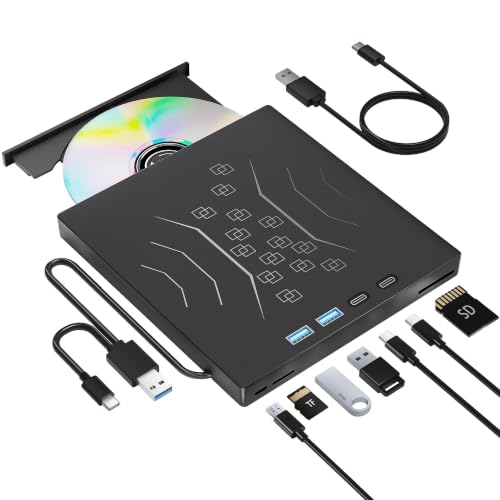 | Best 7-in-1 Hub | Drive Type: External DVD/CD drive | Connectivity: USB 3.0 / USB-C | Disc Speed: 24x CD / 8x DVD | VIEW LATEST PRICE | Read Our Analysis |
More Details on Our Top Picks
Lenovo Ultra Slim Portable DVD Burner DB65
If you want a drive that is easy to carry and quick to use, the Lenovo Ultra Slim Portable DVD Burner DB65 is a smart pick. You can slip its ultra slim, lightweight body into a bag for travel or home use without hassle. It writes CDs at 24x and DVDs at 8x, so you move files fast and work efficiently. Lenovo includes software, so you can start right away. You will also get broad compatibility with Mac, Windows, and media players. Connect it through USB 2.0, and use it with Windows 7 or later.
- Drive Type:External DVD burner
- Connectivity:USB 2.0
- Disc Speed:24x CD / 8x DVD
- Compatibility:Mac / Windows
- Portability:Ultra-slim
- Plug-and-Play:Included software
- Additional Feature:Pre-loaded software
- Additional Feature:24x CD write speed
- Additional Feature:8x DVD-R speed
BPAKDU External CD/DVD Drive for Laptop with Carrying Case
BPAKDU’s B31-Y2 external CD/DVD drive is a smart pick for anyone who needs a slim, portable optical drive that works with laptops, Macs, and PCs. The black, 9-ounce unit includes a carrying case and supports USB 3.0 Type-A and Type-C with plug-and-play setup. It reads, writes, rewrites, records, and rips CDs and DVDs, and it handles software installs, media burns, and camera imports. You can count on wide compatibility, from Windows 7 through 11 to Linux and M1 or M2 Macs, plus 12 months of warranty coverage.
- Drive Type:External CD/DVD drive
- Connectivity:USB 3.0 / USB-C
- Disc Speed:24x CD / 8x DVD
- Compatibility:Mac / Windows / Linux
- Portability:Lightweight, slim
- Plug-and-Play:Plug-and-play
- Additional Feature:Carrying case included
- Additional Feature:4-port USB hub
- Additional Feature:SD/TF card slots
5-in-1 External CD/DVD Drive with Card Reader
The 5-in-1 External CD/DVD Drive with Card Reader is a solid choice if you want one compact device that does more than just read and burn discs. It supports CD and DVD playback, burning, and rewritable media, and includes two USB 2.0 ports, an SD slot, and a TF slot for fast card transfers. It is compatible with Windows, macOS, and Linux, and connects via USB-A or USB-C with plug-and-play ease. Its carbon-neutral build, recyclable packaging, and energy-efficient design make it a more responsible option. A power cable is included for use when a port cannot supply enough power.
- Drive Type:External CD/DVD drive
- Connectivity:USB-A / USB-C 3.0
- Disc Speed:24x CD / 8x DVD
- Compatibility:Mac / Windows / Linux
- Portability:Slim, compact
- Plug-and-Play:Plug-and-play
- Additional Feature:Climate Pledge Friendly
- Additional Feature:5-in-1 hub
- Additional Feature:Recyclable packaging
External USB 3.0 Type-C CD/DVD Drive
With USB-A and USB-C support, this external CD/DVD drive is a smart pick for anyone who wants a simple plug-and-play setup for a laptop or desktop. You can burn CDs at up to 24x and DVDs at up to 8x, while enjoying 5 Gbps transfer speeds for music, movies, software installs, and disc burning. It works with PC and Mac, needs no driver, and handles many file types. At just 0.79 inches thick and 0.55 pounds, you can toss it in a bag. Built-in cable storage and helpful after-sales support make it even easier to use.
- Drive Type:External USB CD/DVD drive
- Connectivity:USB 3.0 / USB-C
- Disc Speed:24x CD / 8x DVD
- Compatibility:PC / Mac
- Portability:Lightweight, compact
- Plug-and-Play:Plug-and-play
- Additional Feature:5Gbps transfer speed
- Additional Feature:Built-in cable
- Additional Feature:No driver required
ROOFULL External CD DVD Drive for Laptop
ROOFULL’s External CD DVD Drive for Laptop is a smart pick if you want one compact unit that handles more than basic disc playback. It can read, write, burn, and rip CDs and DVDs, and it also adds SD and microSD card slots plus extra USB ports. You can use it with USB-A or USB-C devices, and it runs plug-and-play on Windows, macOS, and Linux. It supports fast USB 3.0 transfers, includes extra power for low-port setups, and ships with a carrying case. You will not get Blu-ray support, but you will get strong all-around utility.
- Drive Type:External CD/DVD drive
- Connectivity:USB 3.0 / USB-C
- Disc Speed:24x CD / 8x DVD
- Compatibility:Windows / Mac / Linux
- Portability:Slim, compact
- Plug-and-Play:Plug-and-play
- Additional Feature:Protective carrying case
- Additional Feature:8-in-1 multifunction
- Additional Feature:Built-in card readers
ORIGBELIE External USB 3.0 CD/DVD Drive with Ports
If you want a slim, portable optical drive that does more than just read discs, the ORIGBELIE External USB 3.0 CD/DVD Drive with Ports is a smart fit. It delivers USB 3.0 speeds up to 5 Gbps, and supports CD±R/RW, DVD±R/RW, DVD-RAM, and dual-layer discs. It works with Windows, Mac, and Linux systems, and handles music, movies, backups, and software installs. You also get a 6-in-1 hub with USB and card slots, a built-in cable, quiet operation, and a travel bag.
- Drive Type:External USB CD/DVD drive
- Connectivity:USB 3.0 / USB-C
- Disc Speed:24x CD / 8x DVD
- Compatibility:Mac / Windows / Linux
- Portability:Ultra-slim
- Plug-and-Play:Plug-and-play
- Additional Feature:6-in-1 hub
- Additional Feature:RGB LED indicator
- Additional Feature:Storage bag included
7-in-1 External DVD/CD Drive for Laptop
The 7-in-1 External DVD/CD Drive for Laptop is a practical choice when you need one compact device that does more than play discs. It supports USB 3.0 and Type-C, and is backward compatible, allowing transfers up to 5 Gbps, about 10 times faster than USB 2.0. It reads DVDs at 8x and CDs at 24x, and it handles burning, reading, and +/-RW tasks. The built-in hub adds USB and Type-C ports plus SD and TF card slots. Plug it in, enjoy quiet operation, and use it with Windows, Mac, or Linux.
- Drive Type:External DVD/CD drive
- Connectivity:USB 3.0 / USB-C
- Disc Speed:24x CD / 8x DVD
- Compatibility:Mac / Windows / Linux
- Portability:Ultra-slim, lightweight
- Plug-and-Play:Plug-and-play
- Additional Feature:7-in-1 hub
- Additional Feature:Skip-proof rubber pad
- Additional Feature:Embedded data cable
Factors to Consider When Choosing External Cd Dvd Drives
When choosing an external CD/DVD drive, verify its compatibility with your devices and with the types of discs you plan to use. Compare read and write speeds, connection options, and portability to ensure it fits your setup and travel needs. If you want extra convenience, consider models with hub features that add additional useful ports.
Compatibility Range
Compatibility range matters because an external CD DVD drive has to work with both your device and your operating system. Check OS support first, since some drives work with Windows, macOS, and Linux, while others skip ChromeOS, tablets, or certain Surface models. Then match the drive to your device type; a laptop, desktop, all-in-one, mini PC, or MacBook may need different compatibility. You also need the right connection standard, whether that is USB 3.0, USB-C, USB-A, or older USB 2.0, because the drive cannot help if it will not plug in. Verify your OS version too, and if you use a Mac, confirm support for your specific macOS generation or Apple chip model.
Read And Write Speeds
Speed matters more than you might think, especially if you burn discs often. You should check both read and write ratings before you buy, since a drive can handle CDs at 24x yet only manage DVDs at 8x or less. Higher write speeds save time, and some external models reach 24x for CDs and 8x for DVDs, which helps with large jobs. If you copy or burn discs regularly, faster data transfer, such as 5 Gbps, can help the drive sustain its top optical speed. Don’t overlook slower media, either; DVD-RAM and dual-layer discs often run at reduced speeds, such as 3x or 2.4x. For everyday use, standard 24x CD and 8x DVD performance may be enough, but faster specs mean less waiting.
Connection Options
Connection options can make a bigger difference than you might expect, because the right port setup keeps an external CD/DVD drive easy to use on multiple devices. Choose a drive with both USB-A and USB-C support if you move between newer laptops and older computers, since that saves you from hunting for adapters. Also check for USB 3.0, as it can deliver up to 5 Gbps; USB 2.0 is much slower. If your computer may not provide enough power through a single port, choose a model with an extra power cable for steadier operation. Some drives even add USB hub features, extra ports, or card slots, allowing you to connect more gear without clutter.
Portability And Size
When you choose an external CD/DVD drive for regular travel, size and weight matter more than they might at first. Look for an ultra-slim model that will not crowd your bag or add much bulk. Some portable drives weigh just 0.55 to 0.72 pounds and fit easily in a handbag or backpack. Check the dimensions as well. Compact drives often measure about 6.0 to 6.1 inches long, 5.6 to 5.9 inches wide, and under 0.8 inches thick. A built-in cable can help you pack faster and keep everything streamlined. Also look for a carrying case or storage bag, which protects the drive on the go. Rounded, minimalist designs usually slip into a laptop bag more easily than bulky ones and save desk space.
Extra Hub Features
Extra hub features can turn an external CD/DVD drive into a handy all-in-one accessory, giving you USB-A, USB-C, SD, and TF ports for more than just disc reading and burning. Choose a 7-in-1 or 8-in-1 model if you want to plug in flash drives, keyboards, mice, hard drives, or memory cards while you work. Card-reader hubs are especially useful when you need to import photos and videos from a camera or phone, and some SD and TF slots can move files quickly alongside disc tasks. Before you buy, check whether the extra ports share bandwidth with the drive, and whether SD and TF slots operate independently. A built-in hub also helps when your laptop has few ports, and plug-and-play support keeps setup simple.
Power Requirements
Power is a key factor to check, since some external CD/DVD drives run entirely from your computer’s USB port while others need an extra power cable or a 5V adapter when the port cannot supply enough current. Verify whether your laptop or desktop can power the drive on its own, especially with older ports or low-power machines. USB 3.0 provides plenty of bandwidth, but it does not guarantee sufficient electrical power. If you burn discs often or use the drive through hubs, a powered connection can improve stability. Models that work without an adapter are easier to pack for travel. If the drive adds extra USB functions, those accessories can increase power needs, so check before you buy to avoid surprises later.
Warranty And Support
Warranty and support matter because they can save you time and frustration after you buy an external CD/DVD drive. Check the warranty length first; some models cover only one year, while others provide two years of manufacturer protection. Also look for clear after-sales help, including technical support, free replacement options, and contact details in the manual. Make sure the brand explains troubleshooting for common problems, such as low USB power, driver conflicts, or playback and burning errors. Drives with plug-and-play setup and no driver requirement usually need less support and work more reliably. Finally, confirm the return policy, replacement terms, and which accessories the package covers so you know exactly what you can send back if something goes wrong.
Frequently Asked Questions
Do External CD DVD Drives Work With Gaming Consoles?
No. External CD or DVD drives generally do not work with gaming consoles. Only consoles that explicitly list support for external optical drives will accept them. If your console does not support such drives, use the console’s built-in media options instead.
Can I Boot a Computer From an External CD DVD Drive?
Yes, you can boot a computer from an external CD/DVD drive if your BIOS or UEFI supports USB boot. For example, you might start a Windows installer disc by selecting that drive in the boot menu.
Do These Drives Need Extra Power to Operate?
Yes, some do. Lightweight drives are usually powered through USB, but bus-powered models can struggle. If your drive includes an extra USB plug or an AC adapter, use it for reliable operation and disc reading.
Are External CD DVD Drives Compatible With Tablets?
Yes. You can use external CD and DVD drives with many tablets if the tablet supports USB OTG or USB-C and provides enough power. You may need the correct adapter, and some tablets will not work with certain disc formats.
Can I Use One Drive With Multiple Computers?
Yes. You can share a single external drive among multiple computers by plugging it into whichever machine you need. You may need to reinstall software; your discs and files will function normally.