

You may not realize that the best internet weather stations today do more than show temperature and rainfall; they can send alerts to your phone and adjust to changing conditions in real time.
If you want a clearer view of your home, garden, or farm, the right model can make a significant difference.
Below is a comparison of the top seven choices for 2026 and the features that matter most.
| Weather Station Indoor Outdoor Thermometer with Atomic Clock |  | Best Non-WiFi | Connectivity: RF wireless | Display: 7.5-inch LCD | Temperature: Indoor/outdoor | VIEW LATEST PRICE | Read Our Analysis |
| Sainlogic WiFi Smart Weather Station with Large Display |  | Best Smart Pick | Connectivity: Wi‑Fi/Bluetooth | Display: 8.5-inch LCD | Temperature: Indoor/outdoor | VIEW LATEST PRICE | Read Our Analysis |
| La Crosse Wireless Wi-Fi Weather Wind Station (V21-WTH) | 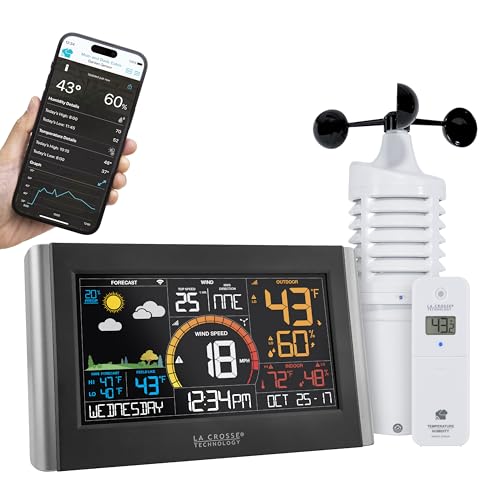 | Best Wind Monitoring | Connectivity: Wi‑Fi | Display: Large LCD | Temperature: Indoor/outdoor | VIEW LATEST PRICE | Read Our Analysis |
| VEVOR YT60234 WiFi 7-in-1 Weather Station |  | Best Waterproof Sensor | Connectivity: Wi‑Fi | Display: 7.5-inch color LCD | Temperature: Indoor/outdoor | VIEW LATEST PRICE | Read Our Analysis |
| OBET Wireless Weather Station with 3 Sensors |  | Best Multi-Sensor | Connectivity: Wireless RF | Display: 7.68-inch color LCD | Temperature: Indoor/outdoor | VIEW LATEST PRICE | Read Our Analysis |
| LFF Wireless Indoor Outdoor Weather Station with Sensors |  | Best Touchscreen | Connectivity: RF wireless | Display: 7.5-inch touch LCD | Temperature: Indoor/outdoor | VIEW LATEST PRICE | Read Our Analysis |
| Sainlogic 12-in-1 Wireless Weather Station (SA6) |  | Best All-Around | Connectivity: Wireless | Display: 6.5-inch color LCD | Temperature: Indoor/outdoor | VIEW LATEST PRICE | Read Our Analysis |
More Details on Our Top Picks
Weather Station Indoor Outdoor Thermometer with Atomic Clock
If you want a weather station that is easy to read at a glance, the U UNNI indoor/outdoor thermometer with atomic clock is a strong pick for your home, office, RV, or garden. You will see indoor and outdoor temperature, humidity, forecast, dew point, heat index, barometer, comfort, tide, moon phase, plus heat, dew, and mold alerts on its 7.5 inch always-on LCD/LED display. Large front digits and adjustable brightness make checks simple. The wireless sensor updates every 30 seconds, reaches 330 feet, and stays accurate within 1 °C. Atomic WWVB syncing and backup power keep time reliable.
- Connectivity:RF wireless
- Display:7.5-inch LCD
- Temperature:Indoor/outdoor
- Humidity:Indoor/outdoor
- Forecast:Real-time
- Sensor:Included
- Additional Feature:Atomic clock sync
- Additional Feature:Dew point reading
- Additional Feature:Moon phase display
Sainlogic WiFi Smart Weather Station with Large Display
The Sainlogic WiFi Smart Weather Station with Large Display is a strong pick if you want a connected, easy-to-read home weather system with real-time alerts and long-term tracking. You can check Weatherseed® AI forecasts, monitor live conditions, and get app or email alerts for temperature, humidity, and pressure changes. Its 8.5-inch LCD stays clear from multiple angles, and the Weathered App lets you sync in three steps. You can track 14-in-1 data, review two years of history, export charts, and power the outdoor sensor with solar energy by day and batteries at night.
- Connectivity:Wi‑Fi/Bluetooth
- Display:8.5-inch LCD
- Temperature:Indoor/outdoor
- Humidity:Monitoring
- Forecast:AI forecast
- Sensor:7-in-1
- Additional Feature:Weatherseed AI forecast
- Additional Feature:2-year history
- Additional Feature:Excel export
La Crosse Wireless Wi-Fi Weather Wind Station (V21-WTH)
With built-in Wi‑Fi, AccuWeather forecasting, and wind-speed history tracking from one hour to a full year, the La Crosse Wireless Wi‑Fi Weather Wind Station (V21-WTH) is a strong pick for homeowners who want detailed local weather data without adding bridges, gateways, or messy wiring. You get indoor and outdoor temperature, humidity, dynamic forecast icons, and customizable alerts. The large LCD is easy to read, and the included wind, rain, and temperature/humidity sensors cover key conditions. Connect it to the free La Crosse View app on 2.4 GHz Wi‑Fi for added internet time, NWS data, and remote convenience.
- Connectivity:Wi‑Fi
- Display:Large LCD
- Temperature:Indoor/outdoor
- Humidity:Indoor/outdoor
- Forecast:AccuWeather
- Sensor:Multiple sensors
- Additional Feature:Wind speed history
- Additional Feature:AccuWeather forecasting
- Additional Feature:NWS weather data
VEVOR YT60234 WiFi 7-in-1 Weather Station
VEVOR’s YT60234 WiFi 7-in-1 Weather Station is a solid choice if you want one compact setup that tracks wind speed, wind direction, rain, temperature, humidity, light, UV, and air pressure in real time. The 7.5-inch color LCD also displays wind chill, dew point, moon phase, and calendar data. Wi-Fi support lets you send readings to Weather Underground or WeatherCloud, and the IPX6 sensor stands up to heavy rain. Solar power with backup batteries and a 150 meter range make it practical for garden use.
- Connectivity:Wi‑Fi
- Display:7.5-inch color LCD
- Temperature:Indoor/outdoor
- Humidity:Monitoring
- Forecast:Internet forecast
- Sensor:7-in-1
- Additional Feature:Weather Underground support
- Additional Feature:Automatic internet time
- Additional Feature:IPX6 waterproof sensor
OBET Wireless Weather Station with 3 Sensors
If you want to monitor multiple spots at once, the OBET Wireless Weather Station with 3 Sensors is a strong pick for home, garden, garage, or RV use. You get a large 7.68 inch color LCD that is easy to read, plus indoor and outdoor temperature, humidity, barometric pressure, trends, max and min records, and a 12 hour forecast. With three wireless sensors you can track different areas up to 500 feet away. It also provides frost alerts, snowflake warnings, and customizable temperature and humidity alerts. USB or battery power keeps it flexible, and brightness adjusts to suit your space.
- Connectivity:Wireless RF
- Display:7.68-inch color LCD
- Temperature:Indoor/outdoor
- Humidity:Monitoring
- Forecast:12-hour forecast
- Sensor:3 sensors
- Additional Feature:Three-location monitoring
- Additional Feature:Frost alert
- Additional Feature:12-hour forecast
LFF Wireless Indoor Outdoor Weather Station with Sensors
The LFF Wireless Indoor Outdoor Weather Station with Sensors is a solid choice if you want a compact, easy-to-read home weather hub that tracks conditions in up to three outdoor locations at once. You can monitor indoor temperature and humidity, plus three remote sensors over a 330 foot range. The 7.5 inch full color touch screen displays forecasts, barometric pressure, comfort icons, and max/min records. It also provides an atomic clock, dual alarms, a calendar, and seven time zones. Use AC power for continuous viewing, or batteries for a portable setup.
- Connectivity:RF wireless
- Display:7.5-inch touch LCD
- Temperature:Indoor/outdoor
- Humidity:Indoor/outdoor
- Forecast:6–12 hour forecast
- Sensor:3 sensors
- Additional Feature:Dual alarms
- Additional Feature:Seven time zones
- Additional Feature:Comfort level icon
Sainlogic 12-in-1 Wireless Weather Station (SA6)
Sainlogic’s 12-in-1 Wireless Weather Station (SA6) stands out for anyone who wants a large, easy-to-read display without giving up detailed outdoor monitoring. You get a 6.5-inch HD color LCD with high-contrast visuals, oversized fonts, and adjustable backlight, so you can check conditions in daylight or low light. It tracks indoor and outdoor temperature, humidity, pressure, wind, rain, dew point, moon phase, and forecasts. Its wireless sensor connects reliably across gardens, farms, and orchards. You can mount it easily, but it does not support WiFi.
- Connectivity:Wireless
- Display:6.5-inch color LCD
- Temperature:Indoor/outdoor
- Humidity:Monitoring
- Forecast:Weather forecast
- Sensor:Outdoor sensor
- Additional Feature:Professional rain gauge
- Additional Feature:Wind gust tracking
- Additional Feature:Monthly rainfall records
Factors to Consider When Choosing Internet Weather Stations
When choosing an internet weather station, check the connectivity options, display readability, sensor range, data update frequency, and which weather metrics it tracks. Choose a system that connects reliably and provides fresh data often enough for your needs. Ensure the screen is easy to read, and the sensors cover the specific area you want to monitor.
Connectivity Options
Connectivity is one of the biggest factors to weigh because it determines how your weather station shares data. Choose a model that matches how you want to use it: Wi‑Fi, Bluetooth, or radio-frequency wireless. That choice decides whether you will see readings only on a local display or also in an app, receive email alerts, and store data in the cloud. If you want internet access, check the Wi‑Fi band carefully, because many stations work only on 2.4 GHz and will not join 5 GHz routers. Also confirm whether you need a hub, bridge, or gateway. Some systems connect directly to Wi‑Fi, while others rely on local sensors only. Finally, make sure the sensor range fits your home and yard, and prefer app or web syncing for remote monitoring, alerts, graphs, and data export.
Display Readability
If you check your station often, display readability should be high on your list. Choose a screen size that fits where you plan to view it. Larger displays, around 7.5 to 8.5 inches, usually make data easier to scan quickly. Prioritize high-contrast colors and oversized digits so you can read temperatures, humidity, and forecasts at a glance, even in dim light. Adjustable backlight or dimming settings help keep the screen clear in a bright room, and comfortable at night. An always-on display saves time when you want instant access without pressing buttons. Also choose a layout with neatly separated sections, so you can find indoor and outdoor readings and the time fast and without confusion.
Sensor Range
Sensor range is the bridge between your outdoor sensor and the base unit, and it matters more than you might think. You want enough distance to place the sensor where it will capture true conditions, whether that is a backyard, garden, roof, orchard, or another separate spot. Many internet weather stations offer about 100 m to 150 m in open space, but real-world layouts usually cut that down. Walls, trees, metal surfaces, and heavy rain can weaken the signal, so do not trust the spec alone. Also consider whether your station uses radio frequency or Wi‑Fi syncing, since the connection type can affect stability. Pick a model with range that comfortably exceeds your actual setup, giving you room for interference and future placement changes without sacrificing reliability.
Data Update Frequency
Data update frequency determines how quickly your internet weather station reflects changing conditions, and faster refreshes can matter when weather turns suddenly. Update intervals commonly range from about 30 seconds to 5 minutes, so choose one that matches how closely you want to watch conditions. If storms, rapid temperature swings, or shifting wind are important to you, faster updates provide more timely readings. Slower cycles still work for general monitoring and long-term trends, but they will not capture brief changes as well. When comparing models, verify whether the station sensors and the app or cloud dashboard refresh at the same pace. If you depend on alerts or forecasting, shorter update times generally help you react sooner and make better decisions.
Weather Metrics
Once you know how often a station updates, the next question is what it actually measures. Pick a model that tracks the readings you care about most, whether that is indoor and outdoor temperature, humidity, barometric pressure, dew point, heat index, wind speed and direction, rainfall, UV, sunlight, moon phase, or comfort indicators. If you want more than the basics, look for forecast data and derived metrics such as feels-like temperature, wind chill, pressure trends, frost or mold alerts, and high or low records. For outdoor use, check whether it supports multiple sensors so you can compare conditions in different spots. Also review each metric’s range and accuracy; good stations often list temperature within about ±1 °C, rainfall within a few millimeters, and humidity within about ±5%.
Power Backup
Power backup matters because a weather station should keep time and save your settings even when the main adapter fails. Choose a model with batteries or built-in battery storage so it can ride through outages without losing data. If you want the display on all the time, make sure it runs on AC power and switches cleanly to battery mode when the cord goes dead. For wireless systems, check whether the outdoor sensor also has backup power or solar support, because readings can stop if that sensor loses power overnight or during cloudy stretches. Also verify whether backup batteries come in the box or need separate purchase. Finally, look for clear behavior in each mode, such as a dimming screen, so you can judge how long it will last.
Smart Alerts
Smart alerts help you react fast when conditions cross the limits you set, whether that is temperature, humidity, barometric pressure, wind, or rainfall. You will want a station that sends instant notifications through a mobile app or email, so you can respond even when you are away from the display. Look for customizable limits across multiple variables, so you can set comfort alerts indoors, safety warnings outdoors, or freeze alerts for plants and pipes. Regular updates matter too, because alerts work best when the system refreshes readings every 30 seconds to 5 minutes. Choose a model that shows both the live reading and the threshold that triggered the warning, since that helps you quickly understand what changed and why you were notified.
Setup Ease
Setup ease matters because you want your weather station up and running without a long, frustrating install. Look for guided setup menus and app pairing that walk you through each step, so you can connect fast without guesswork. A station that joins standard 2.4 GHz Wi Fi usually beats one that needs a hub, bridge, or gateway. You will also want wireless sensors that auto sync to the display and use clearly labeled channels, which helps you avoid mix ups when you add outdoor units. Automatic internet time sync and daylight saving adjustment cut down on manual clock work. Finally, choose a display with organized sections, adjustable brightness, and controls you can reach easily, so you can confirm pairing and data placement with confidence right away.
Frequently Asked Questions
How Accurate Are Internet Weather Stations Compared With Official Weather Services?
They are generally reliable for local conditions, but gaps remain. Rely on official services for calibrated accuracy. Compare both sources, since your station’s sensor placement, maintenance, and shielding can skew readings.
Can These Stations Upload Data to Weather Underground Automatically?
Yes. Many stations can upload to Weather Underground automatically if you connect them via Wi-Fi and enter your station ID and password. You will need a compatible model, and some apps still require additional setup.
Do Internet Weather Stations Work During Power Outages?
Yes, they can, if you have backup power. You will lose Wi-Fi and cloud uploads when electricity fails, but battery backed sensors or a UPS can keep readings coming until service returns.
How Far Can Remote Sensors Transmit Reliably Outdoors?
Most outdoor remote sensors reach 100 to 300 feet reliably, but obstacles reduce that range quickly. You will get better range with a clear line of sight, stronger antennas, and lower interference. Walls, metal, and trees can shrink the range dramatically.
Are Internet Weather Station App Subscriptions Usually Required?
Not usually. Basic features are often available for free, but a subscription is required for advanced forecasts, historical data, alerts, or cloud storage. Check each brand, as plans and limits vary widely.




