

You might think Bluetooth adapters are all the same, but they’re not – and choosing the wrong one can ruin range, latency, or compatibility. You’ll want options that work across laptops, phones, airplanes, and older aux systems, with codecs and drivers that suit gaming or high‑res audio. I’ll walk you through six top choices for 2026 and the key tradeoffs so you can pick the right adapter for your setup – starting with long‑range USB sticks.
| Long-Range USB Bluetooth 5.3 Adapter for PC |

| Best for Range | Bluetooth Version: Bluetooth 5.3 | Primary Function: PC Bluetooth adapter (dongle) | Battery / Power: USB-powered (no battery) | CHECK LATEST PRICE | Read Our Analysis |
| LAICOMEIN Bluetooth 3.5mm Aux Audio Receiver |
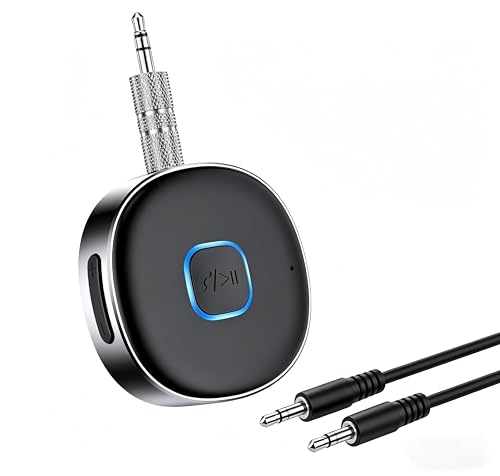
| Best for Cars | Bluetooth Version: Bluetooth 5.3 | Primary Function: 3.5mm aux Bluetooth audio receiver | Battery / Power: Built-in rechargeable battery – up to 16 hours | CHECK LATEST PRICE | Read Our Analysis |
| TP-Link Archer T2UB Nano AC600 USB Wi‑Fi Adapter |

| Best Dual-Purpose Pick | Bluetooth Version: Bluetooth 4.2 | Primary Function: USB Wi‑Fi + Bluetooth adapter (dongle) | Battery / Power: USB-powered (no battery) | CHECK LATEST PRICE | Read Our Analysis |
| UGREEN Bluetooth 6.0 Airplane Transmitter Receiver Adapter |

| Best for Travel | Bluetooth Version: Bluetooth 6.0 | Primary Function: Bluetooth transmitter + receiver (dual-mode) | Battery / Power: Built-in rechargeable battery – up to 16–18 hours (mode-dependent) | CHECK LATEST PRICE | Read Our Analysis |
| TP-Link USB Bluetooth 5.4 Adapter (UB500) |

| Best for Windows PCs | Bluetooth Version: Bluetooth 5.4 | Primary Function: PC Bluetooth adapter (dongle) | Battery / Power: USB-powered (no battery; nano USB) | CHECK LATEST PRICE | Read Our Analysis |
| Twelve South AirFly SE Bluetooth Audio Transmitter Adapter |

| Best for Air Travel | Bluetooth Version: (version not specified; modern Bluetooth transmitter – implied current-gen) | Primary Function: Bluetooth audio transmitter | Battery / Power: Built-in rechargeable battery – over 20 hours; usable while charging | CHECK LATEST PRICE | Read Our Analysis |
More Details on Our Top Picks
Long-Range USB Bluetooth 5.3 Adapter for PC
If you need reliable wireless range for multiple PC peripherals, this Long-Range USB Bluetooth 5.3 Adapter is your best bet. You’ll get Bluetooth 5.3 + EDR with dual-mode BR/EDR and BLE for low power, fast 3 Mbps throughput, and improved anti-interference. It’s Class 1 with an extra-long antenna, offering up to 328 ft (100 m) in open areas, though walls and interference will reduce that. Plug-and-play on Windows 11/10/8.1 lets you connect up to five devices-keyboards, mice, headsets, speakers, printers-quickly. Note it won’t work with macOS, Linux, consoles, car stereos, or most TVs.
- Bluetooth Version:Bluetooth 5.3
- Primary Function:PC Bluetooth adapter (dongle)
- Battery / Power:USB-powered (no battery)
- Simultaneous Connections:Up to 5 devices simultaneously
- Range:Up to 328 ft / 100 m (open area, Class 1)
- Compatibility / Target Devices:Windows PCs only (Windows 8.1/10/11); not Mac/Linux/console/TV
- Additional Feature:Class 1 extra antenna
- Additional Feature:Up to 3 Mbps throughput
- Additional Feature:Plug-and-play (no drivers)
LAICOMEIN Bluetooth 3.5mm Aux Audio Receiver
Choose the LAICOMEIN Bluetooth 3.5mm Aux Audio Receiver when you want a compact, travel-ready way to add reliable Bluetooth 5.3 connectivity to any aux-equipped car stereo, home system, or wired headphones. You pair smartphones, tablets, or laptops quickly, and it remembers the last device for automatic reconnection. Dual-connection support lets two sources stay linked, while the built-in mic handles hands-free calls using the multi-function button to answer, end, or redial. Volume controls adjust music directly. The tiny 0.5 oz unit runs up to 16 hours per charge, fully charging in about two hours, and includes customer support.
- Bluetooth Version:Bluetooth 5.3
- Primary Function:3.5mm aux Bluetooth audio receiver
- Battery / Power:Built-in rechargeable battery – up to 16 hours
- Simultaneous Connections:Dual-device connection (2 devices)
- Range:Up to 33 ft (10 m) without obstacles
- Compatibility / Target Devices:Any device with 3.5mm aux input; pairs with smartphones/tablets/PCs
- Additional Feature:Built-in microphone
- Additional Feature:16-hour battery life
- Additional Feature:Dual-device simultaneous pairing
TP-Link Archer T2UB Nano AC600 USB Wi‑Fi Adapter
Small and travel-ready, the TP‑Link Archer T2UB Nano AC600 gives you dual-band Wi‑Fi and Bluetooth 4.2 in a tiny USB stick, perfect for laptops or desktops that need wireless upgrades without bulky dongles. You get AC600 speeds-up to 200 Mbps on 2.4 GHz and 433 Mbps on 5 GHz-and Bluetooth 4.2 compatible with older Bluetooth standards. It adds Bluetooth to non-Bluetooth PCs and lets you pair PS4/Xbox controllers to a PC, though Bluetooth won’t work with Mac, Linux, TV, or Windows 8. To avoid conflicts, disable internal Bluetooth/Wi‑Fi before using the adapter. WPA3 enhances security.
- Bluetooth Version:Bluetooth 4.2
- Primary Function:USB Wi‑Fi + Bluetooth adapter (dongle)
- Battery / Power:USB-powered (no battery)
- Simultaneous Connections:Standard single Bluetooth (supports peripherals; exact simultaneous count not specified)
- Range:Typical Bluetooth range (not explicitly stated; nano adapter for PC)
- Compatibility / Target Devices:Windows PCs (Bluetooth for PC use only; not Mac/Linux/TV; Wi‑Fi supports Windows 7–11)
- Additional Feature:Dual-band Wi‑Fi (AC600)
- Additional Feature:Nano-sized travel design
- Additional Feature:WPA3 security support
UGREEN Bluetooth 6.0 Airplane Transmitter Receiver Adapter
For travelers who want to turn airline or hotel audio into a wireless feed, the UGREEN Bluetooth 6.0 Airplane Transmitter Receiver Adapter is ideal – it doubles as a transmitter and receiver so you can send TV or airplane sound to two pairs of AirPods or make older car/stereo systems accept Bluetooth. You’ll switch modes before use: TX sends audio to headphones, RX accepts phone audio into non‑Bluetooth speakers. Bluetooth 6.0 gives faster, more stable connections and better A/V sync up to 10 meters. Battery lasts up to 16 hours (TX) or 18 hours (RX). A mic handles calls; reset by holding the multifunction button for 10 seconds. Compatible with AirPods and AirPods Pro; not compatible with AirPods Pro 2 or AirPods 4.
- Bluetooth Version:Bluetooth 6.0
- Primary Function:Bluetooth transmitter + receiver (dual-mode)
- Battery / Power:Built-in rechargeable battery – up to 16–18 hours (mode-dependent)
- Simultaneous Connections:Up to 2 headphones (simultaneous)
- Range:Up to 10 m (≈33 ft)
- Compatibility / Target Devices:Headphones/AirPods (incompatible with some AirPods Pro 2/4 variants); TVs, phones, computers (mode-dependent)
- Additional Feature:TX/RX dual-mode operation
- Additional Feature:Connects two headphones
- Additional Feature:Reset via long-press
TP-Link USB Bluetooth 5.4 Adapter (UB500)
If you want a simple, low-profile way to add modern Bluetooth to a Windows PC, the TP‑Link UB500 delivers Bluetooth 5.4 speeds and range in a nano USB stick you can leave plugged in. You’ll get EDR and BLE support, backward compatibility with older Bluetooth versions, up to twice the transfer speed and four times the range of Bluetooth 4.0, and improved power efficiency. It’s plug-and-play on Windows 8.1/10/11 (driver download required for full features and Windows 7). Disable internal Bluetooth first to avoid conflicts. Note: it’s Windows‑only, not for macOS, Linux, TVs, or consoles.
- Bluetooth Version:Bluetooth 5.4
- Primary Function:PC Bluetooth adapter (dongle)
- Battery / Power:USB-powered (no battery; nano USB)
- Simultaneous Connections:Standard peripheral connections (exact simultaneous count not specified)
- Range:Improved coverage vs Bluetooth 4.0 (exact meters not specified)
- Compatibility / Target Devices:Windows PCs only (Windows 8.1/10/11; Windows 7 with driver); not Mac/Linux/TV
- Additional Feature:Nano-sized form factor
- Additional Feature:Windows 7 driver available
- Additional Feature:Requires disabling internal Bluetooth
Twelve South AirFly SE Bluetooth Audio Transmitter Adapter
Travelers and gym-goers will appreciate the AirFly SE’s ability to turn any 3.5mm audio jack into a Bluetooth source, so you can pair your AirPods or other wireless headphones with airplane seats, hotel TVs, or cardio machines. You’ll get over 20 hours of continuous use per charge, a battery-life indicator, and the option to use it while charging via the included USB-C cable. The compact, lightweight design fits easily in a bag or pocket. Pairing is quick and seamless, and built-in buttons let you adjust volume and control playback. It removes cords and adds wireless convenience to legacy audio gear.
- Bluetooth Version:(version not specified; modern Bluetooth transmitter – implied current-gen)
- Primary Function:Bluetooth audio transmitter
- Battery / Power:Built-in rechargeable battery – over 20 hours; usable while charging
- Simultaneous Connections:Connects to one pair of headphones (typical single audio output; exact simultaneous count not specified)
- Range:Suitable for travel/use on planes and gyms (typical ~10 m; exact hours given, range not specified)
- Compatibility / Target Devices:AirPods/wireless headphones and legacy devices with 3.5mm jacks (airplanes, TVs, gym equipment)
- Additional Feature:20+ hour battery life
- Additional Feature:Usable while charging
- Additional Feature:Battery life indicator
Factors to Consider When Choosing Wireless Bluetooth Adapters
When picking a Bluetooth adapter, you’ll want to check range and coverage, Bluetooth version compatibility, and whether it supports your devices and OS. Pay attention to audio latency and supported codecs for watching or gaming. Don’t forget power requirements and battery life if you need portability.
Range And Coverage
Although Bluetooth specs list class-based ranges, the distance you’ll actually get depends on more than that: device class sets a theoretical ceiling (Class 1 ≈100 m, Class 2 ≈10 m), but walls, metal, antenna design, RF interference, and power/PHY settings for BLE all shape real-world coverage. When choosing an adapter, factor in your environment: indoor walls and metal can cut range dramatically, and crowded 2.4 GHz bands (Wi‑Fi, microwaves, other radios) will raise packet loss and latency. Prefer adapters with better antenna designs or external antennas if you need penetration or extended reach. For battery-powered devices, balance transmit power and BLE PHY modes-higher power or long-range PHY extends coverage but uses more energy. Test in your actual space before committing.
Bluetooth Version Compatibility
Don’t assume newer Bluetooth on an adapter automatically gives you every latest feature – compatibility matters. You’ll get higher data rates, longer range, and better power efficiency with Bluetooth 5.0+ compared to 4.x or 2.1, but backward compatibility means connections fall back to the older device’s limits. That fallback affects throughput and range, so match expectations to the weakest link. Also confirm both devices support specific features like LE Audio, multi-device broadcasting, or improved coexistence – those require mutual support of the same version and profiles. When pairing peripherals, check profile support (A2DP, HFP, HID) as rigorously as the Bluetooth version. Finally, verify your OS and driver support for newer-version features; hardware alone isn’t always enough.
Device And OS Support
Because Bluetooth support varies widely by platform and driver, you should verify explicit OS compatibility before buying an adapter. Check whether the vendor lists Windows 11/10/8.1, macOS, or Linux support-some sticks only work on specific Windows versions. Verify driver requirements: is the device truly plug-and-play or does it need downloadable drivers? Older OSes like Windows 7 often require manual installs. Confirm the Bluetooth roles and profiles you need (peripheral mode for controllers, audio sink for streaming); not every adapter implements the same roles. Confirm backward compatibility with Bluetooth 4.x or 3.x if you have legacy devices, keeping in mind advanced features need newer protocols. Finally, if you’ll switch between PCs, consoles, or smart TVs, verify cross-platform support and any documented OS limitations.
Audio Latency And Codec
Once you’ve confirmed an adapter will work with your OS and devices, check audio latency and codec support-these determine whether audio feels synced for video or responsive enough for gaming. Audio latency is the millisecond delay between source and sound; under ~40 ms is usually fine for video, while gaming benefits from under ~30 ms. Codecs shape latency and quality: SBC often runs 100–200+ ms, AAC commonly 80–150 ms, and low-latency codecs like aptX Low Latency or LC3 can reach ~30–40 ms or lower. End-to-end delay depends on transmitter and receiver codec support plus device buffering, so mismatched support forces fallback to higher-latency codecs. Prioritize adapters and headphones that explicitly list low-latency codecs and test combined round-trip latency in real use.
Power And Battery Life
When choosing a Bluetooth adapter, consider whether it draws power from your USB port or has a built‑in battery, since that choice shapes how you’ll use and maintain the device. If it’s bus‑powered, it runs as long as the host is on and you won’t worry about recharging; if it’s battery‑powered, compare continuous playback times (many quote 10–20+ hours) and fast‑charge specs-some reach full charge in about two hours. Check for pass‑through charging so you can use the adapter during long flights or workouts without interrupting audio. Look for power‑management features like BLE support and auto‑sleep/auto‑disconnect to extend runtime. Finally, plan for battery capacity loss over many cycles and expect gradually shorter runtimes with age.
Size And Portability
Often you’ll carry Bluetooth adapters, so size and portability should guide your choice: nano dongles sit nearly flush in a laptop and stay plugged in safely, while larger units with external antennas boost range but add bulk; battery-powered portable transmitters offer mobility but require checking runtime and pass‑through charging, and you should weigh form factor and weight against how often you travel or swap devices. Choose nano or ultra-small USB dongles if you want low-profile, plug-and-forget convenience that won’t block adjacent ports. Opt for larger adapters only if you need extended range and don’t mind extra size. For battery-powered units, confirm realistic hours (often 8–20+), charging behavior, and whether their weight fits your carry routine.
Multi‑Device Connections
Size and portability matter, but if you plan to run multiple peripherals from one adapter you also need to check how it handles simultaneous connections. First, confirm the maximum simultaneous connections (commonly 1–5) so your headphones, keyboard, and mouse can all stay active. Look for dual‑mode support (BR/EDR + BLE) to mix classic audio and low‑energy devices without killing battery life. Check Bluetooth version and throughput-higher versions and EDR/BLE combos give multi‑megabit rates that cut contention and latency when many devices stream. Make sure firmware and OS drivers support multipoint or multi‑device profiles and automatic reconnection to avoid pairing conflicts. Finally, consider antenna class and range (Class 1 vs. Class 2) to maintain stable links across rooms.
Installation And Drivers
Because Bluetooth support varies widely across systems, check OS compatibility and driver requirements before you buy so you won’t be stuck troubleshooting on install. You should confirm whether the adapter uses built-in drivers, requires downloadable vendor drivers, or truly supports plug-and-play for your OS version (Windows 11/10/8.1, older Windows, or other systems). Verify if you must disable an internal Bluetooth device in Device Manager to avoid conflicts. Note whether advanced features or profiles need the latest manufacturer driver versus generic OS support. Make sure setup won’t fail if your PC lacks internet access to fetch drivers automatically. Finally, prefer adapters with clear documentation outlining reinstall, firmware update, reset, and forced-pairing steps for straightforward troubleshooting.




